Today: ethics: privacy, program style: readability and decomposition, bits and bytes
By "privacy" here we're referring to individuals vs. the government. (Thanks to Ethics Fellow Wanheng Hu for feedback.)
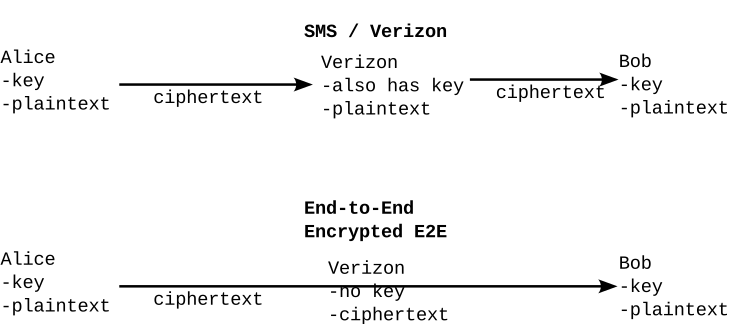
1. SMS is a traditional setup. Alice and Bob have a key, but Verizon also has the key. The message is encrypted in transit, but Verizon has a copy. (The keys may be per-hop, but the essential feature is that Verizon has a copy.)
2. E2E. Alice and Bob both have a key, and Verizon does not. Thus Verizon only sees the ciphertext. Essential point: if the government asks for the plaintext, Verizon does not have it.
The files on phones are typically encrypted, only unlocked by the owner's PIN or fingerprint/face-id unlock. Likewise, an external hard drive can be encrypted with a user's password. Such encryption is effective, even in the face of law-enforcement efforts.
Respect some privacy for yourself and others. Allowing people some privacy is good for society.
Short answer: tolerance. Giving people some privacy helps give them some individual freedom, even in the face of intolerance. In computer terms, privacy could be described as a "hack" which helps get a sort of tolerance.
Privacy is not a black-and-white issue. You do not want 0% or 100% privacy. This gets back to the dual-use pattern — we have both sympathetic and unsympathetic users of privacy, so we end up with a compromise of "some", but not 100%, privacy.
The terror group ISIS was very unfriendly to gay people. That such a person is able to keep their phone, messages encrypted away from ISIS seems good. Note also the de-facto tolerance angle. Or a dissident smuggling their memoirs out of an authoritarian regime.
If we just look at these examples, privacy looks great. But unfortunately there are just as many unsympathetic examples
Criminals are highly aware of using encryption for chats, data etc. A man was an alleged pedophile and refused to unlock his encrypted hard drive. The courts kept him in jail for years, and eventually he was released. The legality of this situation is currently debated in the US. Does the 5th amendment right against self-incrimination apply to one's phone?
The Nth Room case of blackmail and cybersex trafficking on (encrypted) Telegram.
There was a privacy-focussed phone, marketed to criminals. It turned out to be an FBI front, which used the information for convictions. For an entertaining hour, check out the Search Engine podcast episode:Best Phone For Crimes. Evidence was primarily not used against US citizens, I suspect because its collection violated the limited-government need for a warrant — perhaps an example of the system working as intended.
So we end up with a compromise where individuals have some, but not absolute privacy.
US History - limited government. Includes limitations on the government spying on citizens. Compromise: government needs a warrant, probably cause to get info.
Edward Snowden PRISM US was spying on citizens to some degree.
In contrast, in the above crime-phone story .. they did not pursue US citizens with the info. Here the limited-government rules seemed to be followed.
Note that the technology of end-to-end encryption short-circuits the warrant system. Verizon does not have the data to give.
Law enforcement has lobbied for a "back door" to be added to encryption, where trusted parts of the government can, say, decrypt anyone's phone. Apple/Google argue convincingly that any such backdoor will then be used by ISIS, Russia etc. etc. The current state in the US is that there is no back door.
This shows the E2E vs. backdoor issue is very live!
Democracy was increasing 1945-2000, but now Authoritarianism seems to be on the rise. I suspect this is temporary, and Democracy will again increase. But who knows, perhaps this is my own wishful thinking? This will an interesting arc of history that coincides with your adult life, see what happens.
Note that China, North Korea, Iran ... Whats App is illegal in all these countries. Authoritarian governments do not like to extend privacy to their citizens. I think citizens flourish more in democracies, and that's where I want to live.
We'll start a the highest level, seeing the truisms that guide software building. There's software in everything, so you should know the lay of the land.
The main thing we want from code. If code produces the wrong answer, do we really care how fast it runs?
"Broken" is the natural state of code. It's easy to type in some code, and have it not work. We need a plan to work in this environment. Code can work so nicely, we should keep in mind that even more easily it can fail to work.
Can you judge code correctness by looking at it? The surprising answer is - no. To really judge, you need to simulate what the loops and if-statements will with various inputs. In effect, you need to run the code to see what it does.
We need to run the code against a few inputs, checking the output for each case. If the code works against a few cases, suggests it is probably correct. It is not a 100% proof, which is surprisingly difficult or impossible to obtain, but tests are very good in practice.
Code that the computer has never run over likely has bugs in it.
This can happen if an if-test is always false in a program. This happened with the AT&T phone network, where there was some code in the phone-switching system like this.
if rare_error_condition:
    code to
    route around     # un-noticed bug here
    error condition
The error handling code within the if_statement had a simple bug in it, but those lines had never run, so nobody noticed. Until one day the if-statement was true and the code ran (for the first time) and crashed, taking out a part of the US phone system for a while.
Code tests can help with this. There are modern "code coverage" tools that look at all the tests, making sure that every line has been run in some test or other.
Clean code with good style. This helps reduce bugs in the first place, and it's easier to fix and add features to code that is already clean. Stanford has always put an emphasis on writing clean code with good style.
If the code is works correctly and looks good, we might also want to tune it to run fast or use less memory. For some bits of code, speed is crucial. However, the best strategy is generally getting the code working first before messing with it for maximum performance.
Now we'll look through rules for writing clean code, from the very simple, to the zoomed-out architecture.
This has to do with the simplest issues of spaces and words.
Python Guide: PEP8 Tactics (mostly did this one on an earlier lecture)
We prefer code that is "readable" - looking at the code, what it does is apparent. Readable code has fewer bugs, and bugs (and the time they chew up) is a big problem in finishing code.
Python Guide: Readable Code - key points copied to these notes.
Good function names are the first step in readable code. Function names often use verbs indicating what calling the function will accomplish. Look at how the function names below make the surrounding code read nicely.
delete_files(files)


if is_url_sketchy(url):
    display_alert('That url looks sketchy!')
else:
    html = download_url(url)


s = remove_digits(s)


count = count_duplicates(coordinates)


canvas.draw_line(0, 0, 10, 10)
If a function returns a boolean value, starting its name with is_ or has_ can be a good choice. Think about how the function call will read when used in an if or while:
if is_weak(password):
    ...
is_url_sketchy(url) # does what?
The Principle of Least Surprise is a convention for function names. When designing a function, e.g. is_url_sketchy(url), imagine that another programmer is writing code to call this function. Assume that all the other programmers knows is its name since they don't bother to read the documentation. Therefore, the function should only take actions that one might expect given its name. So is_url_sketchy() should not, say, delete a bunch of files.
The code in a function is a story, a narrative, and the variable and function names help you keep the parts of the story clear in your mind. A variable name provides a short label for a bit of data in the story.
Bugs - mix up two values. Many bugs result from the programmer mixing up two data values just in the two minutes they are working on those lines, resulting in a round of debugging.
Previous lecture example - "left" is a fine variable name in there, labelling and distinguishing that value within the function. "x" or "i" would not be good choices.
def brackets(s):
    left = s.find('[')
    if left == -1:
        return ''
    right = s.find(']')
    return s[left + 1: right]
Here are some other possible names for left, exploring how long or short a variable name could be.
left                  # fine
left_index            # fine


int_index_of_left_paren   # too long
index_of_left_paren       # too long
# Don't need to spell out
# every detail in the name

a         # meaningless
li        # cryptic
l         # too short, and don't use "l"
Suppose the algorithm stored both the index and the character at that index - two values it would be very easy to mix up in the code. In that case, the variable names need added words to keep the two values straight:
left_index       # index of left char
left_ch          # char at that index
From the Sand homework, the x_from and x_to variables are good variable name examples. That code was difficult, but at least each variable was labeled as what it was. The code would have been more difficult if the four x/y variables were named a, b, c, d.
x_from
x_to
a, b, c ExampleHere is a version of brackets() with bad, meaningless names - a, b, c:
def brackets(a):
    c = a.find('[')
    if c == -1:
        return ''
    b = a.find(']')
    return a[b + 1:c]   # compare below
Looking at the last lines of the good and bad versions demonstrates the role of good variable names. Look at the last line of the bad names version below. Is that line correct?
# Bad names version
return a[b + 1:c]  # buggy?


# Good names version
return s[left + 1:right]
With a bad variable, you have to look upwards in the code to remind yourself what value it holds. That's the sign of bad variable naming! The name of the variable should tell the story right there, not scrolling up to remind yourself what it holds. Save yourself some time and give the variable a sensible name.
There are some circumstances that are so common and idiomatic, that there are standard, idiomatic short variable names tuned for that situation.
s - idiomatic generic string
ch or char - character from a string
i, j, k - idiomatic index loop: 0, 1, 2, ... max-1
x, y - idiomatic x, y 2-d coordinates
for x in range(image.width):
n - idiomatic generic int value
f - idiomatic opened file
lst - idiomatic list variable
'l' should be avoided
d - idiomatic dict variable
Never name a variable lowercase L or O - these look too much like the digits 1 and 0.
Why are CS106A programs structured the way the are - the many functions, the main(), the Doctests. These structures are not an accident. There is a reason it's all done a particular way, and here it is.
As rough rule of thumb, the difficulty of completing a body of code of N lines seems to be proportionate to N2. This applies if the lines depend on each other directly, not if they are split into separate functions.
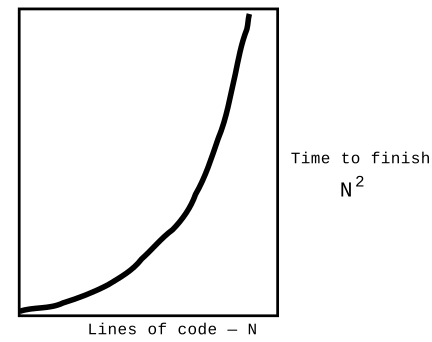
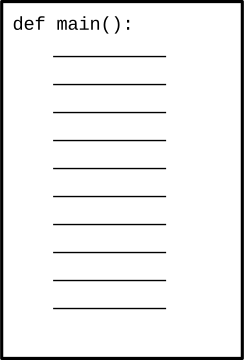
Say we are solving a 500 line problem. The naive approach would be to write all the code as one 500 line main() function. This is a terrible strategy, getting the worst of the N2 curve - too much code all in one piece
The central CS technique to break the N2 trap is dividing the program into a series of relatively small functions. This is known as "modularity" in the program.
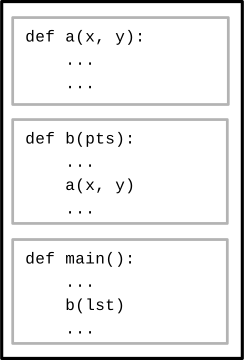
The functions are kept independent from each other as much as possible - thick-walled in the drawing. I should be able to work on the code inside one function without thinking much about what's inside the other functions, thus we escape the N2 trap.
We want the functions to be independent, but then how does the program work? Obviously the functions need to interact a little. We will use abstraction and data-flow to knit the functions together.
We can divide the program into functions, but how do the functions work with each other? With the black-box model, we use the abstraction of the data flowing in and out of each function as its contact point with all the other functions.

Trick: complexity of the data flowing in and out of a function is small fraction of all the code in the function. Working with the data-flow abstraction is cheap.
If the functions are all separate, how do they work with each other? The black box model helps here - we connect the output of one function to the input of the next. The functions are separate, but work together.

The functions are all separate, and yet they are working together to solve the whole problem. Their input/output interactions are kept as narrow and simple as possible.
Most of the time on the homeworks, you are zoomed in on just one function, which is the right way to do it. Zoomed out, the functions form an end-to-end pipeline, working together.
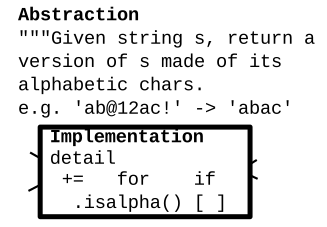
The abstraction of a function is what it accomplishes - what it requires as input and what it will produce as output. We can think of this as the "contract" for the function: what is required to go in. What the function promises to provide. The abstraction contract is also basically what is written in the triple quoted """Docstring""" at the top of a function.
The implementation detail of a function is all the code and complexity within the function that does the actual work. The word "detail" is sometimes used as a blanket term for all the implementation features hidden inside a function.
Usually, the abstraction for a function is relatively simple compared to its implementation.
What do you need to know to call a function correctly? Just the abstraction. The implementation can be hidden inside the function. Our strategy is to hide "implementation detail" inside the function so the rest of the program does not need to know or depend on it. This is how we fight the N2 curve.
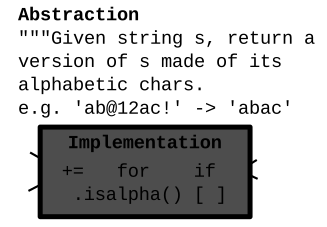
Here's a little story of writing two functions that captures the two key features of modularity.
Say we write function1, that takes in a string, and computes some kind of total. We get this code working first. There's a one sentence abstraction that describes what it returns, and 10 lines of code detail inside the function that implements it.
def function1(s):
   """Given string s, returns total ..."""
   .. 10 lines of code detail ..
   .. in here ..
Now working on function2.
a. Abstraction - there's a line where we call function1(). At that moment, we just think about its once sentence abstraction, not the 10 lines of code detail in function1().
def function2(s):
    .. coding along
    s = something
    total = function1(s)  # a. function call
    # b. Detail independence
    # 1. could write it this way
    i = 0
    while i < total:
        ...

    # 2. or could write it this way
    for i in range(total):
        ...
b. Detail Independence - after the call, we are thinking about two loop strategies we could use. We could solve it with a while, or we could solve it with a for/range. This decision should just depend on the code in function2, not the code in function1. The code in function1 is independent, walled off from here, so we can proceed without knowing or thinking about those lines. This is how we are escaping the N2 trap.
What the N2 trap tells us, is that keeping all of the function implementations in mind at one time is not a good strategy. Here we only think about one implementation at a time. Once a function is done, we work only in terms of its abstraction. Work on one thing at a time.
This strategy applies equally in life. Say you are the VP of some big organization. There are challenges and problems in the drug research department. And those people and problems are separate from the people and challenges in the accounting department, or marketing. The people in the departments are specialized, relying on the other departments to do their part.
datetime.now()now = datetime.now()
The builtin function datetime.now() returns a date-time value that represents the current date and time - suitable for printing, or recording in a file or something. That is its abstractions, which is simple.
What is its implementation? What chip on the computer does it query to get this info - we don't know. That's an implementation detail. It just promises to work when we call it; a nice simple abstraction.
It's very common that calling a function is relatively easy, while all sorts of detail and effort is hidden in the function's implementation.
Think about the abstraction for a funciton you are writing in Python. Choose a good function name, summarizing what it does. The parameters list its inputs. The """Docstring""" at the top of a function summarizes its abstraction in words. What does it require as input? What does it promise to return as output? We generally use the word "given" in here to refer to the parameters, like "Given values x and y, returns something something."
You can delete the ":param s: " stuff PyCharm puts in. That syntax is seldom used at this time. You can summarize the abstraction with the "Given x ..." Docstring.
The Doctests are another way to summarize the abstraction - not with words, but with a series of input/output examples. They also have the benefit of helping you debug your code.
def del_chars(s, target):
    """
    Given string s and a "target" string,
    return a version of s with all chars that
    appear in target removed, e.g. s 'abc'
    with target 'bx', returns 'ac'.
    (Not case sensitive)
    >>> del_chars('abC', 'acx')
    'b'
    >>> del_chars('ABc', 'aCx')
    'B'
    >>> del_chars('', 'a')
    ''
    """
    result = ''
    target = target.lower()
    for ch in s:
        if ch.lower() not in target:
            result += ch
    return result
Extra topic for fun if we have time.
At the smallest scale in the computer, information is stored as bits and bytes. In this section, we'll look at how that works.
How many different patterns can be made with 1, 2, or 3 bits?
| Number of bits | Different Patterns |
|---|---|
| 1 | 0 1 |
| 2 | 00 01 10 11 |
| 3 | 000 001 010 011 100 101 110 111 |
| Number of bits | Different Patterns |
|---|---|
| 1 | 0 1 |
| 2 | 00 01 10 11 |
| 3 | 000 001 010 011 100 101 110 111 |
| Number of bits | Number of Patterns |
|---|---|
| 1 | 2 |
| 2 | 4 |
| 3 | 8 |
| 4 | 16 |
| 5 | 32 |
| 6 | 64 |
| 7 | 128 |
| 8 | 256 |