Today: lambda output, lambda/def, custom sorting with lambda, wordcount sorting, introduction to modules
Lambda is powerful feature, letting you express a lot of computation in very little space. As a result, it's weird looking at first, but when it clicks, you should feel like a Power Hacker when you wield it. Kind of a superpower.
These are well suited to little in-class exercises .. just one line long. Not easy, but they are short!
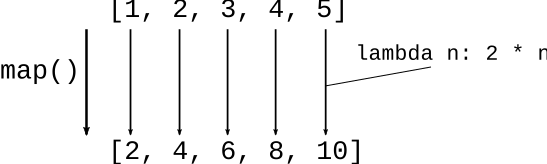
map() takes in a lambda of one parameter, and a list, and calls that lambda for every element in the list, like this:
>>> list(map(lambda n: 2 * n, [1, 2, 3, 4, 5]))
[2, 4, 6, 8, 10]
1. The word "lambda"
2. The input to the lambda will be an element from the list. What type are these - int? string? Choose an appropriate name for the lambda parameter like n: or s:
3. Write an expression to produce the lambda output, no "return". Typically this all fits on one line.
Previously, here is def
def double(n):
    return 2 * n
The def sets up the name of the function, and points it to what we will call the "code object" in memory. The code-object is the byte representation of the code suitable for the CPU to run. We write code in Python text, and there is a translation of this to more CPU-ready code object form.

The lambda creates the code, but without the need for the name.
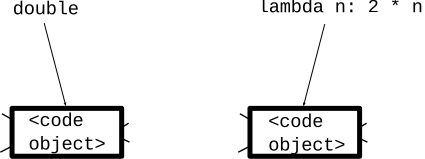
In the interpreter, the code from the two prints out with brackets < .. > which Python uses when it needs to print something that is not printable.
>>> def double(n):
...   return 2 * n
...
>>> double
<function double at 0x7fb944ab6ee0>
>>>
>>> lambda n: 2 * n
<function <lambda> at 0x7fb944ad03a0>
This is just kind of a trick, but it shows how you can actually make your own def using lambda and an equal sign. A def has code and a name. Here we use = to make the name fn point to the lambda code. Then we can call it like any other function.
>>> lambda n: 10 * n
<function <lambda> at 0x1023d1ee0>
>>>
>>> fn = lambda n: 10 * n     # assign to "fn"
>>>
>>> fn
<function <lambda> at 0x1023d2020>
>>>
>>> fn(4)                     # fn call works!
40
>>> fn(123)
1230
>>>
This is a peek at what def is doing under the hood. Python is in a way very simple. A variable is a name in the code that opints to a value, and this is true for any type of value, even code.
> min_x()
Given a non-empty list of len-2 (x, y) points, i.e. tuples. What is the leftmost x among the tuples? Return the smallest x value among all the tuples, e.g. [(4, 2), (1, 2) (2, 3)] returns the value 1.
min_x([(4, 2), (1, 2), (2, 3)]) -> 1
We have a list of (x, y) tuples. Write a map/lambda to make a list of just the x values, then feed that in to the built-in min() to pick out the smallest x.
      [(4, 2), (1, 2), (2, 3)]
          |       |       |
      map |       |       |
          |       |       |
          v       v       v
         [4       1       2]   ->  min()  ->  1
Use lambda to extract just the x value from each (x, y). then feed that into the builtin min() function, and we're done!
def min_x(points):
    return min(map(lambda point: point[0], points))
Now we have lambda, do we just use it for everything? No. Most of a program is good old def, but lambda is a great time-saving technique for spots in the program which need a short phrase of code.
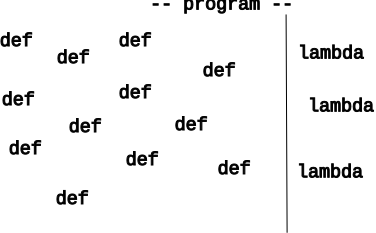
Def can do things that lambda cannot.
In lambda1, see the map_parens() problem.
['xx(hi)xx', 'abc(there)xyz', 'fish'] ->
  ['hi', 'there', 'fish']
Solution Code. Write the "parens" helper function that works on one string.
'xx(hi)xx' -> 'hi'
'fish'     -> 'fish'


def parens(s):
    left = s.find('(')
    right = s.find(')', left)

    if left == -1 or right == -1:
        return s
    return s[left + 1:right]
Then use map(), using the name "parens" to refer to the helper function code.
def map_parens(strs):
    return map(parens, strs)
See the Sorting Chapter in the Python guide for more details.
# food tuple
# (name, tasty, healthy)
('donut', 10, 1)
We'll try these food examples in the interpreter.
By default sorted() works on list of tuples, compares [0] first, then [1], and so on
>>> foods = [('radish', 2, 8), ('donut', 10, 1), ('apple', 7, 9), ('broccoli', 6, 10)]
>>>
>>> # By default, sorts food tuples by [0]
>>> sorted(foods)
[('apple', 7, 9), ('broccoli', 6, 10), ('donut', 10, 1), ('radish', 2, 8)]
>>>

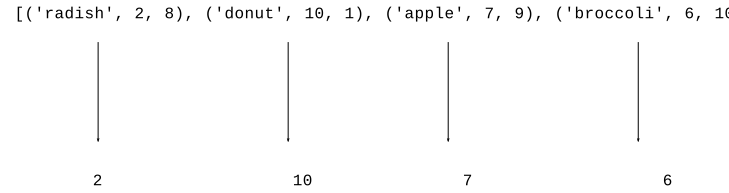
![alt: lambda food: food[1]](python-sort3.svg)
>>> foods = [('radish', 2, 8), ('donut', 10, 1), ('apple', 7, 9), ('broccoli', 6, 10)]
>>>
>>> sorted(foods, key=lambda food: food[1])
[('radish', 2, 8), ('broccoli', 6, 10), ('apple', 7, 9), ('donut', 10, 1)]
>>> sorted(foods, key=lambda food: food[1], reverse=True)
[('donut', 10, 1), ('apple', 7, 9), ('broccoli', 6, 10), ('radish', 2, 8)]
>>> sorted(foods, key=lambda food: food[2], reverse=True)
[('broccoli', 6, 10), ('apple', 7, 9), ('radish', 2, 8), ('donut', 10, 1)]
tasty * healthyNot limited to just projecting out existing values. We can project out a computed value. Here we compute tasty * healthy and sort on that. So apple is first, 7 * 9 = 63, broccoli is second with 6 * 10 = 60. Donut is last :(
>>> sorted(foods, key=lambda food: food[1] * food[2], reverse=True)
[('apple', 7, 9), ('broccoli', 6, 10), ('radish', 2, 8), ('donut', 10, 1)]
>>>
>>> foods = [('radish', 2, 8), ('donut', 10, 1), ('apple', 7, 9), ('broccoli', 6, 10)]
>>> max(foods)     # uses [0] by default - tragic!
('radish', 2, 8)
>>>
>>> sorted(foods, key=lambda food: food[1])
[('radish', 2, 8), ('broccoli', 6, 10), ('apple', 7, 9), ('donut', 10, 1)]
>>>
>>> min(foods, key=lambda food: food[1])  # least tasty
('radish', 2, 8)
>>> max(foods, key=lambda food: food[1])  # most tasty
('donut', 10, 1)
Performance point: computing one max/min element is much faster than sorting all n elements.
Given a list of movie tuples, (name, score, date-score), e.g.
[('alien', 8, 1), ('titanic', 6, 9), ('parasite', 10, 6), ('caddyshack', 4, 5)]
Given a list of movie tuples, (name, score, date-score), where score is a rating 1-10, and date 1-10 is a rating as a "date" movie. Return a list sorted in increasing order by score.
Given a list of movie tuples, (name, score, date-score), where score is a rating 1-10, and date-score 1-10 is a rating as a "date" movie. Well say the "average" score of a move is the mean average of its score and date-score. Return a list of the movies sorted into increasing order of average score.
Idea - for each movie, project out the average of its two scores:
('alien', 8, 1) -> 4.5
('titanic', 6, 9) -> 7.5
...
> sort21()
sort21(nums): Given a list of numbers. Return the list of numbers sorted with the closest to 21 first and the farthest from 21 last. Note: abs(n) is the absolute value function. Use sorted/lambda.
[15, 19, 21, 30, 0] -> [21, 19, 15, 30, 0]
Idea: subtract each number from 21, use that as the sort-by value. Try this, see what it does.
Want: sorted with closest to 21 first

      [15,   19,  21,  0,   30]

21-n:  6     2    0    21   -9
Solution idea:
The negative number is a problem. Use abs() function, Python's absolute value function. The absolute value of the different between two numbers is, in a sense, the "distance" between those two numbers.
By default, < places uppercase before lowercase, so this is what sorted() does. This is rarely what we want.
Fix: project out lowercase version of string as sort-by. The lambda takes in one elem from list - in this case 1 string
e.g. lambda s: s.lower()
>>> # The default sorting is not good with upper/lower case
>>> strs = ['coffee', 'Donut', 'Zebra', 'apple', 'Banana']
>>> sorted(strs)
['Banana', 'Donut', 'Zebra', 'apple', 'coffee']
>>>
>>> sorted(strs, key=lambda s: s.lower())    # not case sensitive
['apple', 'Banana', 'coffee', 'Donut', 'Zebra']
>>>
>>> sorted(strs, key=lambda s: s[len(s) - 1])  # by last char
['Zebra', 'Banana', 'coffee', 'apple', 'Donut']
>>>
Look at wordcount project, apply custom sorting to the output stage, a very realistic lambda application.
Here is the WordCount project we had before. This time look at the print_counts() and print_top() functions.
Here is the output of the regular print_counts() function, which prints out in alphabetic order. Output looks like:
$ python3 wordcount.py poem.txt
are 2
blue 2
red 2
roses 1
violets 1
$
$ python3 wordcount.py alice-book.txt
a 631
a-piece 1
abide 1
able 1
about 94
...
youth 6
zealand 1
zigzag 1
$
This is the standard dict-output sorted loop.
def print_counts(counts):
    """
    Given counts dict, print out each word and count
    one per line in alphabetical order, like this
    aardvark 1
    apple 13
    ...
    """
    for word in sorted(counts.keys()):
        print(word, counts[word])

    # Alternately use .items() to access all the key/value tuples
    # for key, value in sorted(counts.items()):
    #    print(key, value)
-top Output FeatureNow we'll think about a new -top feature.
The print_top(counts, n) function implements this — print the n most common words in decreasing order by count.
$ python3 wordcount-solution.py -top 10 alice-book.txt
the 1639
and 866
to 725
a 631
she 541
it 530
of 511
said 462
i 410
alice 386
-top Ideas
def print_top(counts, n):
    """
    Given counts dict and int N, print the N most common words
    in decreasing order of count
    the 1045
    a 672
    ...
    """
    items = counts.items()
    # Could print the items in raw form, just to see what we have
    # print(items)
    pass
    # Your code - my solution is 3 lines long, but it's dense!
    # Sort the items with a lambda with most common words first.
    # Then print just the first N word,count pairs with a slice
Here's the lines - sort by count decreasing order. Then slice to take the top n.
    # 1. Sort largest count first
    items = sorted(items, key=lambda pair: pair[1], reverse=True)
    # 2. Slice to grab first N
    for word, count in items[:n]:
        print(word, count)