Stanford, Winter 2025-26
# CS106A Exam Reference Reminder
# [square brackets] denote functions that we have not used yet
# Exam questions will not depend on functions we have not used yet
Bit:
  bit = Bit(filename)
  bit.front_clear() bit.left_clear() bit.right_clear()
  bit.get_color()
  bit.move() bit.left() bit.right()
  bit.paint('red') [bit.erase()]
General functions:
  len() int() str() range() [list() sorted()]
String functions:
  isalpha() isdigit() isspace() isupper() islower()
  find() upper() lower() strip()
List functions:
  append() index() [extend() pop() insert()]
SimpleImage:
  # read filename
  image = SimpleImage(filename)
  # create blank image
  image = SimpleImage.blank(width, height)

  # foreach loop
  for pixel in image:

  # range/y/x loop
  for y in range(image.height):
      for x in range(image.width):
          pixel = image.get_pixel(x, y)
Grid 2D:
  grid = Grid.build([['row', '0'], ['row', '1']])
  grid.width, grid.height - properties
  grid.in_bounds(x, y) - True if in bounds
  grid.get(x, y) - returns contents at that x,y, or None if empty
  grid.set(x, y, value) - sets new value into grid at x,y
a. Write what value comes from the Python expression:
>>> 10 - 2 * 3 + 1
>>> 67 % 5
>>> s = 'Python'
>>> s[2:4]
b. What 3 numbers print when the caller() function runs? This code runs without error.
def foo(a, b):
    a += 1
    b += 2
    return a - b

def caller():
    a = 3
    b = 4
    c = foo(b, a)
    print(a, b, c)
# What 3 numbers print?
c. Given a non-negative int n. Build and return a list of n numbers of the form [300, 280, 260, ...]. For example, with n=4, return the list [300, 280, 260, 240]. Use the loop for i in range(n) to build the list.
def list_n(n):
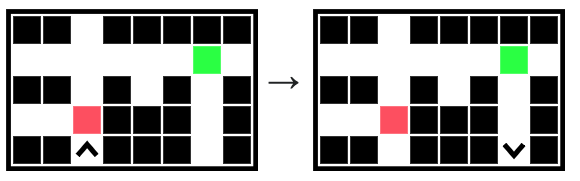
Bit is in a 1-wide hole, facing the top of the world. Move bit forward until an opening appears towards the right side of the world, a tunnel. Move bit through the tunnel until encountering a painted (i.e. non-blank) square. This marks the entrance of a hole towards the bottom of the world. Move bit to the end of the hole. Use three loops.
def loop3(filename):
    bit = Bit(filename)
    # Your code here
Given an image filename and ints a, b, and c which are 1 or more.
Produce a new out image with four features: (1) a vertically flipped copy of the original image. (2) two blank rectangles a pixels high above and below the flipped image. (3) an aqua rectangle c pixels wide immediately on the left of the flipped image and matching its height. (4) a blank rectangle b pixels wide, matching the height of the image plus the
two height a rectangles.

1. Write one line of code to create the out image.
2. Almost all of the code to write the flipped image is provided — looping over the original image, writing the colors at each "pixel" to "pixel_out". Write the one line of code which sets the "pixel_out" variable used by the later lines in this loop. It's fine to write the parameters on multiple lines to make them fit. Please avoid writing too near the paper edge, as this makes it hard on the graders.
3. Lastly, write the loops and other needed code to produce the aqua rectangle. These are separate loops, not nested inside the earlier loops. To set each white pixel to aqua, the last line in the loop is like pixel_out.red = 0. We'll assume there is a return out as the last line.
def do_image(filename, a, b, c):
    image = SimpleImage(filename)
    #### 1. Create "out" image


    # Write flipped image to out
    for y in range(image.height):
        for x in range(image.width):
            pixel = image.get_pixel(x, y)
            #### 2. Set "pixel_out"


            pixel_out.red = pixel.red
            pixel_out.green = pixel.green
            pixel_out.blue = pixel.blue
    #### 3. Fill aqua rectangle
a. This function takes two parameters: s is a string, and ch_star is a single character.
Return a string made of the alphabetic
chars in s. When an alphabetic
char from s is equal to ch_star,
then add a '*' after it in the result.
For example given s '@@aba' and ch_star 'a',
the result is 'a*ba*'.
a_star('@@aba', 'a') -> 'a*ba*'
a_star('Beees123', 'e') -> 'Be*e*e*s'
a_star('abc', 'x') -> 'abc'

def a_star(s, ch_star):
b. Given a string s.
Find the first '@' in s.
If the '@' is immediately followed
by an alphabetic char, which is immediately followed by a digit,
then return the value of the digit + 1.
If the '@' pattern is not present, then if there is a 'z'
anywhere in s, then return 0.
Otherwise return -1.
at_z('xz@a3x') -> 4
at_z('xz@*3x') -> 0
at_z('xx@aaz') -> 0
at_z('x@x') -> -1

def at_z(s):
c. Given a string s. Find the first two non-overlapping '++++' in s. If there are not two '++++' , return the empty string. If there are two '++++', we'll call the substring between the two the "between" substring. For example, with s 'xx++++ab@123++++yz', the between is 'ab@123'. If there is an '@' in the between string, return the part of the between string before the '@'. If there is no '@', return the whole between string. Solve this problem with s.find() and slices.
'xx++++abc@12++++yz' -> 'abc'
'xx++++abc$12++++yz' ->'abc$12'
'a@+@@++++a@++++@@@' -> 'a'
'++++Z++++' -> 'Z'
'++++Z+++x+' -> ''

def tweener(s):
d. Given a list of strings, "strs".
Compute and return a new list made of the
strings from strs which do not contain the character 'i'
and which have length greater than 2. For example, the
strings 'flip' and 'at' would be excluded.
no_eyes(['the', 'flip', 'is', 'at', 'hand', '!']) -> ['the', 'hand']

def no_eyes(strs):
In this problem, every square is one of these four values: empty None, squirrel 's', apple 'a' or banana 'b'. As usual, you can get full credit for each part independently of what you write on the other part.
a. Write code for a see_food(grid, x, y, n), which takes in x, y of an in-bounds square, and n a non-negative int value. We'll call the square one square to the left and n squares above x, y the "up" square. The see_food() function should return True if (1) x, y contains a squirrel and (2) the up square contains an apple or a banana. In all other cases return False. (If you need to write a long line of code, you can write "..." at the end of a line and continue writing on the next line.)
def see_food(grid, x, y, n):
b. The first Grid.build() line is provided, building a small grid suitable for this part. Write two Doctets. (1) Write a Doctest calling see_food() using the grid and returning True. Write a second Doctest calling see_food() using the grid and returning False, with x, y identifying a square with a squirrel in it.
>>> grid=Grid.build([['b', None], [None, 'a'], ['s', 's']])
>>>
This problem resembles the homework encryption, but with some differences. As a simplification, we will not handle uppercase input chars. The source and slug lists are the same length and contain lowercase chars as usual. In this version, the list lengths are even, and the slug is divided into front and back halves. The parameter "back" is the index of the start of the back half e.g. with lists length 6, then back is 3. The back half of the slug may contain '@' chars. (A dotted line in the drawing below shows the front and back halves of the slug.)
![alt: source ['a', 'b', 'c', 'd', 'e'] and slug ['c', 'd', '@', 'e', 'a', 'b']](midterm-25-2-crypto.svg)
Encryption works as follows: If the input char is in the source, then look at the char at the corresponding index in the slug. If the slug char is not '@', then the slug char is the encrypted form. If the slug char is '@', then the encrypted form is the corresponding char from the front half of the slug, in uppercase form. For example with length 6, an '@' at index 3 would use the uppercase form of the char at index 0. An '@' at index 4 would use the uppercase form of the char at index 1, and so on.
Examples using above lists
encrypt 'a' -> 'e'
encrypt 'b' -> 'd'
encrypt 'd' -> 'E'  # @ rule
encrypt 'f' -> 'B'  # @ rule
def encrypt_char(source, slug, back, ch):
## 1. Short Answer

>>> 10 - 2 * 3 + 1 -> 5

>>> 67 % 5 -> 2

>>> s = 'Python'
>>> s[2:4]  -> 'th'

# What 3 numbers print?
3 4 0

def list_n(n):
    result = []
    for i in range(n):
        result.append(300 - i * 20)
    return result


## 2. Bit

def loop3(filename):
    bit = Bit(filename)
    # Move until gap to right
    while not bit.right_clear():
        bit.move()

    # Move along until non-blank
    bit.right()
    while bit.get_color() == None:
        bit.move()

    # Move down to bottom of hole
    bit.right()
    while bit.front_clear():
        bit.move()

## 3. Image

out = SimpleImage.blank(image.width + b + c, image.height + 2 * a)

pixel_out = out.get_pixel(x + b + c, a + image.height - 1 - y)
# or (out.height - a - 1 - y)

for y in range(image.height):
    for x in range(c):
        pixel_out = out.get_pixel(x + b, y + a)
        piexl_out.red = 0
## 4. Strings

def a_star(s, ch_star):
    result = ''
    for ch in s:
        if ch.isalpha():
            result += ch
            if ch == ch_star:
                result += '*'
    return result


def atz(s):
    at = s.find('@')
    # These 4 things need to be true for '@' to work,
    # expressed with some combination of if/and
    if at != -1 and at + 2 < len(s):
        if s[at + 1].isalpha() and s[at + 2].isdigit():
            return int(s[at + 2]) + 1
    if 'z' in s:
        return 0
    return -1


def tweener(s):
    left = s.find('++++')
    right = s.find('++++', left + 4)  # need + 4
    if left == -1 or right == -1:
        return ''
    # Putting in a variable not required, but helps
    between = s[left + 4:right]
    at = between.find('@')
    if at != -1:
        return between[:at]
    return between


def no_eyes(strings):
    """
    >>> no_eyes(['the', 'flip', 'is', 'at', 'hand', '!'])
    ['the', 'hand']
    """
    result = []
    for s in strings:
        if 'i' not in s and len(s) > 2:
            result.append(s)
    return result
## 5. Grid Squirrel

def see_food(grid, x, y, n):
    if grid.get(x, y) != 's':
        return False
    if grid.in_bounds(x - 1, y - n):
        # Could write as 2 ifs, here using "or"
        if (grid.get(x - 1, y - n) == 'a' or
               grid.get(x - 1, y - n) == 'b'):
            return True
        # This does not work in Python:
        # if grid.get(x - 1, y - n) == 'a' or 'b':
    return False


>>> grid=Grid.build([['b', None], [None, 'a'], ['s', 's']])
>>> see_food(grid, 1, 2, 2)
True
>>> see_food(grid, 1, 2, 1)  # x=0, y=2 also works
False


## 6. Encryption

def encrypt4(source, slug, back, ch):
    if ch in source:
        idx = source.index(ch)
        crypt = slug[idx]
        if crypt != '@':
            return crypt
        # Subtract to shift to front half
        crypt = slug[idx - back]
        # Uppercase form
        return crypt.upper()

    return ch
    # Prob statement didn't require this last return,
    # but this is what the homework did.