CS193Q - Day 2
> Nick's Python Guide - maybe open this in a new tab so you can get to its chapters as we go
Today: Install PythonCharm
Install PyCharm "community edition" (free) on your computer.
https://www.jetbrains.com/pycharm/download/
PyCharm is an IDE. It's not required for Python, but it's handy.
cs193q-2.zip today's .zip of code
PyCharm: open the Folder containing the code - e.g. cs193q-2. Do not double click a .py file to open, does the wrong thing.
File Reading
- with - text files by default, handles closing automatically
- 'r' for reading (the default)
- 'w' for file-writing
with open(filename, 'r') as f:
    # use f in here
- More likely do it like this, as 'r' is the default anyway:
with open(filename) as f:
    # use f in here
- "with" form automates the f.close()
- Specify encoding (default depends on your machine / locale)
- utf-8 is what many files use
with open(filename, encoding='utf-8') as f:
- File loop - most common
- Uses the least memory - one line at a time
for line in f:
  # process each line
- Other forms:
s = f.read()  # read whole file as a string
lines = f.readlines()  # read whole file as list of line strs
- str.split() examples - break line into parts
- s.split(), s.split(':')
- Show also join: ','.join(lst)
Nick demos with poem.txt
print()
cat.py Program - Exercise 1
- "cat" traditional command to print out a file
- Run it
python3 cat.py poem.txt
- Complete the code in echo_file() to print out the file contents
- Ignore the "censor" parameter for now
Python Doctests
- See in cat.py
- Doctest is a syntax for embedding a test in the comments next to the code
- This is a fantastic feature
- Can test your functions one at a time as you go
- See the has_word() function
def has_word(line, word):
    """
    Returns True if word is in line, ignoring case differences.
    >>> has_word('aaa cat bbb', 'cat')
    True
    >>> has_word('aaa CAT bbb', 'cat')
    True
    >>> has_word('aaa cat bbb', 'Cat')
    True
    >>> has_word('aaa cat bbb', 'dog')
    False
    """
- Right-click a test to run it (Pycharm)
- Or can run from command line like this
python3 -m doctest -v foo.py
- Exercise: write code for has_word (use string lower() and "in")
- Exercise: Run the doctests
- Extension: modify main() and echo_file() to do censoring with has_word
Dict Type
>>> d = {}
>>> d['a'] = 'apple'
>>> d['g'] = 'grape'
>>> d['d'] = 'donut'
>>>
>>> d['a']
'apple'
>>> d.keys()
dict_keys(['a', 'g', 'd'])
>>>
>>> for key in d.keys():
...   print(key, d[key])
...
a apple
g grape
d donut
>>>
>>> # better: go through keys in sorted order
>>> for key in sorted(d.keys()):
...   print(key, d[key])
...
a apple
d donut
g grape
>>>
>>> 'a' in d
True
>>> '' in d
False
Dict Count Algorithm - ip-count.py
Tuple Type
-
(1, 2, 3)
- Store 2 or 3 things together (vs list)
- Immutable, no .append()
- len() square bracket .. all work
Dict .items()
- dict.items()
- List of (key, value) tuples len-2
- Way to dump out whole contents of dict
- Use this with custom sorting later
Python No Copies - Shallow
Python does not by default ever make a copy. It's always pointers!
Make a list. Put it in a dict with =. There is just one list! Modify it inside the dict, you are modifying the one original list. This is the "no copies" strategy that runs through Python. It's fine! Your code can just work this way. Python: there is just the one list, and using =, we just send references to that one around.
>>> lst = ['aaa', 'bbb']
>>> d = {}
>>> d[1] = lst
>>>
>>> lst
['aaa', 'bbb']
>>> d
{1: ['aaa', 'bbb']}
>>> d[2] = []
>>>
>>> d
{1: ['aaa', 'bbb'], 2: []}
>>>
>>>
>>> d[1].append('ccc')
>>>
>>> d
{1: ['aaa', 'bbb', 'ccc'], 2: []}
>>>
>>>
>>> lst
['aaa', 'bbb', 'ccc']. I
Note: both list and dict have a .copy() method if you need it, but generally you don't need this. I've written tons of production python code, and I never needed to use .copy().
Comprehensions
Super handy way to compute a new list from a list. Here are the steps
1. Write outer [ ]
2. Write "for elem in lst" inside
3. Write expr on the left that you want to compute each elem in the new list
4. Write "if xxx" at the right side, to trim results if wanted
>>> lst = [1, 2, 3, 4]
>>>
>>> [n * n  for n in lst ]
[1, 4, 9, 16]
>>>
>>> [str(n) + '!'  for n in lst ]
['1!', '2!', '3!', '4!']
>>>
>>>
>>> [str(n) + '!'  for n in lst if n >= 2]
['2!', '3!', '4!']
Map Lambda (optional)
- A lambda is a little function, typically of one param - this section is to just show what lambda does
- If you have not seen lambda before, just look at how it works below - it's just a little function
- map runs a function over a list, gathering the results
- Later we'll see a powerful way to use lambda
- works best as a demo!
>>> lst = [2, 1, 3, 6]
>>>
>>>
>>> def double(n):
...   return n * 2
...
>>> list(map(double, lst))   # map the def def
[4, 2, 6, 12]
>>>
>>> list(map(lambda n: 2 * n, lst))  # use lambda!
[4, 2, 6, 12]
>>>
>>> list(map(lambda n: n + 1, lst))
[3, 2, 4, 7]
>>>
>>> list(map(lambda n: n * n, lst))
[4, 1, 9, 36]
>>>
>>> list(map(lambda n: str(n) + '!!', lst))
['2!!', '1!!', '3!!', '6!!']
Custom Sort - Food Example
- sort: For each element in list
- Project a value to use for comparisons
- Suppose I have food tuples, each
- food = (name, tasty 1-10, healthy 1-10)
- e.g. food[1] is how tasty it is
- Sorted by default of tuples tuples: first [0], then [1], .. so 'apple' first
>>> foods = [('donut', 10, 1), ('apple', 7, 9), ('radish', 2, 8), ('broccoli', 6, 10)]
>>>
>>> sorted(foods)
[('apple', 7, 9), ('broccoli', 6, 10), ('donut', 10, 1), ('radish', 2, 8)]
>>>
Want to sort by tasty value

Use lambda to project out that value
Food Sort Examples
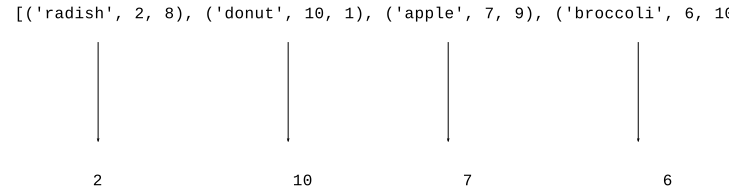
- Say we want to sort by how tasty the foods are, how?
- Project out the tasty int from the tuple
- ('donut', 10, 1) -> 10, sort by that
- e.g. lambda food: food[1]
- sorted(lst) - by default result in increasing order
- sorted(lst, reverse=True) - reverse option, decreasing order
>>> # sort by tasty - project out the tasty int
>>> sorted(foods, key=lambda food: food[1])
[('radish', 2, 8), ('broccoli', 6, 10), ('apple', 7, 9), ('donut', 10, 1)]
>>>
>>> sorted(foods, key=lambda food: food[1], reverse=True)  # by tasty, reverse=True
[('donut', 10, 1), ('apple', 7, 9), ('broccoli', 6, 10), ('radish', 2, 8)]
>>>
>>> sorted(foods, key=lambda food: food[2], reverse=True)  # by healthy
[('broccoli', 6, 10), ('apple', 7, 9), ('radish', 2, 8), ('donut', 10, 1)]
>>>
>>> sorted(foods, key=lambda food: food[1]*food[2], reverse=True) # by tasty*healthy
[('apple', 7, 9), ('broccoli', 6, 10), ('radish', 2, 8), ('donut', 10, 1)]
>>>
Custom Sort upper/lower
- sorted() uses "<" by default
- With strings, < places uppercase before lowercase
>>> sorted(strs)
['Banana', 'Donut', 'Zebra', 'apple', 'coffee']
- reverse=True option
- "Custom" sort = customize how < works here
- e.g. treat uppercase/lowercase the same
- How Python does this - lambda
Custom Sort String upper/lower
- e.g. for these strs
['Banana', 'apple', 'Zebra', 'coffee', 'Donut']
- Project out these to use in comparisons
['banana', 'apple', 'zebra', 'coffee', 'donut']
- Do comparisons with the project list, but sort the upper list
- "proxy" strategy - use this proxy value for comparison
- Q: how to project out these proxy values?
- A: lambda

Python Custom Sort Example
- Strategy: for each elem, project out XXX value for comparisons
- e.g. project out lowercase version of each str to ignore case
- Sorted:
-Takes "key" parameter
-A lambda of 1 parameter, returns the proxy value to use
>>> sorted(strs, key=lambda s: s.lower())
['apple', 'Banana', 'coffee', 'Donut', 'Zebra']
>>>
>>> sorted(strs, key=lambda s: s[len(s)-1])   # by last char
['Banana', 'Zebra', 'apple', 'coffee', 'Donut']
>>>
Sorted vs. Dict Count Items
- Application: organizing dict count data
- Say we have a 'counts' style dict
- Access .items(), list of (key, count) pairs
- What we get from dict.items() when counting...
>>> items = [('z', 1), ('a', 3), ('e', 11), ('b', 3), ('c', 2)]
- Q1: How to sort items in decreasing order by count?
- Q2: How to access the pair with the largest count?
>>> items = [('z', 1), ('a', 3), ('e', 11), ('b', 3), ('c', 2)]
>>>
>>> sorted(items, key=lambda pair: pair[1], reverse=True)
[('e', 11), ('a', 3), ('b', 3), ('c', 2), ('z', 1)]
>>>
>>> max(items, key=lambda pair: pair[1])
('e', 11)
- Could go back to ip-count.py - change it to print the ip addrs with the highest count
Conclusions
- Python has lots of features, but you can do a lot with the core:
- functions, strings, lists, dicts, Doctests, files