Install latest Python3 on your computer, the versions are all quite similar. I recommend you just go to python.org and download and install it from there on to your computer. You can do this during class or later but you'll need it to run Python. https://www.python.org/downloads/ Install python3 for your operating system
You should be able to type "python3" (on windows "python" or "py" to get a Python prompt like this: (quit with ctrl-d or exit(). Here $ represents the operating system prompt.
$ python3
Python 3.12.6 (v3.12.6:a4a2d2b0d85, Sep  6 2024, 16:08:03) [Clang 13.0.0 (clang-1300.0.29.30)] on darwin
Type "help", "copyright", "credits" or "license" for more information.
>>> (ctrl-d or ctrl-z to exit)
Nick's Python Guide - maybe open this in a new tab so you can get to its chapters as we go. Python reference I'm building for CS106A. This will remain free on the web, so this is one resource you can use.
Chapters of interest at the start: Command line, variables, style, strings, doctests. I'll keep a tab of the guide open during lecture, switching to it here and there.
Look at a little program to see a few things
#!/usr/bin/env python3

"""
program1.py - a little python3 program to get started
Run from command line:
  $ python3 program1.py Abby

Triple quote is a string literal that
can span lines. Also a way to write big comments.
"""

import sys

EXCLAIM = '!'


def say_hello(name):
    """Print greeting to the given name."""
    suffix = ''
    if name == 'Abby':
        suffix = EXCLAIM
    elif name == 'Bob':
        suffix = EXCLAIM + EXCLAIM
    if name == 'Oops':
        name = no_such(name)
    print('Hello ' + name + suffix)


def main():
    args = sys.argv[1:]

    # print(args)   # see line args
    if len(args) >= 1:
         say_hello(args[0])


# Standard end-file boilerplate to call main().
if __name__ == '__main__':
    main()
Observations about source code:
Because Python finds many errors only by running the questionable lines, it's important to have a plan to test Python code by actively running the code. The Python DocTest framework works well for this, and we'll see it soon.
>>> x = 'Hello'
>>> y = 'bye'
>>> x = x + '!'
>>> x
'Hello!'
>>> y
'bye'
>>>
>>> x = y   # does what?
>>> x
'bye'
>>> y
'bye'
>>> z
Traceback (most recent call last):
NameError: name 'z' is not defined
>>>
>>> # Note runtime tracking of type
>>> x + y
'byebye'
>>> x = 6
>>> y = 7
>>> x + y
13
>>>
>>> # type() function, avoid use in production, use for demos
>>> type(x)
int
>>> type('hello')
str
>>>
>>> 1 + 2 * 3
7
>>>
>>> 2 ** 10
1024
>>>
>>> 2 ** 63 - 1
9223372036854775807
>>>
>>>
>>> 7 / 2     # always float
3.5
>>>
>>> 7 // 2    # always int
3
>>>
>>> int(3.9)
3
>>>
>>> int('345')
345
>>>
>>> int('xx345')
Traceback (most recent call last):
  File "", line 1, in
ValueError: invalid literal for int() with base 10: 'xx345'
>>>
>>> str(5)
'5'
>>>
>>> 1 + 2.0 + 3
6.0
>>>
>>> float('3.14')  #
3.14
>>>
>>> 2.1e16
2.1e+16
>>>
>>> 5 / 4
1.25
>>>
>>> 13 / 2
6.5
>>>
>>> 13 // 2
6
>>>
>>> x = 2/3
>>> x
0.6666666666666666
>>> f'x is {x:.4}'
'x is 0.6667'
>>> # f'...' new feature, evals { }
>>> # .4 rounds to 4 places
>>>
>>> import math   # functions sin, cos, sqrt, ...
>>> math.sqrt(2)
1.4142135623730951
Very briefly, complex numbers work to with "j" format. Use the cmath module for complex math, not the regular math module.
>>> x = 2 + 3j
>>> x * 4 + 6j
(8+18j)
>>>
>>> import cmath
>>> cmath.sqrt(-4)
2j
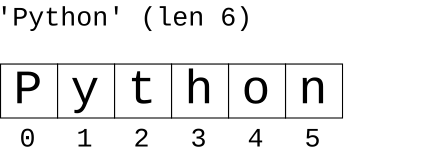
>>> s = 'Python'
>>> len(s)
6
>>>
>>> s[0]
'P'
>>>
>>> s[3]
'h'
>>>
>>>
>>> t = "isn't"
>>> t
"isn't"
>>>
>>> t = 'hi\nthere'
>>>
>>> t
'hi\nthere'
>>>
>>>
>>> t = """hi
... there"""
>>>
>>> t
'hi\nthere'
>>>
You can write a unicode char inside a Python string with a \u followed by the 4 hex digits of its code point, like '\u03A3' to insert a 'Σ' at that spot. Or \U followed by 8 hex digits for greater-than-4.
>>> s = 'hi \u03A3'  # 4 digit unicode
>>> s
'hi Σ'
>>> len(s)
4
>>> s[0]
'h'
>>> s[3]
'Σ'
>>>
>>> s = '\u03A9'  # upper case omega
>>> s
'Ω'
>>> s.lower()     # compute lowercase
'ω'
>>> s.isalpha()   # isalpha() knows about unicode
True
>>>
>>> 'I \u2665'
'I ♥'
>>>
>>> 'the place is on \U0001F525'  # 8 digit
'the place is on 🔥'
>>> s = 'Python'
>>>
>>> s[1]
'y'
>>>
>>> s[1:4]
'yth'
>>>
>>>
>>> s[2:3]
't'
>>>
>>> s[2:5]
'tho'
>>>
>>>
>>> s[2:6]
'thon'
>>>
>>>
>>> s[2:]
'thon'
>>>
>>> s[:4]
'Pyth'
>>>
>>> s[:]
'Python'
>>>
>>> s[:2]
'Py'
>>>
>>> s[2:]
'thon'
>>>
>>>
>>>
>>> s[5]
'n'
>>>
>>> s[4]
'o'
>>>
>>> s[-1]
'n'
>>>
>>> s[-2]
'o'
>>>
>>> s[:-2]
'Pyth'
>>>
>>> s[2]
't'
>>> s[99]
Traceback (most recent call last):
IndexError: string index out of range
>>>
>>>
>>> s[-2]
'o'
>>>
>>> s[:3670]
'Python'
See String chapter in the guide
>>> s = '7'
>>> s.isdigit()
True
>>>
>>> s = 'Python'
>>> 'th' in s     # "in" to check
True
>>> 'x' in s
False
>>> 'x' not in s  # "not in" variant
True
>>>
>>> s.find('y')
1
>>>
>>> s.find('yt')
1
>>> s.find('yx')
-1
>>>
>>> s.lower()
'python'
>>> s
'Python'
>>>
>>>
>>> 'this is it'.replace('is', 'is not')
'this not is not it'
>>>
>>>
>>> 'this is it'.replace('is', 'xxx')
'thxxx xxx it'
>>>
>>> # old way to str / int:
>>> 'score:' + str(45)
'score:45'
>>>
>>> # new - format strings:
>>> name = 'Alice'
>>>
>>> f'this is {name}'
'this is Alice'
>>>
>>> f'this is {name.upper()}'  # fn call in  { }
'this is ALICE'
>>>
>>> x = 12
>>> f'value: {x}'
'value: 12'
>>>
>>> f'value: {x * 10}'
'value: 120'
>>>
>>> x = 2/3
>>> f'value: {x}'
'value: 0.6666666666666666'
>>> f'value: {x:.4}'
'value: 0.6667'
>>>
>>> s = 'cat[dog]bird'
>>> left = s.find('[')
>>> left
3
>>> right = s.find(']')
>>> right
7
>>> s[left + 1:right]
'dog'
>>>
if syntax
if test:
    xxx
elif test2:
    yyy
else:
    zzz
Style note - given a boolean var "weekend"...
if weekend == True:  # never do this
    print('yay')
Write it this way, letting the if do the testing...
if weekend:
    print('yay')
This is due to the flexible definition of what counts as True and False
This is in the exercise1.py file
def bigger(a, b):
    """
    Given two strings, a and b.
    Return whichever string is longer.
    If they are the same length,
    return 'woot'
    >>> bigger('aa', 'bbb')
    'bbb'
    >>> bigger('aa', 'z')
    'aa'
    >>> bigger('aa', 'bb')
    'woot'
    """
    if len(a) > len(b):
        return a
    elif len(b) > len(a):
        return b
    else:
        return 'woot'
See the Doctest chapter in the guide. Typically test some ordinary cases and some edge cases.
Doctests are a fantastic feature, running and checking each function as you go. The ">>> bigger(..._" are tests, showing input and expected output.
$ python3 -m doctest exercse1.py
Get a command line, so you can run "python3 -m doctest exercise1.py" in the code1 directory. You can use any editor to edit exercise1.py. We'll demonstrate "PyCharm" (free) community edition to Edit Python next week - you can download that if you like, or just use any editor.
Look at the >>> input/output data in each Doctest to understand each function. Write code for the functions minus_plus() and get_float(). When correct, the doctest command line should exit with no output.
Keep the file with your solutions, we'll collect all the exercises at once later in the quarter.
Normally "-m doctest" just runs all the tests in the file. That is the default Doctest behavior and it's sufficient. BUT if you want to run the test for just one function at a time, the code to do this is shown in main() testing "bigger" but you can change it to any function.