Notice that each new type has a char that marks it literal form in the code:
For more detail see guide Python Tuples
>>> t = ('smith', 'alice', 53635252)
>>>
>>> len(t)
3
>>> t[0]
'smith'
>>> t[2]
53635252
>>> t[0] = 'xxx'
TypeError: 'tuple' object does not support item assignment
>>>
# Tuple Examples

# Store sunet, id number, date together
  ('sally22', 123456, '2025-11-1')

# Store 3 float x,y,z coordinates all together
  (4, 5.2, 6.1)
# List examples

# Store many urls - list of strings
  ['http://foo.com', 'http://kitten.org/bleh', ...]

# Store many weights - list of floats
  [34.5, 12.0, 16.8, ...]
It's possible to omit the parenthesis when writing a tuple. We will not do this in CS106A code, but you can write it if you like and it is allowed under PEP8. We will write our code more spelled-out, showing explicitly when creating a tuple.
>>> t = 1, 4     # This works
>>> t
(1, 4)
>>> t = (4, 5)   # I prefer it spelled out like this
>>> t            # PEP8 says parenthesis optional
(4, 5)
Here is a neat sort of trick you can do with a tuple. This is a shortcut for the use of =, assigning multiple variables in one step. This is just a little trick, not something you need to use.
>>> (x, y) = (3, 4)
>>> x
3
>>> y
4
This can be used to swap to values - handy for that situation.
>>> a = 3
>>> b = 4
>>>
>>> (a, b) = (b, a)
>>> a
4
>>> b
3
>>> d = {'a': 'apple', 'g': 'grape', 'd': 'donut'}
>>>
>>>
>>> d.items()
dict_items([('a', 'apple'), ('g', 'grape'), ('d', 'donut')])
>>>
>>> for key, value in d.items():
...   print(key, value)
...
a apple
g grape
d donut
Everything is pointers. So we can put a pointer to a list inside a dict. We can access that pointer later, editing the "nested" list, even while it is still in the dict.
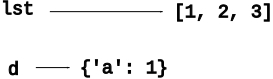
Here is code that creates one list and one dict, each with a variable pointing to it.
>>> lst = [1, 2, 3]
>>> d = {}
>>> d['a'] = 1
Memory looks like:
>>> d['b'] = lst
What does this do? Key: the = does not make a copy of the list. Instead, it stores an additional reference to the one list inside the dict.
Memory looks like:
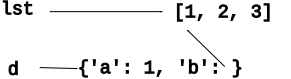
d['b'].append(4) - What Happens?There is just one list, and there are two references to it. This is fine. What does the following code do?
>>> d['b'].append(4)
The d['b'] is a reference to the [1, 2, 3] list, so the .append() adds 4 to it.
Memory then looks like:
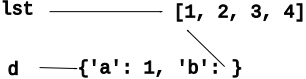
What do these lines of code print now?
>>> lst
???
>>> d['b']
???
Answer
Both lst and d['b'] are references to the one underlying list, which is now [1, 2, 3, 4]
Use = to store another reference to list in a "nums" variable. Does this make a copy of the list? No. It's just another reference to the one list. Adding in the "nums" variable makes this complex phrase more readable. What happens when we do nums.append(99)?
>>> nums = d['b']
>>> nums.append(99)
>>> nums
[1, 2, 3, 4, 99]
>>> d['b']
[1, 2, 3, 4, 99]
>>>
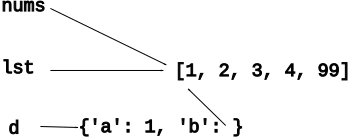
Python does not copy a list or dict when used with, say, =. Instead, Python just spreads around more pointers to the one list. This is a normal way for Python programs to work - a few important lists or dicts, and pointers to those structures spread around in the code. This does not require any action on your part, just have the right picture in mind.
Other computer languages have varied rules, where sometimes there is a copy and sometimes not, and the programmer has to keep this in mind. Python is simple - no copy.
Python Guide: Command Line
You should be able to write a python script that reads some inputs from the command line. Here we will do a simple example.
When a program runs like this (See the "Python Command" guide at top of this page)
The command line args are the words after the foo.py on the command line:
$ python3 foo.py aaa bbb ccc
1. The program by convention begins running in the function mainn()
2. The first line in main() sets up the variable args to point to a list of the command line args, in this case
['aaa', 'bbb', 'ccc']
def main():
    args = sys.argv[1:]    # Our standard first line
    # now args is ['aaa', 'bbb', 'ccc']
Therefore, you can write code in main() to look at the args and then call different functions. Here is an example problem for us all to do.
How it works: The list sys.argv is just a list like this ['foo.py', 'aaa', 'bbb', 'ccc']. The first element in the list is the python program itself. Trim off that first element with a slice, and we have args, just the rest of the arguments.
Modify program1.py from lecture-1 it supports the following args, '-mean' and '-nice'
$ python3 program1.py -mean Bob
Hello Bob you old doofus!
$ python3 program1.py -nice Bob
Hello Bob you are just super!
Warmup - add print(args) in main(), so we can see what the args are. We see: args is a list of whatever words are typed on the command line after 'program1.py'.
For the '-mean' feature...
python3 program1.py -mean Bob

 -in main()-

args -> ['-mean', 'Bob']
Write regular string/logic on the args list to detect if there are 2 args, and the first is '-mean'. Could use "elif" but it's not required, since the '-mean' vs. '-nice' strings are all distinct.
Solution
def main():
    args = sys.argv[1:]

    if len(args) == 2 and args[0] == '-mean':
        print('Hello', args[1], 'you old doofus!')
    if len(args) == 2 and args[0] == '-nice':
        print('Hello', args[1], 'you are just super!')
    ....
Top of file import math
In code, use math.xxx to refer to thing in module. e.g. sys.argv in previous example of getting list of command line arguments from inside the sys module.
>>> import math
>>> math.sqrt(9)
3.0
>>>
>>> import math
>>> dir(math)
['__doc__', '__file__', '__loader__', '__name__', '__package__', '__spec__', 'acos', 'acosh', 'asin', 'asinh', 'atan', 'atan2', 'atanh', 'ceil', 'copysign', 'cos', 'cosh', 'degrees', 'e', 'erf', 'erfc', 'exp', 'expm1', 'fabs', 'factorial', 'floor', 'fmod', 'frexp', 'fsum', 'gamma', 'gcd', 'hypot', 'inf', 'isclose', 'isfinite', 'isinf', 'isnan', 'ldexp', 'lgamma', 'log', 'log10', 'log1p', 'log2', 'modf', 'nan', 'pi', 'pow', 'radians', 'remainder', 'sin', 'sinh', 'sqrt', 'tan', 'tanh', 'tau', 'trunc']
>>>
>>> help(math.sqrt)
Help on built-in function sqrt in module math:

sqrt(x, /)
    Return the square root of x.
>>>
>>> help(math.cos)
Help on built-in function cos in module math:

cos(x, /)
    Return the cosine of x (measured in radians).
You already have! A regular old foo.py file is a module.
How hard is it to write a module? Not hard at all. A regular Python file we have written works as a module too with whatever defs the foo.py file has.
Consider the file ipcount.py
Forms a module named ipcount
>>> # Run interpreter in ipcount directory
>>> import ipcount
>>>
>>> ipcount.read_counts('small-ips.txt')
{...
Note: if filename has a dash in it like 'ipcount-solution.py', import this way:
import importlib
ipcount = importlib.import_module("ipcount-solution")
Big modern projects tend to build on a bunch of modules. How to plan this?
Other modules are valuable but they are not a standard part of Python. For code using non-standard module to work, the module must be installed on that computer via the "pip" Python tool. e.g. for the CS106A image homeworks, we had the students pip-install the "Pillow" image module with this command:
$ python3 -m pip install Pillow
..prints stuff...
Successfully installed Pillow-5.4.1
A non-standard module can be great, although the risk is harder to measure. The history thus far is that popular modules continue to be maintained. Sometimes the maintenance is picked up by a different group than the original module author. A little used module is more risky.
When you install a module on your machine from somewhere - you are trusting that code to run on your machine. In very rare cases, bad guys have tampered with modules to include malware in the module, which then runs on your machine, steal data, install malware, etc. A so called "supply chain attack"
Installing code from python.org is very safe, and also very well known modules like Pillow and matplotlib are safe, benefiting from large, active base of users.
Several supply chain attacks have been made on lesser known modules, from lesser known code sources, in particular the code source pypi.org
Be more careful if installing a little used module.
When you upgrade Python, you will lose the pip installed modules which are back in your previous Python install directories. You need to install them again - not hard actually. There's a pattern where you store a list of all the modules in a file "requirements.txt" and then "pip" can read this file and install them all in one step. (below)
For more information see: python.org venv.
The old way to install modules is that they are installed on the whole machine, as part of the Python install. There has been a gradual move towards "virtual environments" (venv), where a bunch of modules are installed in a directory, separate from other directories with their own modules. Each project has its own directory, and its own modules are installed there and kept separate from other directories. The "pip install" commands are the same, but they are done in a context where modules are installed in the virtual environment.
Normally when you "pip install" a library, it goes into the Python space shared by all the programs on that computer.
1. A project has a set of modules/versions it uses. In a new directory (for a developer, in production) We want to re-create exactly that set of modules. Solved: with "pip freeze" and "pip install -r" shown below.
2. I have multiple projects, and they need different sets of modules. Solved: each venv has its own copy of its modules, independently of other venvs.
The "venv" system is part of a slowly growing consensus within the python community about how to handle library versions. I'm confident using the venv system, that future Python features will work with it.
You can watch and/or do it all yourself too. Here we'll create a venv within code4 and install the Pillow image module in it.
1. Go to the code4 directory. use this command to setup venv within, creating a "venv" directory.
$ python3 -m venv venv
Now there's a "venv" dir
$ ls
__pycache__		ipcount-starter.py	simpleimage.py
big-ips.txt		ipcount.py		small-ips.txt
ipcount-solution.py	program1.py		venv
2. Activate the venv
Mac:      source venv/bin/activate

Windows:  venv\Scripts\activate
What this does: sets "python3" to point to the version in this venv dir, and sets the prompt to be different. Notice that python3 is now the python3 down in the venv, not the regular system python3 (it does ultimately use the system python, but through this adapter down in the venv dir.)
$ which python3
/Users/nick/cs193q/code4/venv/bin/python3
2a. Hack. If you don't want to activate, you can just explicitly use the "python3" in the venv, which is venv/bin/python3, and that will properly route everything through the venv.
3. Pip install stuff - goes into venv, not the system.
Try to run simpleimage.py - it fails because it needs the Pillow library. Now install Pillow. Just use "python3" and its the venv version.
$ python3 -m pip install Pillow

# look in this dir: venv/lib/python3.13/site-packages
4. Now software in this dir, using this version of "python3" can use Pillow. This command now works, since Pillow is installed, putting a yellow rectangle on screen.
$ python3 simpleimage.py # uses Pillow
5. List installed with "freeze" - outputs a list of all installed modules with their versions.
$ python3 -m pip freeze
pillow==12.0.0
6. Capture the freeze as "requirements.txt" - a convention. The requirements file just lists all the modules with their specific versions.
$ python3 -m pip freeze > requirements.txt
$ cat requirements.txt
pillow==12.0.0
7. Key Point - with the requirements.txt file - can re-build this exact set of libraries with "install -r requirements.txt" as below. You could do this in the future or on another machine, and it would re-create exactly this set of modules.
$ python3 -m pip install -r requirements.txt
KEY Do not copy the venv directory to a new location to re-create this setup. Instead, copy the requirements.txt file, and do an install in any new directory, and that will re-create this setup.
8. To switch out of the venv, use the command "deactivate"
$ deactivate
Now python3 is back pointing to the regular system one. Notice that the prompt is now back to normal.
Super handy way to compute a new list from a list. Best for short computations. Don't go crazy expression your whole program as nested comprehensions — there's a tension between short and readable.
1. Write outer [ ] 2. Write "for elem in lst" inside 3. Write expr on the left that you want to compute each elem in the new list 4. Write "if xxx" at the right side, to trim results if wanted
>>> lst = [1, 2, 3, 4]
>>>
>>> [n * n  for n in lst]
[1, 4, 9, 16]
>>>
>>> [str(n) + '!'  for n in lst ] # type change
['1!', '2!', '3!', '4!']
>>>
>>>
>>> [str(n) + '!'  for n in lst if n >= 2]
['2!', '3!', '4!']
Python is a big language, but strings, lists, dicts, functions, tests, modules, and files are pretty central for everything. You've seen all the core technologies, well set up to explore on your own from here.
Homework: see our home page, due end of week 6.