Step-Through Startup:
Timepath97.exe Frontend
This page contains screenshots for the Win95/NT graphical input Timepath97.exe;
the Timepath97 program output from this setup is found under the Tp Output TAB
Input Tab Dialog Screen
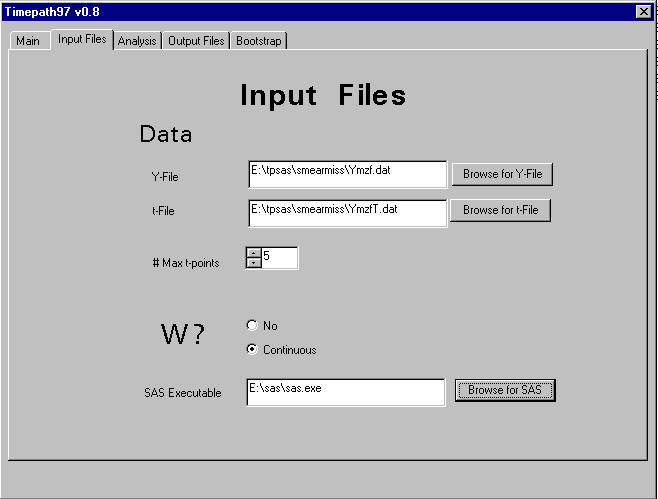
Y-File
data file that contains the outcome measure and (if present) exogenous
measure W.
each row contains data for an individual unit:
ID Y-values W (if present) [columns are space delimited]
see data structures TAB
missing data indicated by SAS standard "." (period)
file for smearmiss example
t-file
data file that contains the values of the time points coresponding to the
outcome measures.
each row contains data for an individual unit:
ID t-values [columns space delimited]
see data structures TAB
file for smearmiss example
At present we require Y-file and t-file to be rectangular--i.e. all individuals have the same number of
observations, which can be filled in as missing values. Admittedly this is inconvenient for
data sets in which the number of observations vary greatly across persons. Eventually, other
data input forms will be supported (such as each datum is a row rather than each individual)
# Max t-points
to help a less than omniscient programming job, this
spinner asks for the number of time observations for
the individual with the largest number of time observations
(currently, all individuals must have the same number of observations,
although some Y-data may be missing)
W?
Whether or not an exogenous variable is present
(in future versions special procedures for W as a group
membership indicator and accomodation for multiple W)
SAS Executable
path to location of SAS System program
Analysis Tab Dialog Screen
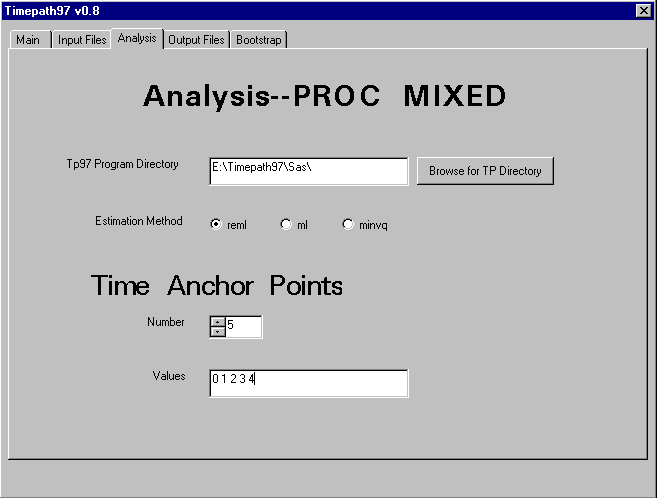
Tp97 Program Directory
path to location of timepath97.sas and jackboot.sas
Estimation Method
PROC MIXED estimation (see SAS manual);
Restricted Maximum Likelihood or Maximum Likelihood are the common options
Time Anchor Points input # of points and values [space delimited numerals]
The idea of the "anchor points" is to tell the program the time-values to
be used in evaluating selected descriptive statistics and parameter
estimates in the program output.
In a simple "synchronous" data set (everyone measured at the same
time), the choice of the anchor points will often be obvious: choose
the times of observed measurements.
In data sets (such as smear*) where time measurements vary across
individuals (see Data structures TAB), choice of representative time
values for the anchor times is most useful.
Special status is given to the first anchor time; that time point is
identified as time of initial status measurement in the analysis.
Output Tab Dialog Screen
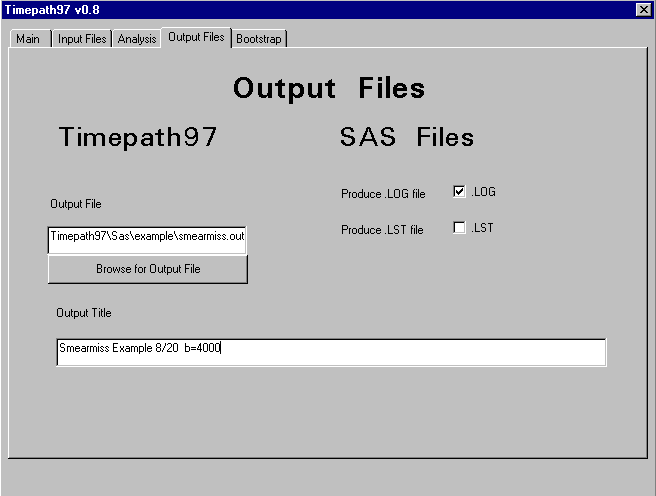
For Timepath97
provide the name and location for the output file created by Timepath97
(see Tp Output TAB)
provide the desired descriptive title for this output file
For SAS Files
Typical SAS runs produce a .LOG (program activity) and a .LST
(SAS program output) files.
Checking the boxes will produce these files; leaving the
checkboxes blank will suppress these files. The files, if produced, will
be written to the same directory in which the .sas file produced by this frontend resides.
These files can be produced in addition to the heavily edited output
of Timepath97 the .LST file contains the Proc MIXED SAS output for the
analyses in Timepath97 program; that file will be
useful to those experienced with SAS output. With bootstrap
replications the .LST file will become quite large (40-60 MB for 4000
resamples); one good strategy is to keep a .LST file for a b=0 run but
suppress the .LST file for b=4000.
Bootstrap Tab Dialog Screen
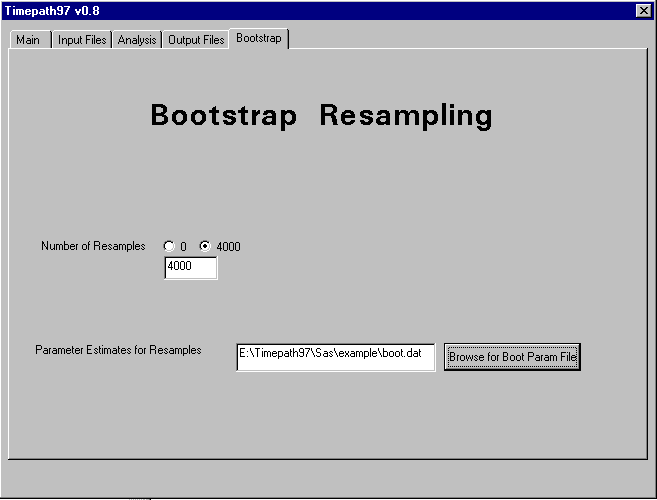
Number of Resamples
The program will use the number showing in the edit control window .
Common choices are b=0 for no bootstrapping, and b=4000,
the recommended number of resamples for good determination of BCa
confidence intervals.
Parameter Estimates
The program can generate a file containing values of selected
parameter estimates for each resample. Each resample is a row in this file.
These values are useful for descriptive (e.g. histrograms) examination of
the bootstrap inference procedures.
Main Dialog Screen
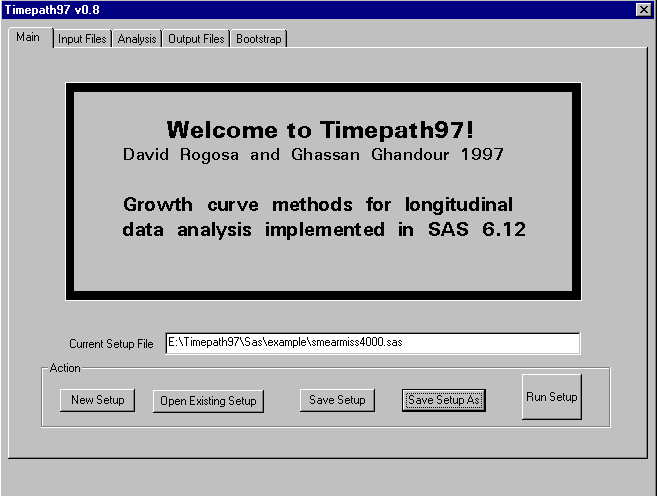
Current Setup File edit control
If a new setup file was created within this front-end, it must be named and
saved before running SAS (via the Run Setup button). The "Run setup" button will launch a SAS batch session running Timepath97.
The subsequent file is an ascii format .sas file which can alternatively be run in batch mode
on the machine that created the file (or, for example, on a remote Unix
installation in batch mode, just by changing the relevant paths). For the smearmiss data
example used here, the annotated .sas file
If an existing setup has been imported and modified, then using
"save setup as" allows the modified file to be saved separately.