Project: Camera Design
This script illustrates step by step how to load color filters and set the various pixel and optics parameters for a simulated camera.
This class project was implemented prior to the implementation of the camera object in ISET.
Copyright, 2011, Stanford University, Psych 221, Wandell
Contents
ieInit
Create some quick defaults
scene = sceneCreate;
oi    = oiCreate;

% Store the wavelength sampling we will use
wave = sceneGet(scene,'wave');
Selecting the optics
% Adjust optics and set anti-aliasing parameters here ...
oi = oiSet(oi,'optics f number',5);

oi = oiCompute(oi,scene);

% If you want to visualize what you have, you can run this
% oiWindow(oi);
Set the PIXEL and SENSOR properties
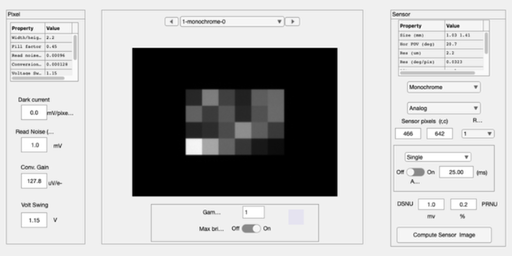
We create a monochrome sensor and set the pixel properties. We use this as a default. In the next section, we add various types of color filter arrays.
% To create the pixel and sensor structures, begin with the default
sensorM = sensorCreate('monochrome');
pixel   =  sensorGet(sensorM,'pixel');

% You can set the pixel and sensor properties to one of the possible sets
% described on the project web-page this way:

% Here are the pixel properties
voltageSwing   = 1.15;  % Volts
wellCapacity   = 9000;  % Electrons
fillfactor     = 0.45;       % A fraction of the pixel area
pixelSize      = 2.2*1e-6;   % Meters
darkvoltage    = 1e-005;     % Volts/sec
readnoise      = 0.00096;    % Volts

conversiongain = voltageSwing/wellCapacity;

% We set these properties here
pixel = pixelSet(pixel,'size',[pixelSize pixelSize]);
pixel = pixelSet(pixel,'conversiongain', conversiongain);
pixel = pixelSet(pixel,'voltageswing',voltageSwing);
pixel = pixelSet(pixel,'darkvoltage',darkvoltage) ;
pixel = pixelSet(pixel,'readnoisevolts',readnoise);

%  Set the sensor properties
exposureDuration = 0.025; % Seconds
dsnu =  0.0010;           % Volts
prnu = 0.2218;            % Percent (ranging between 0 and 100)
analogGain   = 1;         % Used to adjust ISO speed
analogOffset = 0;         % Used to account for sensor black level
rows = 466;               % number of pixels in a row
cols = 642;               % number of pixels in a column

% Set these sensor properties
sensorM = sensorSet(sensorM,'exposuretime',exposureDuration);
sensorM = sensorSet(sensorM,'rows',rows);
sensorM = sensorSet(sensorM,'cols',cols);
sensorM = sensorSet(sensorM,'dsnulevel',dsnu);
sensorM = sensorSet(sensorM,'prnulevel',prnu);
sensorM = sensorSet(sensorM,'analogGain',analogGain);
sensorM = sensorSet(sensorM,'analogOffset',analogOffset);

% Put the pixel back into the sensor structure, and one more little cleanup
sensorM = sensorSet(sensorM,'pixel',pixel);
sensorM = pixelCenterFillPD(sensorM,fillfactor);

% We are now ready to compute the sensor image
sensorM = sensorCompute(sensorM,oi);

% We can view the monochrome sensor image in the GUI.
sensorWindow(sensorM);
Fill factor may have changed. You can use: size same fill factor
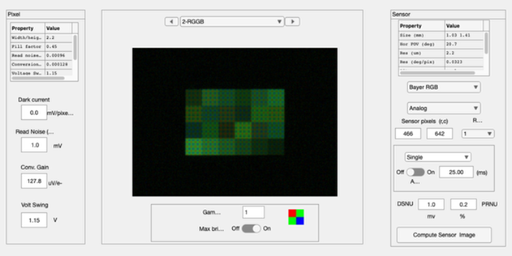
Modify the sensor by placing a CFA array
% Initialize the new color sensor as the monochrome one we built
sensor = sensorM;
sensor = sensorSet(sensor,'name','RGGB');

% Load the calibration data and attach them to the sensor structure
fullFileName = fullfile(isetRootPath,'data','sensor','colorfilters','nikon','NikonD100.mat');
[data,filterNames] = ieReadColorFilter(wave,fullFileName);
sensor = sensorSet(sensor,'filterspectra',data);
sensor = sensorSet(sensor,'filternames',filterNames);
sensor = sensorSet(sensor,'cfapattern',[1 2; 2 3]);
sensor = sensorSet(sensor,'Name','RGGB');

% Set the infrared filter
irFilter = 0.5*ones(size(wave));
sensor = sensorSet(sensor,'ir filter',irFilter);

% We are now ready to compute the sensor image
sensor = sensorCompute(sensor,oi);

% We can view the monochrome sensor image in the GUI.
sensorWindow(sensor);
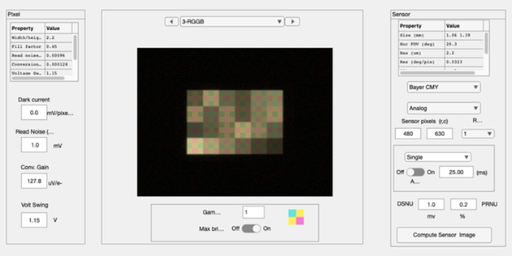
Use a different color filter array pattern
sensor = sensorM;
sensor = sensorSet(sensor,'name','3x3');

rows = 3*160;               % number of pixels in a row
cols = 3*210;               % number of pixels in a column
sensor = sensorSet(sensor,'rows',rows);
sensor = sensorSet(sensor,'cols',cols);

sensor = sensorSet(sensor,'cfapattern',[1 2 3; 2 3 1; 3 1 2]);
sensor = sensorSet(sensor,'Name','CMYMYCYCM');

% Load the calibration data and attach them to the sensor structure
fullFileName = fullfile(isetRootPath,'data','sensor','colorfilters','CMY.mat');
[data,filterNames] = ieReadColorFilter(wave,fullFileName);
sensor = sensorSet(sensor,'filterspectra',data);
sensor = sensorSet(sensor,'filternames',filterNames);
sensor = sensorSet(sensor,'cfapattern',[1 2; 2 3]);
sensor = sensorSet(sensor,'Name','RGGB');

% Selecting the infrared filter
sensor = sensorSet(sensor,'ir filter',irFilter);

% We are now ready to compute the sensor image
sensor = sensorCompute(sensor,oi);

% We can view the monochrome sensor image in the GUI.
sensorWindow(sensor);