t_codeRendering
The display windows show radiance and irradiance data as RGB images. ISET stores spectral power distributions of the radiance and irradiance images (and illuminants). The display rendering maps the spectral data into RGB using a simple principle
  Convert the radiance/irradiance data to CIE XYZ values
  Convert the XYZ values to sRGB data appropriate for display
This tutorial shows these functions in action.
Copyright Imageval Consulting, LLC 2013
Contents
ieInit
Create a yellowsh blackbody spectrum
% Here is a simple vector of a yellowsh SPD
wave = 400:10:700;   % Specify the wavelength samples
spd = blackbody(wave,3000);

vcNewGraphWin; plot(wave,spd);
xlabel('Wavelength (nm)');
ylabel('Energy (watts/sr/m2/nm)');
grid on;
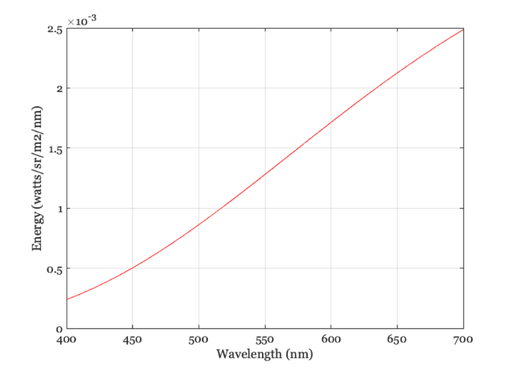
We convert the spd into an sRGB value
% We calculate the XYZ values from the spd
XYZ = ieXYZFromEnergy(spd',wave);

% We want the data to be in (row,col,wave) format
XYZ = XW2RGBFormat(XYZ,1,1);

% We then convert this to sRGB
sRGB = xyz2srgb(XYZ);

vcNewGraphWin;
imagesc(sRGB)
axis off; axis image

3D Format for images
% We treat represent images using a 3D format (row,col,channels)
% RGB images have three channels.  SPD images have more channels, equal to
% the number of wavelength samples.

% We convert a vector into the 3D format (which we call RGBFormat) as
% follows.
vcNewGraphWin;
spd3D = XW2RGBFormat(spd(:)',1,1);

% The spd3D has only one spatial point, which is hard to see.  So, let's
% make it bigger
spd3D = imageIncreaseImageRGBSize(spd3D,40);
imageSPD(spd3D,wave);


Here is a bluish blackbody radiator
spd   = blackbody(wave,8000);
spd3D = XW2RGBFormat(spd',1,1);

% It is only one point, which is hard to see.  So, let's make it bigger
spd3D = imageIncreaseImageRGBSize(spd3D,40);
imageSPD(spd3D,wave);