t_displaySurfaceReflectance
We create a theoretical display for use with sceneFromFile.  The purpose
of the display is to create a scene radiance and illuminant from the
input sRGB image so that
* The illuminant is the mean CIE Daylight
* The scene reflectances are within the first three natural reflectance
  function bases, reflectanceBasis.mat
Description:
This is how we create the (theoretical) display.
* The display radiance must be within the space spanned by the Daylight
light times each of the three natural reflectance bases.  That way,
when we divide out by the light, we are left with a reflectance in the
natural reflectance database.
* We find a 3x3 transform from the linearized srgb values so that the
XYZ values of the theoretical display match the XYZ of the sRGB
display. This means the XYZ values on the theoretical reflectance
display are the same as if we had put the image up on an sRGB display.
This script can be used to write out the reflectance-basis display, but
the writing code is commented out below.
From the logic, you might notice that we could build a theoretical
display for other lights or surface basis functions.
See also
  displayReflectance.m
  reflectanceBasis.mat, reflectance-display.mat
Contents
- Load the reflectance basis for natural surfaces
- Load the standard CIE daylight illuminant
- Radiance basis - 3D
- Find the sRGB XYZ values
- Find a 3x3 T to match the reflectance display and sRGB primaries
- Create the display
- Set the display to a luminance of 100
- Set the gamma of the display
- Save the reflectance-display
- Try it out
- END
Load the reflectance basis for natural surfaces
wave = 400:1:700;
basis = ieReadSpectra('reflectanceBasis.mat',wave);
basis(:,1) = -1*basis(:,1);
% plotReflectance(wave,basis(:,1:3));
Load the standard CIE daylight illuminant
% Loaded as energy.
illEnergy = ieReadSpectra('cieDaylightBasis.mat',wave);
% plotRadiance(wave,data);

% Loaded as energy.
% d65 = ieReadSpectra('D65.mat',wave);
% plotRadiance(wave,data);
Radiance basis - 3D
The radiance basis must be described by these three columns if the light is D65 and the surfaces are within the space spanned by the first three natural reflectance function bases.
radianceBasis = diag(illEnergy(:,1))*basis(:,1:3);
% plotRadiance(wave,radianceBasis);
Find the sRGB XYZ values
% Suppose a point in the rgb file we read is represented by the row vector,
%
%    p = [R,G,B].
%
% The matrix lrgb2xyz transforms the row vector, XYZ = p*lrgb2xyz;
%
lrgb2xyz = colorTransformMatrix('lrgb2xyz');

% Transposing the matrix gives us the XYZ values of the XYZ values of the
% sRGB display in the columns.
%
lXYZinCols = lrgb2xyz';
Find a 3x3 T to match the reflectance display and sRGB primaries
The match is with respect to XYZ. The matrix lXYZinCols has the sRGB primaries in its columns. We want T that satisfies
lXYZinCols = XYZ'*radianceBasis*T
By making the reflectance-display primaries to be radianceBasis*T, the
lRGB (linearized sRGB) values produce a radiance that matches the XYZ
values in the new display that they would have produced in the sRGB
display.
% Read in the XYZ functions with respect to energy.
XYZ = ieReadSpectra('XYZEnergy.mat',wave);

T = pinv(XYZ'*radianceBasis)*lXYZinCols;

% We use these as the primaries of the theoretical reflectance
% display.  They span the space of illuminant*refBasis, and they are
% adjusted so that rgbPrimaries*lRGB has the same XYZ as lRGB on an
% sRGB display.
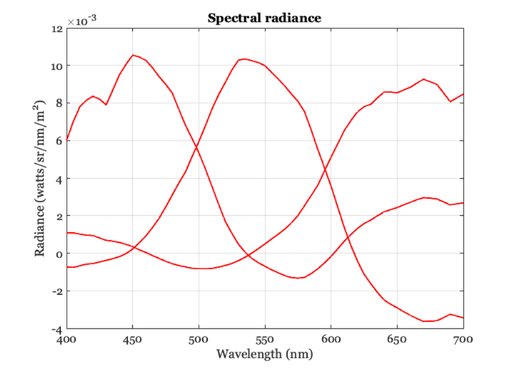
rgbPrimaries = radianceBasis*T;

% The primaries are not physically realizable (they have some negative
% entries).  But this is all simulation, so we don't care.  The scene
% radiance values for any natural image will be all positive because
% natural scenes never have [1,0,0] and the like.  If they do, then the
% image data are outside of the range of the natural reflectances under
% mean daylight illuminant.
plotRadiance(wave,rgbPrimaries);
Create the display
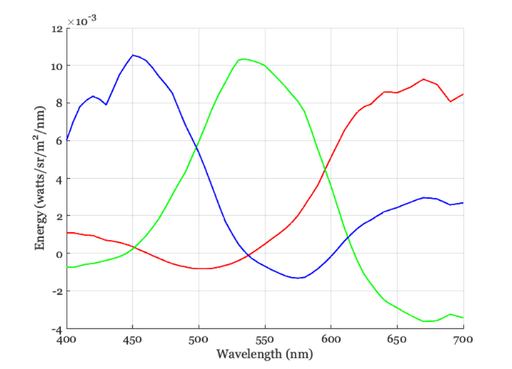
d = displayCreate('default');
d = displaySet(d,'wave',wave);
d = displaySet(d,'spd',rgbPrimaries);

displayPlot(d,'spd');
displayGet(d,'white xy')
peakL = displayGet(d,'peak luminance');
ans =

    0.3127    0.3290
Set the display to a luminance of 100
rgbPrimaries = rgbPrimaries*(100/peakL);
d = displaySet(d,'spd',rgbPrimaries);
peakL = displayGet(d,'peak luminance');
Set the gamma of the display
% When we read in the image we will be applying the gamma correction for
% some display when we compute the radiance.  Maybe we should be using
% sRGB, which is something like 2.2 or 1.8.  For now, I inserted a measured
% gamma from an Apple display.

% Maybe we should set this based on the MCC gray series.  We know those
% reflectance levels and the horizontal luminance line should get at least
% the ratios on that right. (BW).
dApple = displayCreate('LCD-Apple');
g = displayGet(dApple,'gamma');
d = displaySet(d,'gamma',g);
Save the reflectance-display
%{
 % We will use this as the default display for sceneFromFile
 fname = fullfile(isetRootPath,'data','displays','reflectance-display');
 save(fname,'d');
%}
Try it out
thisWave = 400:10:700;
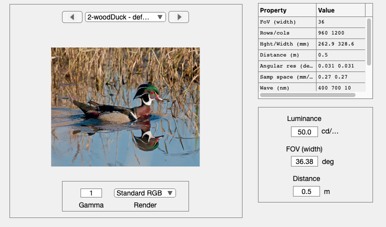
scene = sceneFromFile('woodDuck.png','rgb',50,'reflectance-display',thisWave);
sceneWindow(scene);