CS106AP - Lecture 1 - Code and Bit
CCS106A: Computer - Code - You
- Computer is powerful
- But dumb! Just runs code
- You have insight
-Think of an algorithm
-Express ideas in code
-Dumb it down so even a computer can do it
- A great marriage..
- Your insight + the computer
Story #1 - Bit's World - Simple
We have this "bit" robot, lives in a rectangular world. Use this just at the start of CS106A to get things going.
Bit can 4 things, move, left, right, paint .. show b
Bit Reference - more detailed list of Bit features
Suppose Bit starts at the upper left corner facing to the right, and then the following code runs:
    bit.move()
    bit.paint('blue')
    bit.right()
    bit.move()
    bit.paint('green')
Before:
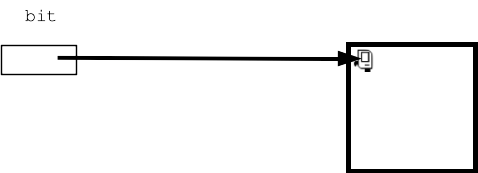
After:
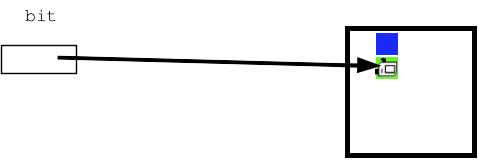
The syntax bit.move() is a Python function call. A function hold some code. To "call" a function runs its code. This is the noun.verb function call form.
Story #2 - Running Python Code
Now look at a def that has those same steps as formal Python code:
Bit blue_green() def
Here is complete Python function that does those same steps:
def blue_green(filename):
    bit = Bit(filename)
    bit.move()
    bit.paint('blue')
    bit.right()
    bit.move()
    bit.paint('green')
Before Running
- Run a function - runs its lines top to bottom (aka "call" that function)
- Each line does something
- In this case, for each line see bit take an action
Here is a "live" on the web version of the above def. Click "Run" on the page and watch what it does. Use the steps slider.
> bit1 blue_green function
Story #3 - 6 Things About def Syntax
So having seen a function run, now look at the details of the syntax. Sorry, it's a bunch of small syntactic points.
Looks weird, but is basically superficial and you will get used to it quickly.
def blue_green(filename):
    bit = Bit(filename)
    bit.move()
    bit.paint('blue')
    bit.right()
    bit.move()
    bit.paint('green')
The first code line sets up the bit-arrow as pictured above, explained in a later lecture
bit = Bit(filename)
- 1. A function starts with the word "def"
- 2. Followed by a name for the function, e.g. "blue_green". We'll have deeper thoughts about function naming later.
- 3. Followed by a parenthesis/colon thing, explained later
- 4. Followed by the indented lines of code of the function
- 5. line:
bit.move() calls the move() function
When bit.move() is called, we see the action to the right
This is the noun.verb style of calling a function
- 6. line:
bit.paint('blue') calls the paint() function
-passes in the parameter 'blue' as extra info the call
- The run of the function ends on its last line
A Little Talk About Syntax Errors
- Syntax - code is structured for the computer
- Very common error - type in code, with slight syntax problem
- e.g. syntax error:
bit.move[)
- Professional programmers make that sort of "error" all the time
- Just type it in, run it, fix the errors
- Not a reflection of some flaw in the programmer
- Do not give in to the following thoughts (imposter syndrome):
-"Another syntax error .. maybe I'm not cut out for this!"
-"I bet nobody else is getting these"
- Just the nature of typing ideas into the mechanical computer language
- Exercises to desensitize: a bunch of typical syntax errors + fixing them
- Fixing these little errors is a small, normal step
- Computers are powerful for you, but you need to work their way on syntax
Code Demos - Get Errors - Fix!
- These all have errors, trying run and fix (lecture demo, or on your own)
- These are on the parlante.org experimental server, uses your Stanford login
- bit1a
- bit1b
- bit1c
- bit1d
- Common syntax errors:
-messed up "()" on function call
-ragged indentation
-missing ":"
-typo the name of a function, like "bit.mve()"
You Try One: green2 (if we have time)
Bit begins at the upper left corner facing right.
Paint the square below the start square green,
and the square below that green as well, ending like this:

The word pass is a placeholder for your code, remove it. Feel free to make some syntax errors getting this to work!)
> green2
- Now you write code to solve one.
- Use the Run button to try your code as you go
- Type Ctrl-Return - Like clicking the Run button
- On this problem the system is checks if the output is correct
(To be clear this is not part of your grade, just checking the output for the exercise.)
- "diff" Feature - red marks on incorrect squares
-The system knows what the world is supposed to look like, so marks differing sq