More on Linked Lists
CS 106B: Programming Abstractions
Spring 2022, Stanford University Computer Science Department
Lecturer: Chris Gregg, Head CA: Neel Kishnani
 (linked wrists)
Slide 2
Announcements
- YEAH for assignment 6 is on Monday, May 16th at 6:45pm in STLC 114
- Snacks will be provided!
Slide 3
Today's Topics
- Building a
LinkedIntListclass
Slide 4
A LinkedIntList class
- Let's create a full
LinkedIntListclass- We should keep a private pointer to its front node
- We will write functions to add, insert, and remove from the list
- We need to properly traverse the list
LinkedIntList.h:
// Represents a linked list of integers.
#pragma once
#include<ostream>

using namespace std;

struct ListNode {
    int data;
    ListNode *next;
    ListNode(int value) { // constructor
        data = value;
        next = nullptr;
    }
};

class LinkedIntList {
  public:
    LinkedIntList();
    ~LinkedIntList();
    void addFront(int value);
    void addBack(int value);
    bool isEmpty();
    bool removeValue(int value);
    void removeFront();
    friend ostream &operator<<(ostream &out, LinkedIntList &list);

  private:
    ListNode *_front; // nullptr if empty
    void removeAfter(ListNode *prev);
};
- The
ListNodedefinition is a bit different than what we've seen before.- It has a constructor which sets the value for us:
ListNode(int value) { // constructor data = value; next = nullptr; } - We create a new
ListNodeusing dynamic memory like this:ListNode *node = new ListNode(value);
- It has a constructor which sets the value for us:
-
It looks like this in memory:

- Why are there two separate objects in the diagram above?
- The
ListNode *nodeis a variable that is simply a pointer. - The value / next box is the memory that has been allocated for the
ListNodeobject. nodepoints to the object in memory
- The
- The constructor for the
ListNodeclass looks like this (pretty simple):_front = nullptr;
Slide 5
Adding to the front of a linked list
- This should look familiar, from the stack above:
void ListNode::addFront(int value) { ListNode *newNode = new ListNode(value); newNode->next = _front; _front = newNode; } - If we are adding to the front of an empty list (ex.
list.addFront(42)), this is what it looks like. We start with_frontpointing tonullptr: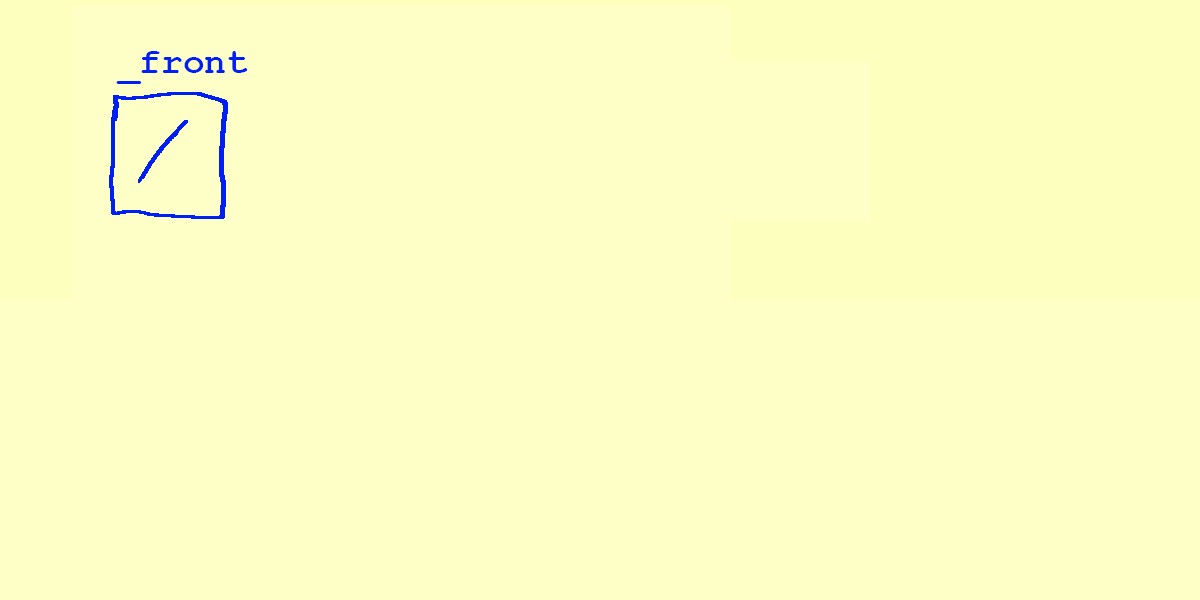
- Next, we create a new
ListNodeand a pointer,newNodethat points to it:
- We point the
nextof the new node to_front(which is alsonullptr), and then we point_frontto the new node. That's it!
- When the function returns, we have a single node in our linked list:
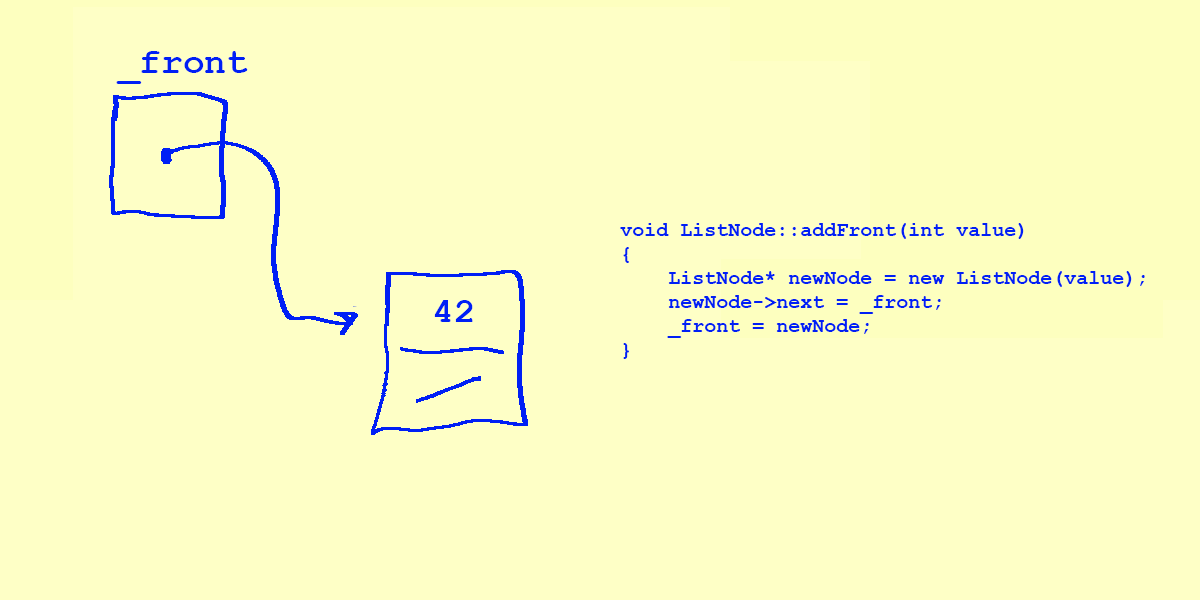
- If we want to
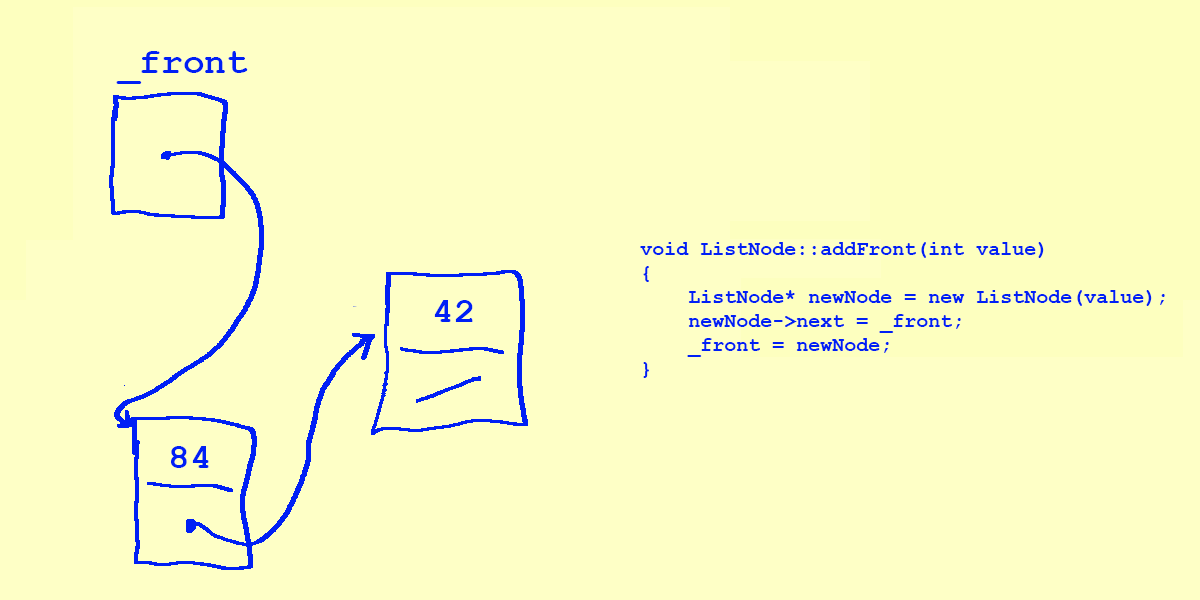
list.addFront(84), we repeat the process from above, but now the new node gets added before the 42:
- We first change
newNode's next pointer to point to where_frontpoints to:
- Then we change
_frontto point tonewNode:
- After the function ends, we have a two-node list:
Slide 6
Adding to the back of a linked list
- If we want to add to the back of a linked list, and we don't have an explicit
_backpointer, we must traverse the entire list to get to the back. This requires a traversal idiom that is common for linked lists. Here is the code foraddBack:void LinkedIntList::addBack(int value) { ListNode *newNode = new ListNode(value); if (_front == nullptr) { _front = newNode; } else { ListNode *curr = _front; while (curr->next != nullptr) { curr = curr->next; } // at this point, we're at the back curr->next = newNode; } } - First, we create a new
ListNode - If we are adding to the back of an empty list, this is a special case (handled by the
ifstatement). - The interesting part is the traversal:
ListNode *curr = _front; while (curr->next != nullptr) { curr = curr->next; } // at this point, we're at the back curr->next = newNode; - Let's look at this specifically with a three-node list from before:
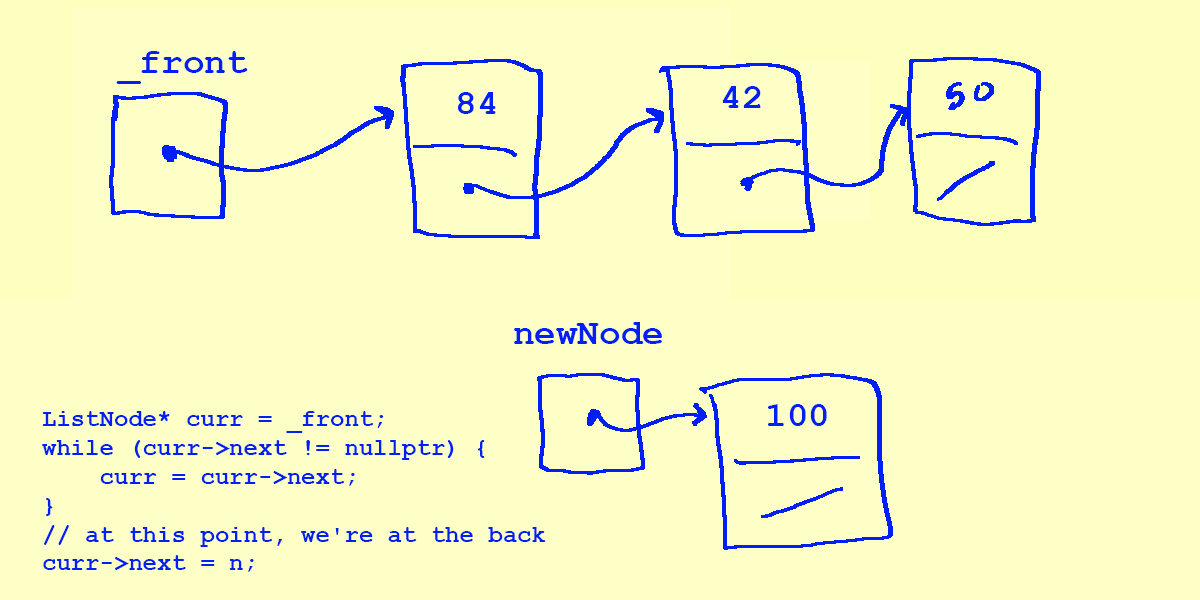
- First, we create a
currpointer that points to the current node, and we setcurrto point at the first node, via_front:
- Now, we start traversing the list in a while loop, checking if
curr->next != nullptr.- We update
currat each iteration withcurr = curr->next. This may seem like strange syntax, but it is just assigning pointer values. We keep iterating until we have reached the last node. In the first iteration:
- We update
- After the second iteration:

- Now, we are at the end of the list, and we can append our new node with
curr->next = n;: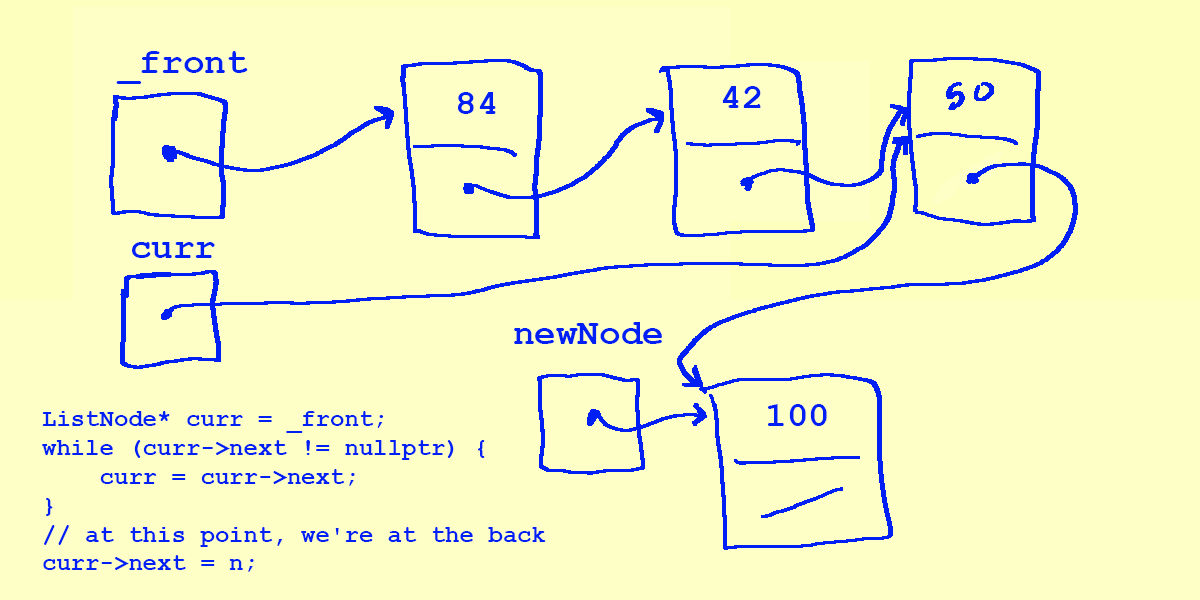
- After the function ends, this is our list:

Slide 7
Removing a value
- Let's write a function to remove the first instance of a value in our list (e.g., if the list had
4->2->3->5->8->3->9, thenremove(3)would remove the first3and leave the list looking like4->2->5->8->3->9. - Sometimes, you have to traverse but stop before the node you want to do somthing with.
bool LinkedIntList::removeValue(int value) {
    // Removes the first instance of value in the list
    // We need to find the node before
    // the one we want to remove
    ListNode *temp;

    // traverse the list to the end, if necessary
    ListNode *curr = _front;
    ListNode *prev = nullptr;

    while (curr != nullptr) {
        if (curr->data == value) {
            break;
        }
        prev = curr;
        curr = curr->next;
    }

    if (prev == nullptr) {
        removeFront();
    }

    if (curr == nullptr) {
        // did not find value
        return false;
    }
    removeAfter(prev);
    return true;
}

void LinkedIntList::removeFront() {
    if (_front != nullptr) {
        ListNode *temp = _front;
        _front = _front->next;
        delete temp;
    }
}

void LinkedIntList::removeAfter(ListNode *prev) {
    ListNode *temp = prev->next;
    prev->next = temp->next;
    delete temp;
}
-
Let's say we want to remove the 50, or
list.remove(50). Initially:
-
We will update the above diagram as we go.