Next:Building
a project.Up:Front
EndPrevious:Download
and installation.Contents
Overview.
The front end organizes data analysis into ``projects''. Each project is
connected to a single data file. When creating a project, the user also
provides information that specify how to read the data file (number of
loci, number of individuals, etc). These are characteristics of the data
file, and are always the same within this project. Each project also contains
one or more ``parameter sets''. These allow the user to specify the details
of the MCMC runs, including the number of repetitions, burnin length, etc,
as well as specifying the model of analysis (e.g., whether to allow admixture,
models of allele frequencies, etc). The user can then run the Markov chain
at chosen values of  ,
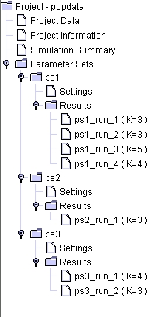
for a given parameter set. Figure 1 shows
an example of the components of a project called ``popdata''.
,
for a given parameter set. Figure 1 shows
an example of the components of a project called ``popdata''.
Figure 1: Example showing the components of a project. Project Data is
the data file; Project
Information specifies data file format. Simulation Summary provides
a summary of all MCMC
simulations run as part of this project. Parameter Sets consists of three
groups of MCMC runs
that used different parameter settings: ps1, ps2, and ps3; each of
these shows the Settings, as well
as a list of results for completed MCMC runs with these parameter values.
The user can click on
any of these to see details
The program can then be run, using these parameter values. The front
end stores various summaries of the results, including a number of graphical
plots, described below.
Next:Building
a project.Up:Front
EndPrevious:Download
and installation.Contents
William Wen 2002-07-18