Where am I?
You are trapped in a labyrinth and your only hope of escape is to cast the magic spell that will free you from its walls. Scattered within the labyrinth are three magical items:
- The Spellbook (📕), which contains the script for the escape spell.
- The Potion (🧪), containing the arcane compounds that power the spell.
- The Wand (⚡️), which concentrates your focus to make the spell work.
Collecting all three magical items will allow to cast the spell to escape to safety.
A pointer labyrinth
This is, of course, no ordinary labyrinth. It’s a pointer labyrinth. It is a linked arrangement of MazeCells. The MazeCell struct is defined in the labyrinth.h file and reproduced here:
struct MazeCell {
    string contents;   /* Value is either "", "Spellbook", "Potion", or "Wand" */
    MazeCell* north;   /* The cell to the north, or nullptr if no cell to the north. */
    MazeCell* south;   /* The cell to the south, or nullptr if no cell to the south. */
    MazeCell* east;    /* The cell to the east, or nullptr if no cell to the east. */
    MazeCell* west;    /* The cell to the west, or nullptr if no cell to the west. */
};
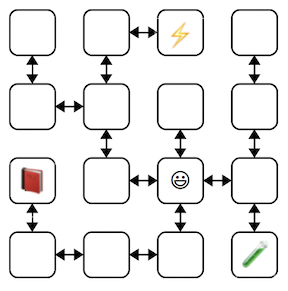 The diagram to the right is an example 4 × 4 labyrinth. The starting
location is marked with a smiley face and the location of the three items with
similarly cute emojis. The
The diagram to the right is an example 4 × 4 labyrinth. The starting
location is marked with a smiley face and the location of the three items with
similarly cute emojis. The MazeCell containing the smiley face has
north, south, east, and west pointers pointing to the MazeCell located one step in each of those directions. The MazeCell containing the book (📕) has north,
east, and west pointers set to nullptr, and only its south pointer
would point to another MazeCell (specifically, to the cell in the bottom-left
corner).
Each MazeCell has a field named contents that indicates the
item at that location. If the cell contains no item, its contents field is an empty string. A cell that holds the Spellbook, Potion, or Wand item would contain the string "Spellbook", "Potion", or "Wand", respectively.
Once dropped into this labyrinth at the starting location, you can roam around to find the items you need to cast the escape spell. There are many paths you can take; here are two of them:
ESNWWNNEWSSESWWNSWWNSEENWNNEWSSEES
Each path is represented as a sequence of letters (N for north, W
for west, etc.) that, when followed from left to right, trace out the
steps. Starting from the smiley-face, the first path steps East, then South (collects Potion from this cell), then North, then West, and so on.
Trace the two paths above through the example labyrinth and confirm that you understand how each is a valid path that gathers all three magical items. Then, answer the following question in short_answer.txt:
Q6. Give a different valid path through the example labyrinth that collects all three magical items.
Escaping from your personal labyrinth
You are now ready to find the escape path from your own personal labyrinth. We have provided a function that will build a personalized labyrinth for you. By “personalized” we mean that “no one else in the course is going to have the exact same labyrinth as you.” Your job is to use the debugger to explore your labyrinth and find a path that from the starting point that collects all three magical items, allowing you to escape.
The path you come up with will be a single string that meets the following conditions:
- The string consists only of uppercase
'N','S','E', and'W'characters, just like the paths you encountered in the previous section. - The string represents a path that begins at the starting point of your personal maze and collects all three magical items. (Assume that if your path hits a cell with a magical item, you collect that item.)
- Each step in the path must be legal (i.e., each character in the string must correspond to a valid move from the current cell to one of its neighboring cells that can be reached via a link). The path should never try to move in a direction where there is a
nullptrinstead of a valid pointer to another cell. - Note that it is permissible for your path to visit the same cell more than once.
Accessing your personal labyrinth
At the top of labyrinth.cpp are two constants marked with a "TODO" message. The first one, kYourName, is a spot for your name. Edit this constant so that it contains your name (first and last). You will fill in the second constant kPathForYourName with a path through your labyrinth that collects all three magical items.
A provided test case generates the personal labyrinth for kYourName. To find the path you are looking for, you will use your old friend, the debugger! Set a breakpoint on the test case that creates your personal labyrinth, and then run the program under the debugger. When stopped at the breakpoint, look to the Variables pane to see the state of the local variables. The startLocation variable is a pointer to the starting MazeCell inside your labyrinth. Click the dropdown triangle to view the contents field of startLocation, as well as the four pointers leading to the cell's neighbors.
Depending on your labyrinth, your starting location may allow you to move in all four cardinal directions, or you may find that you can only move in some of them. A pointer in a direction you cannot move will be set to nullptr, which displays as 0x0 in the Variables pane. A pointer in a direction you can move will be set to a non-zero value and have dropdown arrow on the value in the Variables panel. Clicking the arrow will unfold to show the neighbor cell. You can navigate further by choosing one of its dropdown arrows, or you could back up to the starting cell and explore in other directions. It’s up to you!
Draw a lot of pictures. Grab a sheet of paper and map out your labyrinth. There is no guarantee where you start – you
could be in the upper-left corner, dead center, etc. The items are
scattered randomly, and you’ll need to seek them out. Once you’ve mapped
it out, work out the steps in your escape path and assign those steps in string form to the constant
kPathForYourName; then go to the following link to see if you pass the escape test:
🔗 CS106B Personal Labyrinth Path Verifier
If you get a "SUCCESS" message on that page, hooray! You’ve escaped! Follow the instructions in the test case comments for how to proceed from there.
If not, you have some options. You could re-run the program under the debugger and carefully expand each link that corresponds to a move in your kPathForYourName string to see if one of the letters you entered isn't what you intended and accidentally tries to move in an illegal direction. Or perhaps the issue is that your path does not encounter all three magical items. You could alternatively set the breakpoint at the test case again and walk through the creation of your map a second time, seeing whether the diagram of the labyrinth you drew was incorrect.
To summarize, here’s what you need to do:
- In
labyrinth.cpp, edit the constantkYourNameto a string containing your full name (first and last). Don’t skip this step! If you forget to do this, you’ll be solving the wrong maze. Once you have setkYourName, do not change it, as this would cause a different maze to be generated than the one you have already solved. - Set a breakpoint at the escape test case and run the program under the debugger.
- Use the debugger to explore the labyrinth links. Draw out the labyrinth on a sheet of paper and find where the items are.
- Find a path that collects all three items and run it through our Personal Labyrinth Path Verifier to ensure you have a valid path.
- Once you've confirmed you have a valid path, double check that
kPathForYourNamehas been set to that string. Your SL will be verifying thatkPathForYourNameis a valid solution for the labyrinth created fromkYourName, so it's vital that you make sure those constants are an exact match for the strings you plunked into the Personal Labyrinth Path Verifier when it gave you the "SUCCESS" message. - Toggle the
verifiedvariable in the labyrinth test case totrue. That will cause the test case to pass, but note that your SL won't rely on that to award credit; as mentioned above, your SL will check thatkPathForYourNameis a valid solution for the labyrinth created fromkYourName. - Leave a nice note for your SL in a comment above your
kPathForYourNamedefinition inlabyrinth.cpp. They will look for that comment as an indicator that you read these instructions carefully. :)
Advice
- A labyrinth can have loops or multiple distinct paths between different cells. Keep this in mind as you’re exploring or you might find yourself going in circles!
- You don’t necessarily need to map out the whole labyrinth. You only need to explore enough of it to find the three magical items and create a path to collect them all.
- In the example labyrinth above, every link that leads northward from cell A to B has a corresponding reverse south link from B back to the A (and the same for east/west links). This may not always be the case for all labyrinth configurations. It is possible for a labyrinth to have one-way links.
Concluding thoughts
At this point, you have a good command of how to use the debugger to examine linked structures. You know how to recognize a null pointer, how to manually follow links between objects, and how to reconstruct the shape of a linked data structure. We hope you find these skills useful as you continue to write code that works on linked lists and other linked structures!
 From the wacky imagination of xkcd.