CS 49 - Creating Websites Using WordPress

Mark Branom, Instructor
branom@alumni.stanford.edu
markbranom@gmail.com
User Roles and Permissions in WordPress
Roles
In WordPress, everyone who comes to a web site is given a User Role, which determines the types of things that user is allowed to do. A user role defines a group of users that have certain privileges as defined in user permissions. Examples of user roles include Administrator, Editor, Author, Contributor, Subscriber, and the general public viewer of the blog.
- Administrator. Administrators are the chief administrators for a blog. Administrators have full access to all administrative features, including theme editing and user management.
- Editor. Editors can publish and manage their own posts as well as those of other Editors, Authors, or Contributors.
- Author. Authors can write, manage, and publish their own posts.
- Contributor. Contributors can write and manage their own posts, but cannot publish without approval from an Author, Editor, or Administrator.
- Subscriber. A subscriber is a user that has signed into the blog, either by using WebAuth or by using the WordPress account management. Subscribers can read and comment on posts and receive notification when new articles are posted.
- General public viewer. This is the default role of a visitor to your web site before signing in.
Permissions
Permissions let a WordPress administrator control what users can do on your site. Each user role (defined on the user roles section) has its own set of permissions.
For example, the WordPress administrator could give certain users permission to edit web pages within the blog, but deny this power to ordinary users.
Be sure to have a conversation with the WordPress administrator for your site.
Your level of access is based on the role(s) to which you have been assigned and the levels of permission that those role(s) have been granted.
Your ability to create, edit, and/or view content is based on these roles and permissions.
If you are expected to update existing content, you will need to be granted the right to edit pages within the blog.
Bottom line:
You should speak with your WordPress administrator about the role to which you need to be assigned so you can do the things you are expected to do. Only Administrators and Editors can edit other people’s work.
To set permissions:
- In your web browser, go to the blog and log in to the Dashboard.
- In the Dashboard, click Users.
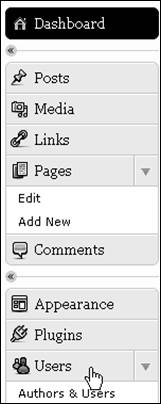
- Select desired user and set the desired permission.
In the drop-down menu Change role to, select Administrator.
Then click Change.
