Running into issues not on this page? Check our discussion forum and make a new post if you're still stuck!
Can I use some other version of Python?
Our strong recommendation is to use the latest stable version of Python, and this can be installed without removing older versions of Python already on your computer. Older versions tend to run into issues when installing other libraries later in the class.
Can I use an editor that isn't PyCharm?
If there's another environment that you're more comfortable with, you may use it, but the course staff will only provide support for issues in PyCharm. You must not modify any configuration files provided in assignment starter code.
When I try to run my code, I get an error saying "can't open file intro.py: No such file or directory!" What does this mean?
This most often happens when you open the incorrect file or folder in PyCharm. In this case, make sure to open the pycharm_intro folder that directly contains intro.py, rather than intro.py itself or a folder containing pycharm_intro. On Windows computers, you may have a folder called pycharm_intro with another folder inside it called pycharm_intro. Make sure to open the inner folder.
To fix this error, open the 'File' menu and click 'Open'. Then, navigate to the correct pycharm_intro folder and click on it. Now hit the 'Open' button.
To verify that you are in the correct folder, type ls (that's a lowercase 'L') if you're using a Mac or dir if you're using Windows, into your terminal. This is the same place you type python3 intro.py <YOUR NAME HERE>. This will show you a list of all the files in that folder, and intro.py should be in this list.
I'm getting the error 'Python was not found; run without arguments to install from the Microsoft Store, or disable this shortcut from Settings > Manage App Execution Aliases.'
Go into your computer settings (not PyCharm settings) and search for "Manage App Execution Aliases". Click on this, and then you should see a page with lot of switches for various applications. Scroll to the bottom, and turn off the switches for python.exe.
If you're still getting this error, try using python instead of py or python3 when you enter your command into the terminal - if this works, you should use it in your terminal commands for the rest of the quarter.
I'm getting a 'No Python Interpreter configured for the project' message when I open a file! What should I do?
This is likely caused by an issue with how you set up the interpreter. To fix this, click 'Configure Python Interpreter', and set up the interpreter by following the instructions in the Installing Pycharm handout.
When I run my Karel program, some elements of Karel's world seem to be missing (walls and corners).
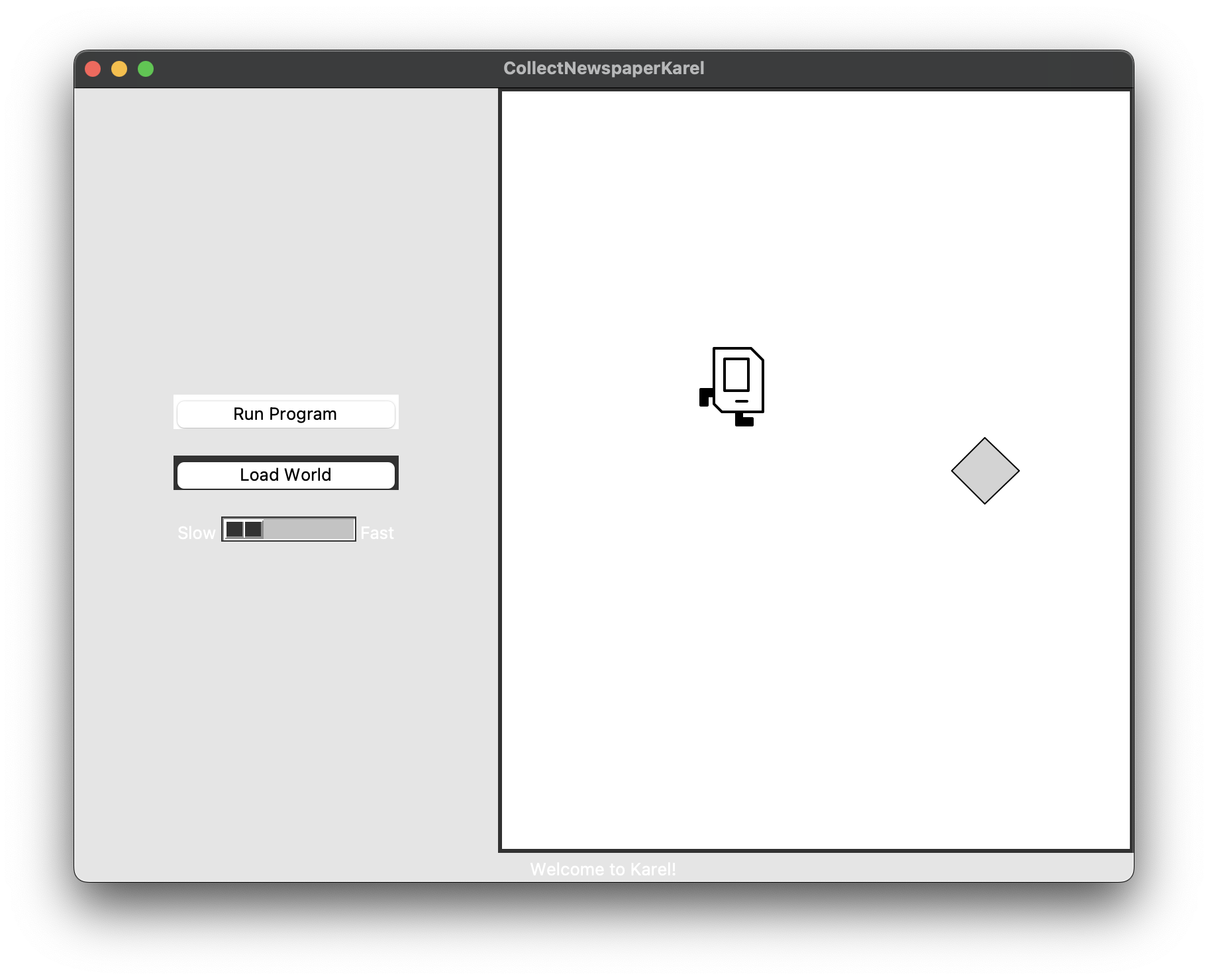
If Karel and the beeper appear, but you don't see any of the walls around the world, this might be because your computer is in dark mode. To fix this, go into your computer settings, and in the "Appearance" section, change the appearance to light.
I'm getting the error couldn't recognize data in image file "./karel/icon.png" when I run my code.
Check the Python version you're running by looking in the bottom right of your terminal. The latest stable version of Python is 3.14, so if your version number is much older (3.8), close out of PyCharm and repeat the install process for Python 3.14. Check out the top of the Installing PyCharm handout and complete the "Installing Python" and "Installation" sections.
PyCharm quits unexpectedly when I open it.
If you are using a Mac and PyCharm 2026.1 quits unexpectedly, uninstall it and install PyCharm 2025.3 instead.
I'm geting an unexpected popup about Licenses!
You might have downloaded the professional version of PyCharm, which is paid. Uninstall the version you currently have, and go back to the PyCharm website. This time, select the community version on the PyCharm site and download that version.
I get the following error when I try to run my code from the terminal DEPRECATION WARNING: The system version of Tk is deprecated and may be removed in a future release. Please don't rely on it. Set TK_SILENCE_DEPRECATION=1 to suppress this warning. What should I do?
Do you have the most current version of Python? Try:
- Saving your code
- Closing PyCharm and then updating Python to the newest version (instructions to download Python are at the top of the Installing PyCharm Handout)
- Reopening the project in PyCharm
- Re-running your code
How do I update to the most current version of Python?
First, close out of PyCharm completely. You can use these Python download links:
When you click this link, you will see a Download Python (Some Version Number) button. Click this, after open this file after it finishes downloading and follow the installer instructions. In PyCharm, you'll want to change your interpreter to this newer version of Python using the instructions in the PyCharm Installation handout.