Assignment 3A: Fractals
Assignment by Marty Stepp and Victoria Kirst. Thanks to Eric Roberts, Julie Zelenski, Jerry Cain, Keith Schwarz for other problem ideas.
This problem focuses on recursion.
This is a pair assignment. You are allowed to work individually or work with a single partner. If you work as a pair, comment both members' names on top of every submitted code file. Only one of you should submit the assignment; do not turn in two copies.
It is fine to write "helper" functions to assist you in implementing the recursive algorithms for any part of the assignment. Some parts of the assignment essentially require a helper to implement them properly. It is up to you to decide which parts should have a helper, what parameter(s) the helpers should accept, and so on. You can declare function prototypes for any such helper functions near the top of your .cpp file. (Don't modify the provided .h files to add your prototypes; put them in your own .cpp file.)
Links:
Starter Code
We provide a ZIP archive with a starter project that you should download and open with Qt Creator. You will edit and turn in only the following file. The ZIP contains other files/libraries; do not modify these. Your code must work with the other files unmodified. If you want to declare function prototypes, declare them at the top of your .cpp file, not by modifying our provided .h file.
- fractals.cpp, the C++ code for your solution
demo JAR
If you want to further verify the expected behavior of your program, you can download the following provided sample solution demo JAR and run it. If the behavior of our demo in any way conflicts with the information in this spec, you should favor the spec over the demo.
"How do I run the assignment solution demos?"
If you want to further verify the expected behavior of your program, you can download the provided sample solution demo JAR and run it. If the behavior of our demo in any way conflicts with the information in this spec, you should favor the spec over the demo.
Our assignments offer a solution 'demo' that you can run to see the program's expected behavior. On many machines, all you have to do is download the .jar file, then double-click it to run it. But on some Macs, it won't work; your operating system will say that it doesn't know how to launch the file. If you have that issue, download the file, go to the Downloads folder in your Finder, right-click on the file, and click Open, and then press Confirm.
Some Mac users see a security error such as, "cs106b-hw2-wordladder-demo.jar can't be opened because it is from an unidentified developer." To fix this, go to System Preferences → Security & Privacy. You will see a section about downloaded apps. You should see a prompt asking if you would like to allow access to our solution JAR. Follow the steps and then you should be able to open the demo.
If all else fails, you could run the demo JAR from a terminal. Every operating system allows you to open a "terminal" or "console" window for typing raw system commands. Open your operating system's terminal or console window (Google if you need to learn how to do this), and then type:
cd DIRECTORY_WHERE_DEMO_JAR_IS_STOREDjava -jar JAR_FILE_NAME
For example, on a Mac machine, if your user name is jsmith12 and you have saved a demo JAR named hw2.jar in your Documents/106b directory, you would type:
cd /users/jsmith12/Documents/106bjava -jar hw2.jar
Or on a Windows machine, if your user name is jsmith12 and you have saved a demo JAR named hw2.jar in your Documents/106b directory, you would type:
cd C:\users\jsmith12\Documents\106bjava -jar hw2.jar
We provide a GUI for you that helps you run and test your code.
Problem Description:
In this problem you will write several recursive functions related to drawing graphics. Recursive graphical patterns are also called fractals.
1) Sierpinski Triangle
If you search the web for fractal designs, you will find many intricate wonders beyond the Koch snowflake illustrated in Chapter 8. One of these is the Sierpinski Triangle, named after its inventor, the Polish mathematician Waclaw Sierpinski (1882-1969). The order-1 Sierpinski Triangle is an equilateral triangle, as shown in the diagram below.
For this problem, you will write a recursive function that draws the Sierpinski triangle fractal image.
Your solution should not use any loops; you must use recursion.
Do not use any data structures in your solution such as a Vector, Map, arrays, etc.
void drawSierpinskiTriangle(GWindow& gw, double x, double y, double size, int order)

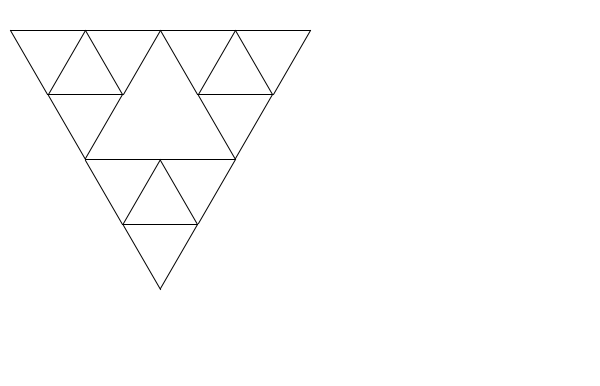
To create an order-K Sierpinski Triangle, you draw three Sierpinski Triangles of order K-1, each of which has half the edge length of the original. Those three triangles are positioned in what would be the corners of the larger triangle; together they combine to form the larger triangle itself. Take a look at the Order-2 Sierpinski triangle below to get the idea.
Your function should draw a black outlined Sierpinski triangle when passed a reference to a graphical window, the x/y coordinates of the top/left of the triangle, the length of each side of the triangle, and the order of the figure to draw (such as 1 for Order-1, etc.).
The provided code already contains a main function that pops up a graphical user interface to allow the user to choose various x/y positions, sizes, and orders.
When the user clicks the appropriate button, the GUI will call your function and pass it the relevant parameters as entered by the user.
The rest is up to you.
If the order passed is 0, your function should not draw anything. If the x, y, order, or size passed is negative, your function should throw a string exception. Otherwise you may assume that the window passed is large enough to draw the figure at the given position and size.
Some students mistakenly think that some levels of Sierpinski triangles are to be drawn pointing upward and others downward; this is incorrect. The upward-pointing triangle in the middle of the Order-2 figure is not drawn explicitly, but is instead formed by the sides of the other three downward-pointing triangles that are drawn. That area, moreover, is not recursively subdivided and will remain unchanged at every order of the fractal decomposition. Thus, the Order-3 Sierpinski Triangle has the same open area in the middle.

Order-2
|

Order-3
|

... Order-6
|
We have not really learned much about the GWindow class or drawing graphics, but you do not need to know much about it to solve this problem.
The only member function you will need from the GWindow is its drawLine function.
(complete GWindow documentation):
| Member | Description |
|---|---|
gw.drawLine(x1, y1, x2, y2); |
draws a line from point (x1, y1) to point (x2, y2) |
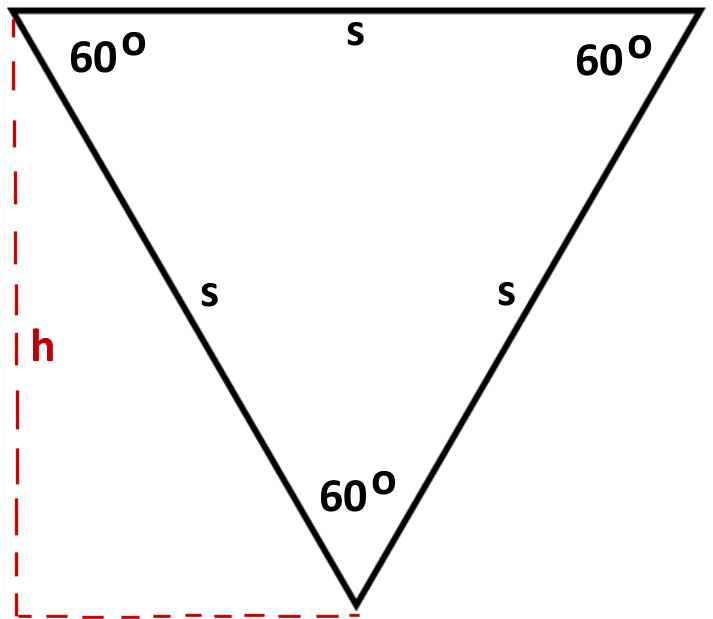
Note: You may find yourself needing to compute the height of a given triangle so you can pass the right x/y coordinates to your function or to the drawing functions. Keep in mind that the height h of an equilateral triangle is not the same as its side length s. The diagram below shows the relationship between the triangle and its height. You may want to look at information about equilateral triangles on Wikipedia and/or refresh your trigonometry.
A particular style of solution we want you to avoid is the "pair of functions" solution, where you write one function to draw "downward-pointing" triangles and another to draw "upward-pointing" triangles, and each one calls the other in an alternating fashion. That is a poor solution that does not capture the self-similarity inherent in this fractal figure.
Another thing you should avoid is re-drawing the same line multiple times. If your code is structured poorly, you end up drawing a line again (or part of a line again) that was already drawn, which is unnecessary and inefficient. If you aren't sure whether your solution is redrawing lines, try making a counter variable that is incremented each time you draw a line and checking its value.
If the order passed is 0, your function should not draw anything. If the x, y, order, or size passed is negative, your function should throw a string exception. Otherwise you may assume that the window passed is large enough to draw the figure at the given position and size.
Expected output:
 You can compare your graphical output against the following image files, which are already packed into the starter code and can be compared against by clicking the "compare output" icon in the provided GUI, as shown at right.
Please note that due to minor differences in pixel arithmetic, rounding, etc., it is very likely that your output will not perfectly match ours.
It is okay if your image has non-zero numbers of pixel differences from our expected output, so long as the images look essentially the same to the naked eye when you switch between them.
You can compare your graphical output against the following image files, which are already packed into the starter code and can be compared against by clicking the "compare output" icon in the provided GUI, as shown at right.
Please note that due to minor differences in pixel arithmetic, rounding, etc., it is very likely that your output will not perfectly match ours.
It is okay if your image has non-zero numbers of pixel differences from our expected output, so long as the images look essentially the same to the naked eye when you switch between them.
- sierpinski at x=10, y=30, size=300, order=1
- sierpinski at x=10, y=30, size=300, order=2
- sierpinski at x=10, y=30, size=300, order=3
- sierpinski at x=10, y=30, size=300, order=4
- sierpinski at x=10, y=30, size=300, order=5
- sierpinski at x=10, y=30, size=300, order=6




2) Flood Fill
For this problem, write a recursive function to perform a "flood fill" on a graphical window as described below. Your solution should not use any loops or data structures; you must use recursion. (This is technically not a fractal, but it is a recursive graphical function.)
int floodFill(GBufferedImage& image, int x, int y, int color)
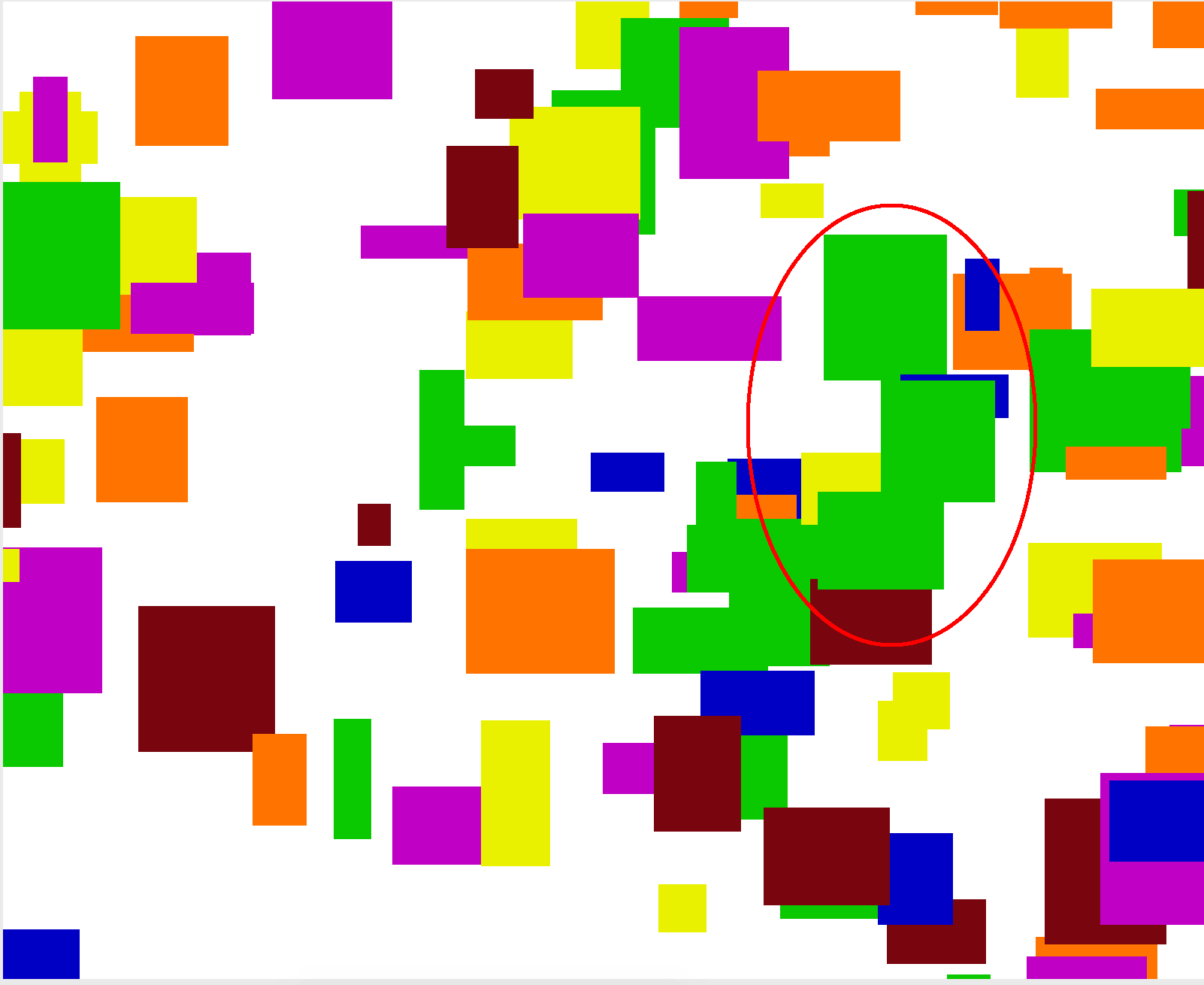
Most computer drawing programs make it possible to fill a region with a solid color. Typically you do this by selecting the "fill" tool and selecting a color, then clicking the mouse somewhere in your drawing. When you click, the paint color spreads outward from the point you clicked to every contiguous part of the image that is the same color as the pixel where you clicked. For example, if you select the Fill tool and choose Green as your color, then click on a purple part of the image, the Fill operation will cause that part of the image, along with any purple part that is touching it, to become green. The image below is circled for clarity, but there wouldn't be a circle in your FloodFill. The screenshots below provide an illustration:

Before flood fill
|
After flood fill
|
The image is composed of a 2-D grid of tiny square dots called pixels (picture elements). When the user clicks, whatever color that pixel was, it should be replaced by the fill color outward in all four directions: up, down, left, and right. For example, if the initial pixel color is purple, change it to red, then explore one pixel up, down, left, and right from there, looking for more purple pixels and changing them to red. If your exploration leads you to a pixel that is a different color (such as yellow rather than purple in our example), stop exploring in that direction.
Drawing pixels:
The same GWindow object as used in the other images is also used here.
You can use the following member functions of the window object to get and set the color of individual pixels, where (0, 0) is the top-left corner of the drawing canvas and (w-1, h-1) is the bottom right corner.
| Member | Description |
|---|---|
gw.getPixel(x, y) |
returns the color of the pixel at position (x, y) as an RGB integer |
gw.getCanvasWidth()
|
returns the width of the window's drawing canvas in pixels |
gw.getCanvasHeight()
|
returns the height of the window's drawing canvas in pixels |
gw.inCanvasBounds(x, y) |
returns true if pixel (x, y) is within the bounds of the drawing area |
gw.setPixel(x, y, rgb); |
sets the color of the pixel at position (x, y) to the given color as an RGB integer |
NOTE:
The GWindow object has other methods that are similar to the ones in the table above but would be incorrect to use on this assignment.
For example, there are methods getWidth, getHeight, and inBounds that operate relative to the entire window's height, but that height includes things like the window's title bar, the northern area of widgets in the window, etc. that we do not want to consider in this problem.
So take care to use getCanvasWidth, getCanvasHeight and inCanvasBounds here to limit yourself to the proper bounds.
Your code should take care not to access any pixel outside of the bounds of the graphical image, (0, 0) through (width-1, height-1). If you try to get/set a pixel color that is out of bounds, your program will crash.
Colors as RGB integers:
The colors of pixels are returned as int values.
The exact values that map to various colors don't especially matter to your code, though you can see what color maps to what integer value by looking at the fractalmain.cpp file.
If you want to print a color out on the console for debugging, it is easier to view it in hexadecimal (base-16) mode.
To do that, you'd issue a special hex command (from the <iomanip> C++ system library) to cout to make it print an integer in hexadecimal rather than decimal (base-10), such as the following:
cout << hex << color << endl; // print an RGB integer for debugging
Return value:
Your function must return the total number of pixels that changed color.
For example, if your code ends up filling a 50x30 rectangular region, your function would return 1500.
If no pixels change color, return 0.
If the x or y value passed is negative or is outside the bounds of the given image, throw a string exception. You may assume that the color passed is a valid RGB color that can be drawn on the screen.
Optimization:
For efficiency your function is required to implement a particular optimization.
If the caller passes the same fill color as the current pixel's existing color, do not color any pixels and immediately return 0.
For example, if the user has the Fill color set to Blue and clicks a blue area, your function should immediately return 0.
You can test whether your function is implementing this correctly by examining the number of pixels filled by your function in the GUI.
On some machines, filling a very large area of pixels can crash your program because of too many nested function calls (also called a "stack overflow"). This is out of your control. You may ignore this issue, so long as your algorithm is correct.
Tip: If you hold the Shift key when pressing the Flood Fill button, it won't add any random rectangles to the screen. This makes it easier for you to play around with mixing the different graphical algorithms, such as flood-filling the center of the triangles in a Sierpinski triangle fractal.
Expected output:
It is sometimes tricky to compare output in this problem because the GUI makes random rectangles appear on the screen, so your program's rectangles may not match ours.
We have tried to mitigate this by "seeding" the random number generator in our program to produce the same rectangles on each run.
You can compare your graphical output against the following image files, which are already packed into the starter code and can be compared against by clicking the "compare output" icon in the provided GUI, as shown at right.
Please note that due to minor differences in pixel arithmetic, rounding, etc., it is very likely that your output will not perfectly match ours.
It is okay if your image has non-zero numbers of pixel differences from our expected output, so long as the images look essentially the same to the naked eye when you switch between them.


Style Details:
As in other assignments, you should follow our Style Guide for information about expected coding style. You are also expected to follow all of the general style constraints emphasized in the Homework 1 and 2 specs, such as the ones about good problem decomposition, parameters, using proper C++ idioms, and commenting. The following are additional points of emphasis and style constraints specific to this problem:
Recursion: Part of your grade will come from appropriately utilizing recursion to implement your algorithm as described previously. We will also grade on the elegance of your recursive algorithm; don't create special cases in your recursive code if they are not necessary. Avoid "arm's length" recursion, which is where the true base case is not found and unnecessary code/logic is stuck into the recursive case. Redundancy in recursive code is another major grading focus; avoid repeated logic as much as possible. As mentioned previously, it is fine (sometimes necessary) to use "helper" functions to assist you in implementing the recursive algorithms for any part of the assignment.
Variables:
While not new to this assignment, we want to stress that you should not make any global or static variables (unless they are constants declared with the const keyword).
Do not use globals as a way of getting around proper recursion and parameter-passing on this assignment.
Collections: Do not use any collections on any of the graphical algorithms in this part of the assignment.
Frequently Asked Questions (FAQ):
For each assignment problem, we receive various frequent student questions. The answers to some of those questions can be found by clicking the link below.
- Q: I'd like to write a helper function and declare a prototype for it, but am I allowed to modify the .h file to do so?
- A: Function prototypes don't have to go in a .h file. Declare them near the top of your .cpp file and it will work fine.
- Q: What does it mean if my program "unexpectedly finishes"?
- A: It probably means that you have infinite recursion, which usually comes when you have not set a proper base case, or when your recursive calls don't pass the right parameters between each other. Try running your program in Debug Mode (F5) and viewing the call stack trace when it crashes to see what line it is on when it crashed.
-
Q: The spec says that I need to throw an exception in certain cases.
But it looks like the provided
mainprogram never goes into those cases; it checks for that case before ever calling my function. Doesn't that mean the exception is useless? Do I actually have to do the exception part? - A: The exception is not useless, and yes you do need to do it. Understand that your code might be used by other client code other than that which was provided. You have to ensure that your function is robust no matter what parameter values are passed to it. Please follow the spec and throw the exceptions in the cases specified.
- Q: Is the Sierpinski code supposed to be slow when I put in a large, value for N like 15?
- A: Yes; keep in mind that the program is drawing roughly 315 triangles if you do that. That is a lot of triangles. We aren't going to test you on such a high order fractal.
- Q: Are the Sierpinski triangles supposed to exactly overlay each other? Mine seem to be off by ~1 pixel sometimes.
- A: The off-by-one aspect is because the triangle sizes are rounded to the nearest integer. You don't have to worry about that, as long as it is only off by a very small amount such as 1 pixel.
- Q: Is the flood fill code supposed to paint so slowly?
- A: Yes; the Stanford graphics library has poor graphics performance.
- Q: When I run the sample solution, the flood fill pixels paint in a certain order. Does my function need to fill in that same order?
- A: No; the order the pixels are filled does not matter, as long as you fill the right pixels.
- Q: What does it mean if my program "unexpectedly finishes"?
-
A: It might mean that you have infinite recursion, which usually comes when you have not set a proper base case, or when your recursive calls don't pass the right parameters between each other.
Try running your program in Debug Mode (F5) and viewing the call stack trace when it crashes to see what line it is on when it crashed.
You could also try printing a message at the start of every call to make sure that you don't have infinite recursion.
If you are certain that you do not have infinite recursion, it is possible that there are just too many calls on the call stack because you are filling a very large area of the screen. If you tried to fill the whole screen with the same color, it might crash with a "stack overflow" even if your algorithm is correct. This would not be your fault.
- Q: Can I use one of the STL containers from the C++ standard library?
- A: No.
- Q: I already know a lot of C/C++ from my previous programming experience. Can I use advanced features, such as pointers, on this assignment?
- A: No; you should limit yourself to using the material that was taught in class so far.
- Q: Can I add any other files to the program? Can I add some classes to the program?
- A: No; you should limit yourself to the files and functions in the spec.
Possible Extra Features:
Here are some ideas for extra features that you could add to your program for a very small amount of extra credit:
- Sierpinski colors: Make your Sierpinski triangle draw different levels in different colors.
- Add color picker to flood fill: The existing client program has a small number of fixed colors that it uses. Go look at its code and add more colors of your own, and then make it possible to choose any color you want.
-
Flood fill tolerance threshold:
Right now the flood fill expands outward as long as it sees pixels of exactly the same color.
But in some cases (such as Photoshop programs) the user wants to keep filling until the color has changed by more than a certain threshold.
For example, when filling a black area, a neighboring very dark gray area might also be filled.
Implement a modified version of
floodFillthat also accepts a tolerance amount as an integer and keeps going until the pixel color distance exceeds that threshold. The distance between two pixels' colors could be defined in several ways, but one simple way would be the sum of the absolute values of the differences between the red, green, and blue components of the two colors. - Flood fill gradient: Make your flood fill algorithm slightly "fade" the color as it spreads further from the original click point. You can do this by slightly decreasing the brightness in RGB of pixels based on their distance from the original click point. This makes it harder to tell which squares to color, so stay within a nearby color range so that you can back-calculate what original color the faded pixels must have come from.
- Add another fractal: Add another fractal function representing a fractal image you like. You'll have to do some reconstructive surgery on the GUI to achieve this, and/or swap it in place of one of the existing fractal functions (make sure to turn in your non-extra-feature version first, so as not to lose your solution code).
- Other: If you have your own creative idea for an extra feature, ask your SL and/or the instructor about it.
Indicating that you have done extra features: If you complete any extra features, then in the comment heading on the top of your program, please list all extra features that you worked on and where in the code they can be found (what functions, lines, etc. so that the grader can look at their code easily).
Submitting a program with extra features: Since we use automated testing for part of our grading process, it is important that you submit a program that conforms to the preceding spec, even if you want to do extra features. If your feature(s) cause your program to change the output that it produces in such a way that it no longer matches the expected sample output test cases provided, you should submit two versions of your program file: a first one with the standard file name without any extra features added (or with all necessary features disabled or commented out), and a second one whose file name has the suffix -extra.cpp with the extra features enabled. Please distinguish them in by explaining which is which in the comment header. Our turnin system saves every submission you make, so if you make multiple submissions we will be able to view all of them; your previously submitted files will not be lost or overwritten.
Honor Code Reminder:
You are expected to follow the Stanford Honor Code.
- In your file's comment header, list your name (and your partner’s name, if you worked in a pair); also cite all sources of help, including books, web pages, friends, section leaders, etc.
- Do not consult any assignment solutions that are not your (pair's) own.
- Do not attempt to disguise any code that is not your (pair's) own.
- Do not give out your assignment solution to another student.
- Do not post your homework solution code online. (e.g. PasteBin, DropBox, web forums).
- Please take steps to ensure that your work is not easily copied by others.
Remember that we run similarity-detection software over all solutions, including this quarter and past quarters, as well as any solutions we find on the web.
If you need help solving an assignment, we are happy to help you. You can go to the LaIR, or the course message forum, or email your section leader, or visit the instructor/Head TA during their office hours. You can do it!