Assignment 7: Trailblazer
Thanks to Keith Schwarz, Dawson Zhou, Eric Roberts, Julie Zelenski, Nick Parlante, Jerry Cain, and Leonid Shamis (UC Davis) for creating and evolving this assignment and its predecessor, "Pathfinder." BasicGraph class and other modifications by Marty Stepp. Large graph map data added by Chris Gregg and Chris Piech.
Due Date:
Trailblazer is due Wednesday, December 6th at 6:00pm. You may only use one late day on this assignment.
This assignment focuses on graphs, specifically on searching for paths in a graph.
This is a pair assignment. You are allowed to work individually or work with a single partner. If you work as a pair, comment both members' names on top of every submitted code file. Only one of you should submit the assignment; do not turn in two copies.
Links:
We provide a PDF version of this spec for your convenience.
Starter Code
We provide a ZIP archive with a starter project that you should download and open with Qt Creator. You will edit and turn in only the following two files. The ZIP contains other files/libraries; do not modify these. Your code must work with the other files unmodified.
- trailblazer.cpp, the C++ implementation for your solution
- map-custom-SUNET.txt, a custom world map data file of your own creation (each person should submit individually).
- map-custom-SUNET.jpg, a custom world map image of your own creation (each person should submit individually).
demo JAR
If you want to further verify the expected behavior of your program, you can download the following provided sample solution demo JAR and run it. If the behavior of our demo in any way conflicts with the information in this spec, you should favor the spec over the demo.
Here are some expected output files to compare:
-
maze01-tiny:output, DFS, BFS, Dijkstra, A* -
maze04-small:output, DFS, BFS, Dijkstra, A* -
maze05-medium:output, DFS, BFS, Dijkstra, A* -
maze10-huge:output, DFS, BFS, Dijkstra, A* -
terrain01-tiny:output, DFS, BFS, Dijkstra, A* -
terrain03-small:output, DFS, BFS, Dijkstra, A* -
terrain06-medium:output, DFS, BFS, Dijkstra, A* -
terrain07-large:output, DFS, BFS, Dijkstra, A* -
map-middleearth:output -
Rauros:DFS, BFS, Dijkstra -
Black Gate:DFS, BFS, Dijkstra -
map-san-francisco:output, Dijkstra, A* -
map-stanford:output, DFS, BFS, Dijkstra, A* -
map-stanford-big:output, Dijkstra, A* -
map-usa:output -
Portland/NY:DFS, BFS, Dijkstra -
Bismarck/CHI:BFS -
random (medium):output, screenshot


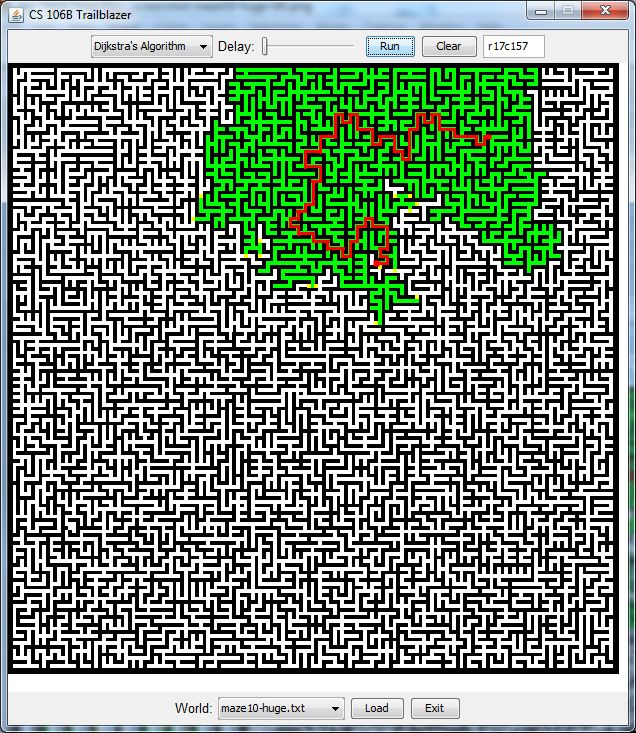


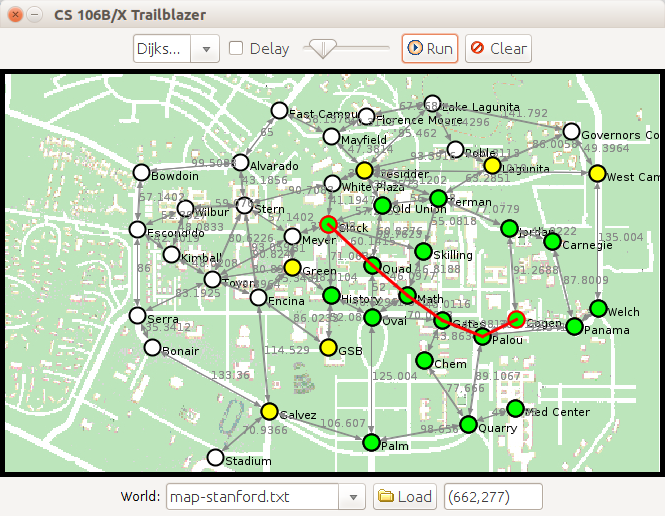

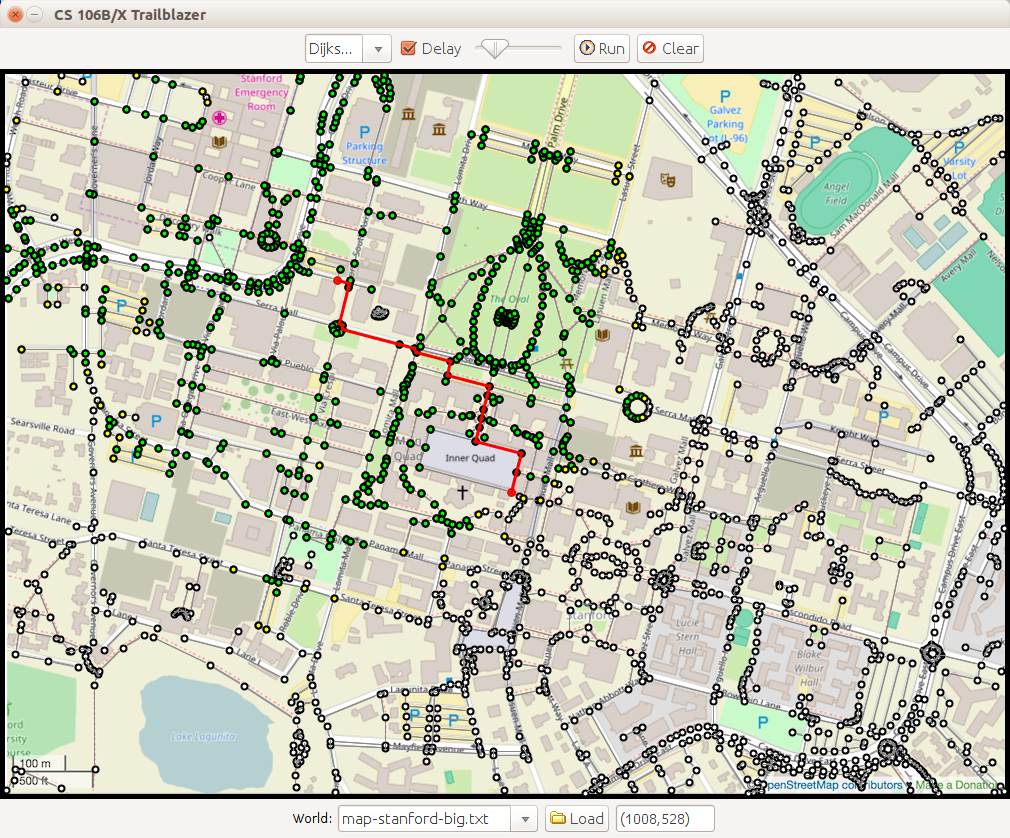


The screenshots are taken on a variety of different operating systems, so your output may not match exactly. Depending on the path algorithm being used, some other paths may be equally correct to the ones shown in our output. See later in spec for discussion of "correct" output.
Problem Description:
This program displays various 2-dimensional worlds that represent either maps, mazes, or terrain and allows the user to generate paths in a world from one point to another. When you start up the program, you will see a graphical window containing a 2D maze, where white squares are open and black ones represent walls. The program is also able to display terrain, where bright colors indicate higher elevations and darker colors represent lower elevations. Mountain ranges appear in bright white, while deep canyons are closer to black.

If you click on any two points in the world, the program will find a path from the starting position to the ending position. As it does so, it will color the vertexes green, yellow, and gray based on the colors assigned to them by the algorithm. Once the path is found, the program will highlight it and display information about the path cost in the console. The user can select one of four path-searching algorithms in the top menu:
- depth-first search (DFS)
- breadth-first search (BFS)
- Dijkstra's algorithm
- A* search
The window also contains several controls. You can load mazes and terrains of different sizes (tiny, small, medium, large, and huge) from the bottom drop-down menu and then clicking the "Load" button.
In your trailblazer.cpp file, you must write the following 5 functions for finding paths and creating mazes in a graph:
Vector<Vertex*> depthFirstSearch(BasicGraph& graph, Vertex* start, Vertex* end)
Vector<Vertex*> breadthFirstSearch(BasicGraph& graph, Vertex* start, Vertex* end)
Vector<Vertex*> dijkstrasAlgorithm(BasicGraph& graph, Vertex* start, Vertex* end)
Vector<Vertex*> aStar(BasicGraph& graph, Vertex* start, Vertex* end)

Set<Edge*>      kruskal(BasicGraph& graph)
Each of the first four implements a path-searching algorithm taught in class. You should search the given graph for a path from the given start vertex to the given end vertex. If you find such a path, the path you return should be a list of all vertexes along that path, with the starting vertex first (index 0 of the vector) and the ending vertex last.
If no path is found, return an empty vector. If the start and end vertexes are the same, return a one-element vector containing only that vertex. Though the mazes and terrains in our main app are undirected graphs (all edges go both ways), your code should not assume this. You may assume that the graph passed has a valid state.
Our provided main client program will allow you to test each algorithm one at a time before moving on to the next. You can add more functions as helpers if you like, particularly to help you implement any recursive algorithms and/or to remove redundancy between some algorithms containing similar code.

The 2D world is represented by a BasicGraph, where each vertex represents a specific location on the world.
If it is a maze, each location represents one square in the maze's grid-like world.
Open squares are connected by edges to any other neighboring open squares that are directly adjacent to them (differ by +/- 1 row or column exactly).
Black "wall" squares are not connected as neighbors to any other squares; no edges touch them.
If the world is a terrain rather than a maze, each location represents some elevation between 0 (lowland) and 1 (high mountain peak).
Terrain locations are connected to neighbors in all 8 directions including diagonal neighbors, but maze locations are only connected to neighbors directly up, down, left, and right.
Your code can treat maps, mazes, and terrains exactly the same. You should just think of each kind of world as a graph with vertexes and edges that connect neighboring vertexes. In the case of mazes, vertexes happen to represent 2D locations and neighbors happen to be directly up, down, left, right, etc., but your code does not utilize or rely on that information. Your path-searching algorithms will work on any kind of graph that might be passed to them.
Implementation Details:
Provided Code:
We provide you with a lot of starter code for this assignment. Here is a quick breakdown of what each file contains, though you do not need to examine or know about each file or its contents in order to complete the assignment.
- trailblazer.h/.cpp: We provide a skeleton version of these files where you will write your path-searching code for the assignment.
- Color.h/.cpp: Constants representing colors of vertexes.
- TrailblazerGUI.h/.cpp: The app's graphical user interface.
- trailblazermain/.cpp: The main function that initializes the GUI and launches the application.
- World(Abstract,Grid,Map,Maze,Terrain).h/.cpp: Hierarchy of types of world graphs.
Each vertex in the graph is represented by an instance of the Vertex structure, which has the following members:
Vertex member |
Description |
|---|---|
v->name |
vertex's name, such as "r34c25" or "vertex17" (a string) |
v->edges |
edges outbound from this vertex (a Set<Edge*>) |
v->setColor(c) |
sets this vertex to be drawn in the given color in the GUI;
set it to one of the following constants: UNCOLORED, WHITE, GRAY, YELLOW, or GREEN |
v->getColor() |
returns the color you set previously using setColor; initially UNCOLORED
|
v->toString() |
returns a printable string representation of the vertex for debugging
|
Each edge in the graph is represented by an instance of the Edge structure, which has the following members:
Edge member |
Description |
|---|---|
e->start |
pointer to the starting vertex of this edge (a Vertex*)
|
e->finish |
pointer to the ending vertex of this edge; i.e., finish is a neighbor of start (a Vertex*)
|
e->cost |
cost to traverse this edge (a double)
|
e->toString() |
returns a printable string representation of the edge for debugging
|
The vertexes and edges are contained inside a BasicGraph object passed to each of your algorithm functions.
See the Stanford C++ library documentation for descriptions of the members of the BasicGraph class.
In addition to those members, BasicGraph includes all of the public members from its parent class Graph.
BasicGraph has a useful public member named resetData.
You must call resetData on the graph at the start of any path-searching algorithm that wants to store data in the vertexes, to make sure that no stale data is left in the vertexes from some prior call.
Call it at the start of your algorithm and not at the end, to ensure that any old state (such as vertex colors) is cleaned out before your algorithm begins.
If you don't call it, your algorithms may fail for subsequent calls.
Graph Algorithm Details:
Coloring: In addition to searching for a path in each algorithm, we also want you to add some code to give colors to various vertexes at various times.
This coloring information is used by the GUI to show the progress of your algorithm and to provide the appearance of animation.
To give a color to a vertex, call the setColor member function on that vertex's Vertex object, passing it a global color constant such as GRAY, YELLOW, or GREEN.
For example:
Vertex* myVertex = graph.getVertex("foo");
myVertex->setColor(GREEN);                  // set the vertex's color to green
Here is a listing of colors available and when you should use them:
- enqueued = yellow:
Whenever you enqueue a vertex to be visited for the first time, such as in BFS and Dijkstra's algorithm when you add a vertex to a data structure for later processing, color it yellow (
YELLOW). - visited = green:
Whenever your algorithm directly visits and examines a particular vertex, such as when it is dequeued from the processing queue in BFS or Dijkstra's algorithm, or when it is the starting vertex of a recursive call in DFS, color it green (
GREEN). - eliminated = gray:
Whenever your algorithm has finished exploring a vertex and did not find a path from that vertex, and therefore is "giving" up on that vertex as a candidate, color it gray (
GRAY). The only algorithm that explicitly "backtracks" like this is depth-first search (DFS). You don't need to set any vertexes to gray in any other path-searching algorithms besides DFS.
The provided GUI has an animation slider that you can drag to set a delay between coloring calls.
If the slider is not all the way to its left edge, each call to setColor on a vertex will pause the GUI briefly, causing the appearance of animation so that you can watch your algorithms run.
Depth-first search implementation notes: You can implement it recursively as shown in lecture, or non-recursively. The choice is up to you. A recursive solution can sometimes run slowly or crash on extremely large worlds; this is okay. You do not need to modify your DFS implementation to avoid crashes due to excessive call stack size.
Dijkstra's algorithm implementation notes: The version of Dijkstra's algorithm suggested in the course textbook is slightly different than the version we discussed in lecture and is less efficient. Your implementation of Dijkstra's algorithm should follow the version we discussed in lecture. The priority queue should store vertexes to visit, and once you find the destination, you should reconstruct the shortest path back. See the lecture slides for more details.
Our pseudocode for Dijkstra's algorithm occasionally refers to "infinity" as an initial value when talking about the cost of reaching a vertex.
If you want to refer to infinity in your code, you can use the double constant POSITIVE_INFINITY that is visible to your code.
Both Dijkstra's algorithm and A* involve a priority queue of vertexes to process, and furthermore, they each depend on the ability to alter a given vertex's priority in the queue as the algorithm progresses.
Use the Stanford library's PriorityQueue class (documentation) for this.
To do this, call the changePriority member function on the priority queue and pass it the new priority to use.
It is important to use this function here because otherwise there is no way to access an arbitrary element from the priority queue to find the one whose priority you want to change.
You would have to remove vertexes repeatedly until you found the one you wanted, which would be very expensive and wasteful.
The new priority you pass must be at least as urgent as the old priority for that vertex (because the function bubbles a value upward in the priority queue's internal heap structure).
Note that the notion of a given vertex's current priority might be stored in two places in your code: in your own record-keeping about each Vertex, and in the priority queue's ordering.
You'll have to keep these two in sync yourself; if you update just your own records, the priority queue won't know about it if you don't call changePriority, and vice versa.
If the two values get out of sync, this can lead to bugs in your program.
A* implementation notes:
As discussed in class, the A* search algorithm is essentially a variation of Dijkstra's algorithm that uses heuristics to fine-tune the order of elements in its priority queue to explore more likely desirable elements first.
So when you are implementing A*, you need a heuristic function to incorporate into the algorithm.
We supply you with a global function called heuristicFunction that accepts a pointer to two vertexes v1 and v2 and returns a heuristic value from v1 to v2 as a double.
You can assume that this is an admissible heuristic, meaning that it never overestimates the distance to the destination (which is important for A*).
For example:
Vertex* v1 = graph.getVertex("foo");
Vertex* v2 = graph.getVertex("bar");
double h = heuristicFunction(v1, v2);   // get an A* heuristic between these vertexes
You can compare the behavior of Dijkstra's algorithm and A* (or any pair of algorithms). First try performing a search between two points using Dijkstra's algorithm, then select A* and press the "Run" button at the top of the GUI window. This will repeat the same search using the currently selected algorithm. Run a search using Dijkstra's algorithm, switch the algorithm choice to "A*," then run that search to see how much more efficient A* is.
Your A* search algorithm should always return a path with the same cost as the path found by Dijkstra's algorithm. If you find that the algorithms give paths of different costs, it probably indicates a bug in your solution. For mazes, all three of BFS, Dijkstra's algorithm, and A* should return paths with the same length and cost.
The A* algorithm performs no better than Dijkstra's algorithm when run on most maps because many maps disable the heuristic.
Several expected output files have been posted to the class web site. If you have implemented each path-searching algorithm correctly, for DFS you should get any valid path from the start to the end; for BFS you should get the same path lengths as shown in the expected outputs posted on the class web site. For Dijkstra's and A* you should get the same path costs as shown in the expected outputs. But you do not need to exactly match our path itself, nor its "locations visited", so long as your path is a correct one. For Kruskal's algorithm (described next), your code must find a valid minimum spanning tree on the given graph. If there are several of equal total weight, any will suffice.
As mentioned previously, your code should not assume that the graph is undirected; we will test your code with directed graphs as well as undirected ones.
Random Maze Generation (Kruskal's Algorithm)
Your final task in this assignment is to implement Kruskal's algorithm for finding a minimum spanning tree.
Your function should accept a graph as a parameter, and you should return a set of pointers to edges in the graph such that those edges would connect the graph's vertexes into a minimum spanning tree.
(Don't actually add/remove edges from the graph object passed in by calling addEdge, removeEdge, etc. on it.
Just return the set of edges separately.)
Specifically, your task is to write a function with the following signature:
Set<Edge*> kruskal(BasicGraph& graph)
The specific application we'll Kruskal's algorithm to solve is the problem of generating new random mazes. As discussed earlier in this handout, you can think of a maze as a graph, where the vertexes are connected as follows. The following figure would be a fully connected maze with no walls:
If you assign each edge a random weight and then run Kruskal's algorithm on the resulting graph, you will end up with a spanning tree; there will be exactly one path between each pair of vertexes. For example, assigning the edges in the above graph weights as follows and running Kruskal's algorithm would produce the following result:

In the above tree, lines represent edges between connected neighbors, which are passable. Neighbors that are not connected by an edge can be thought of as having an impassable "wall" between them. You can turn the above tree into a maze by drawing lines in all of the empty space, as shown here:

Whenever you click the GUI's "Load" button with one of the "Random" options selected, our starter code will generate a maze of the given size with every vertex connected to all of its neighbors, as in the "fully connected" maze figure above. Our code will randomly assign weights to each edge for you; you shouldn't change the weights we pass in. Then we will pass the graph to your algorithm for you to find the minimum spanning tree. Once you return your set of edges, our starter code will process your set and fill in "walls" between any neighbors that are not directly connected by an edge. The resulting maze will show in the GUI. Once you've made a maze, you can run your path-finding algorithms to locate paths between points in the maze. Implementing this function raises questions such as:
- How will you keep track of which nodes are in each cluster?
- How will you determine which cluster a node belongs to?
- How will you merge together two clusters?
Think about these issues yourself and come up with a clean and efficient way of solving the problem. Our own sample solution is able to generate "Large" sized mazes in a few seconds' time at most, and you should strive for similar efficiency. If your maze generation algorithm takes, say, close to a minute or more to finish, optimize it.
Creative Aspect (map-custom.txt and map-custom.jpg):
Turn in files map-custom-SUNET.txt and map-custom-SUNET.jpg representing a map graph of your own. Put the files into the res/ folder of your project. The text file contains information about the graph's vertexes and edges. The graph can be whatever you want, so long as it is not essentially the same as any of the provided graphs. Your image can be any (non-offensive) JPEG image you like; we encourage you to use a search engine like Google Image Search to find an interesting background. The text file's format should exactly match the following example, from map-small.txt. For full credit, your file should load successfully into the program without causing an error and be searchable by the user. Each person in a pair must submit their own custom map.
IMAGE
map-usa.jpg                               ←    image file name
654                                       ←    image width, in pixels
399                                         image height, in pixels

VERTICES
Washington, D.C.;536;176                  ←    vertex format is: name;x;y
Minneapolis;349;100
San Francisco;26;170

EDGES
Minneapolis;San Francisco;1777            ←    edge format is: vertex1;vertex2;weight
Minneapolis;Washington, D.C.;1600           (or, for a directed one-way edge:
San Francisco;Washington, D.C.;2200         vertex1;vertex2;weight;true )
Development Strategy and Hints:
- Trace through the algorithms by hand on small sample graphs before coding them.
- Work step-by-step. Complete each algorithm before starting the next one. You can test each individually even if others are incomplete. We suggest doing DFS/BFS, then Dijkstra's, then A*, and finally Kruskal's.
- Start out with tiny worlds first. It is much easier to trace your algorithm and/or print every step of its execution if the world is small. Once your output matches perfectly on tiny files, go to small, medium, large.
- In Dijkstra's algorithm, you cannot call
changePriorityon a vertex that is not already in the queue. You also cannot call changePriority with a priority less urgent (greater) than the existing priority in the queue. - Remember that edge costs are
doubles, notints. - In A* search, when storing the candidate distance to a vertex, do not add the heuristic value in. The heuristic is only used when setting the priorities in the priority queue, not when setting the cost fields of vertexes.
- Don't forget to keep previous pointers up-to-date in Dijkstra's algorithm or A* search. Otherwise, though you'll dequeue the vertexes in the proper order, your resulting path might end up incorrect.
- In Dijkstra's algorithm, don't stop your algorithm early when you enqueue the ending vertex; stop it when you dequeue the ending vertex (that is, when you color the vertex green).
- When merging clusters together in Kruskal's algorithm, remember that every vertex in the same cluster as either endpoint (not just the endpoints themselves) should be merged together into one resulting cluster.
Style Details:
As in other assignments, you should follow our Style Guide for information about expected coding style. You are also expected to follow all of the general style constraints emphasized in the Homework 1-6 specs, such as the ones about good problem decomposition, parameters, redundancy, using proper C++ idioms, and commenting. The following are additional points of emphasis and style constraints specific to this problem.
Memory usage: Your code should have no memory leaks. Free the memory associated with any new objects you allocate on the heap.
Frequently Asked Questions (FAQ):
For each assignment problem, we receive various frequent student questions.
- Q: Can I work with a partner on this assignment?
- A: Yes! This is a pair assignment. You can also choose to work individually. If you work in a pair, submit only a single copy of your solution, not two.
-
Q: The spec says I am not supposed to modify the
.hfiles. But I want to use a helper function. Don't I need to modify the.hfile to add a function prototype declaration for my helpers? Can I still use helper functions even if I don't modify the.hfile? -
A: Do not modify the provided .h file.
Just declare your function prototypes in your .cpp file (near the top, above any code that tries to call those functions) and it'll work fine.
You can declare a function prototype anywhere: in a .cpp file, in a .h file, wherever you want.
The idea of putting them in a .h file is just a convention.
When you
#includea file, the compiler literally just copy/pastes the contents of that file into the current file. We have already done this on hw1, hw2, and others. - Q: Why am I getting a runtime error of, "Non-adjacent locations passed into cost function"?
- A: Your path-finding function is returning an invalid path that contains two or more vertices that are not actually neighbors of each other.
- Q: My depth-first search crashes on very large graphs. Why?
- A: If you implemented it recursively, it crashes if the call stack has too many recursive calls piled up. This is okay and you don't need to worry about it, as long as it works for most graphs other than really large ones.
- Q: I implemented the algorithms and I get the same path length/cost, but my "Locations visited" is slightly different on some inputs. And my solution seems to visit the possible paths in a different order than the screenshot. Is this okay? Is my algorithm wrong? Do I need to change/fix it?
-
A: If you have implemented each path-searching algorithm correctly, for DFS you should get any valid path from the start to the end; for BFS you should get the same path lengths as shown in the expected outputs posted on the class web site.
For Dijkstra's and A* you should get the same path costs as shown in the expected outputs.
But you do not need to exactly match our path itself, nor its "locations visited", so long as your path is a correct one.
One common reason for output differences comes from how you loop over neighbors. Our solution loops over them by calling
getNeighborson the graph and passing in the vertex of interest. Some students loop over them by accessing theedgesfield of the vertex of interest and looking at all the vertices that are endpoints of those edges. Neither way is "right" or "wrong", but they sometimes produce different orders. - Q: How should we handle the case when a path is not found?
- A: The spec answers this question, under the "Required Functions:" section. "If no path is found, ..."
- Q: How should we handle the case when the start and end vertices are the same?
- A: The spec answers this question, under the "Required Functions:" section.
- Q: How do I test unusual cases, like impossible paths?
- A: The USA map input file has some vertexes that you can use to test such cases, as well as some of the maze files.
- Q: The A* algorithm produces results where the cost is too high / incorrect. What might be causing this?
- A: Check the lecture slides on A* carefully. There is a difference between a vertex's cost and its priority. The former doesn't incorporate heuristics and the latter does. Make sure you are properly maintaining these two values separately.
- Q: My Dijkstra's and A* work for mazes but the costs are often a little bit too high for terrains. Why could this be?
-
A: Are you storing costs as an
int, by chance? They must be adoublefor the algorithm to work properly on terrains. - Q: Is there an efficient way to determine whether or not a value already exists in the priority queue (like a contains() function)?
- A: You are supposed to be storing various information associated with each vertex. When you look at a vertex, you can look at that information and based on its value you can take different actions. At the start of Dijkstra's algorithm, you are supposed to set every vertex's associated information/state to certain values. If you haven't ever added a given vertex to the PQ, its state will still be set to those same values. But if you do enqueue it, presumably you change the state to different values. So you should be able to look at the state and figure out what if anything has been done to that vertex in the past.
- Q: My Kruskal's algorithm is very slow. Why? How can I speed it up?
-
A: This part of the assignment really stretches your understanding of Big-Oh.
Note that seemingly simple operations can be very expensive, such as:
- looping over all vertices (O(V))
- looping over all edges (O(E))
- looping over all vertices once for every edge in the graph (O(V * E))
- repeatedly calling a method that makes a deep copy of a collection, like
getEdgeSet(O(E log E)), orgetVertexSet(O(V log V)) - setting a Vector variable equal to another Vector variable (O(N))
- setting a Set variable equal to another Set variable (O(N log N))
- ...
Operations like the above can really add up. Carefully audit your code and reduce the number of unnecessary bulk operations you are performing.
- Q: The spec mentions the possibility of doing a bi-directional search. How would I go about adding this to the program in a way that can be tested?
-
A: If you want to enable bidirectional search, in the
trailblazer.hfile, add the following line:
Then in your#define BIDIRECTIONAL_SEARCH_ALGORITHM_ENABLED truetrailblazer.cppfile, write a function with exactly the following heading that contains your algorithm:Vector<Vertex*> bidirectionalSearch(BasicGraph& graph, Vertex* start, Vertex* end) { ... }You'll need to do a "clean" and a full rebuild of your project.
Possible Extra Features:
Here are some ideas for extra features that you could add to your program for a small amount of extra credit:
- Implement bidirectional search: A common alternative to using A* search is to use a bidirectional search algorithm, in which you search outward from both the start and end vertexes simultaneously. As soon as the two searches find a vertex in common, you can construct a path from the start vertex to the end vertex by joining the two paths to that vertex together. Try coding this algorithm up as a fifth algorithm choice.
- Implement a disjoint-set forest: When implementing Kruskal's algorithm, you need a way to keep track of which vertexes in the graph are connected to one another. While it's possible to do this using the standard collections types, there is a much faster way to do this using a disjoint-set forest, a specialized data structure that makes it easy to determine if two vertexes are connected and to connect pairs of vertexes. It is not particularly hard to code up a disjoint-set forest, and doing so can dramatically reduce time required to create a maze.
- Make a new world type: The existing code has several classes that extend a superclass World to represent maps, mazes, and terrains. Add your own new subclass for a type of world that we didn't include.
- Write better heuristics: The heuristics we have provided for estimating terrain costs and map / maze distances are simple admissible heuristics that work reasonably well. Try seeing if you can modify these functions to produce more accurate heuristics. If you do this correctly, you can cut down on the amount of unnecessary searching required. However, make sure that your heuristics are admissible; that is, they should never overestimate the distance from any starting vertex to any destination vertex.
- Write another maze-generation algorithm: Kruskal's algorithm is only one of many ways to generate a random maze. Another minimum spanning tree algorithm called Prim's algorithm can also be used here to generate random mazes. Try adding Prim's algorithm in addition to Kruskal's algorithm for maze generation. Can you generate more complicated mazes and maps?
- Write a better terrain generator: Our starter code generates terrain uses the diamond-square algorithm, coupled with a Gaussian blur. Many other algorithms exist that can generate random terrains, such as the 2D Perlin Noise algorithm. Try implementing a different terrain generator and see if it produces better results.
- Other: If you have your own creative idea for an extra feature, ask your SL and/or the instructor about it.
Indicating that you have done extra features: If you complete any extra features, then in the comment heading on the top of your program, please list all extra features that you worked on and where in the code they can be found (what functions, lines, etc. so that the grader can look at their code easily).
Submitting a program with extra features: Since we use automated testing for part of our grading process, it is important that you submit a program that conforms to the preceding spec, even if you want to do extra features. If your feature(s) cause your program to change the output that it produces in such a way that it no longer matches the expected sample output test cases provided, you should submit two versions of your program file: a first one with the standard file name without any extra features added (or with all necessary features disabled or commented out), and a second one whose file name has the suffix -extra.cpp with the extra features enabled. Please distinguish them in by explaining which is which in the comment header. Our turnin system saves every submission you make, so if you make multiple submissions we will be able to view all of them; your previously submitted files will not be lost or overwritten.
Honor Code Reminder:
You are expected to follow the Stanford Honor Code.
- In your file's comment header, list your name (and your partner’s name, if you worked in a pair); also cite all sources of help, including books, web pages, friends, section leaders, etc.
- Do not consult any assignment solutions that are not your (pair's) own.
- Do not attempt to disguise any code that is not your (pair's) own.
- Do not give out your assignment solution to another student.
- Do not post your homework solution code online. (e.g. PasteBin, DropBox, web forums).
- Please take steps to ensure that your work is not easily copied by others.
Remember that we run similarity-detection software over all solutions, including this quarter and past quarters, as well as any solutions we find on the web.

If you need help solving an assignment, we are happy to help you. You can go to the LaIR, or the course message forum, or email your section leader, or visit the instructor/Head TA during their office hours. You can do it!