Assignment 4A: Marble Solitaire
Assignment by Cynthia Lee. Minor modifications by Marty Stepp.
This is a pair assignment. You are allowed to work individually or work with a single partner. If you work as a pair, comment both members' names on top of every submitted code file. Only one of you should submit the assignment; do not turn in two copies.
Links:
Starter Code
We provide a ZIP archive with a starter project that you should download and open with Qt Creator. You will edit and turn in only the following file. The ZIP contains other files/libraries; do not modify these. Your code must work with the other files unmodified. If you want to declare function prototypes, declare them at the top of your .cpp file, not by modifying our provided .h file.
- marbles.cpp, the C++ code for your solution
demo JAR
If you want to further verify the expected behavior of your program, you can download the following provided sample solution demo JAR and run it. If the behavior of our demo in any way conflicts with the information in this spec, you should favor the spec over the demo.
"How do I run the assignment solution demos?"
Our assignments offer a solution 'demo' that you can run to see the program's expected behavior. On many machines, all you have to do is download the .jar file, then double-click it to run it. But on some Macs, it won't work; your operating system will say that it doesn't know how to launch the file. If you have that issue, download the file, go to the Downloads folder in your Finder, right-click on the file, and click Open, and then press Confirm.
Some Mac users see a security error such as, "cs106b-hw2-wordladder-demo.jar can't be opened because it is from an unidentified developer." To fix this, go to System Preferences → Security & Privacy. You will see a section about downloaded apps. You should see a prompt asking if you would like to allow access to our solution JAR. Follow the steps and then you should be able to open the demo.
If all else fails, you could run the demo JAR from a terminal. Every operating system allows you to open a "terminal" or "console" window for typing raw system commands. Open your operating system's terminal or console window (Google if you need to learn how to do this), and then type:
cd DIRECTORY_WHERE_DEMO_JAR_IS_STOREDjava -jar JAR_FILE_NAME
For example, on a Mac machine, if your user name is jsmith12 and you have saved a demo JAR named hw2.jar in your Documents/106b directory, you would type:
cd /users/jsmith12/Documents/106bjava -jar hw2.jar
Or on a Windows machine, if your user name is jsmith12 and you have saved a demo JAR named hw2.jar in your Documents/106b directory, you would type:
cd C:\users\jsmith12\Documents\106bjava -jar hw2.jar
Problem Description:
In this problem you will use backtracking to write a solver for the game of Marble Solitaire. We provide you with a GUI and some helpful starter code. The overall finished program will look something like this:
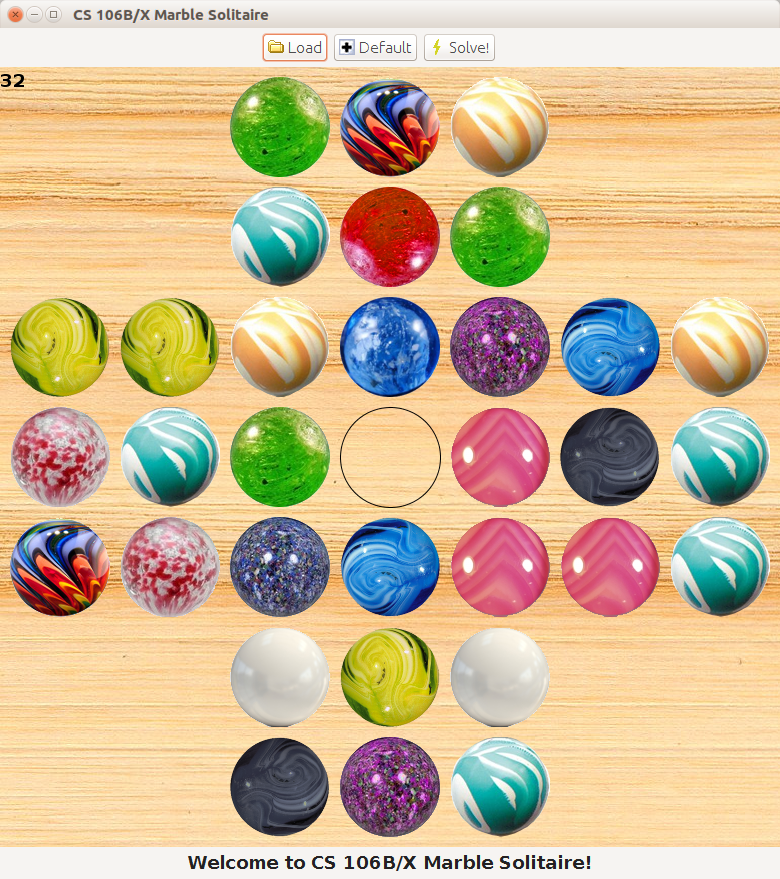
The object of the Marble Solitaire game is to clear the board of marbles and leave the last remaining marble in the center position (for our version, one marble remaining anywhere on the board will suffice to win). Each move consists of a marble "jumping" over one of its orthogonal neighbors into an empty space. The jumped-over marble is cleared from the board. You may have seen a similar game at the Cracker Barrel restaurant chain, where it is presented as a wooden peg board game, rather than with marbles (the board layout is also different).
The provided code will allow you to play the game. So the procrastination activity for this assignment is built into the assignment! :-) Take a moment to play the game to learn the rules for valid moves. (Briefly: no diagonal moves; jumps are only one marble wide; no jumping over an already empty space.) You will soon discover that it is challenging to solve. After a few failed attempts, you might say to yourself in frustration, "I should just write a program to solve this!" (This happened to assignment author Cynthia Lee over winter break in 2013-2014, which is what inspired this assignment in Winter 2014 quarter.)
Fortunately, you will be doing exactly that for this assignment. You will write code that does a randomized depth-first search of all possible moves using recursive backtracking. The provided starter code contains a GUI and the ability for a human player to make moves. Your code can pick up at the point where the human player has given up and can then see if the board is solvable from its current state.
Your only job is to implement the recursive part of the solver by filling in the body of the solvePuzzle function in marbles.cpp.
Although you should not edit any other files, you may wish to add helper functions to help with decomposition of the solvePuzzle function.
Its function signature is as follows:
bool solvePuzzle(Grid<Marble>& board, int marbleCount, Vector<Move>& moveHistory)
-
Your
boardparameter is the current game board configuration. The values of typeMarblein the grid contain information about whether each space is currently occupied by a marble, is empty, or is out of bounds or invalid on the board (i.e. the four corners of the board where there are no marbles). -
Your
marbleCountparameter tells you the number of total squares on the board that contain marbles. This is provided as a convenience, since you could calculate it yourself by looping over the board grid. A board is considered solved when only a single marble remains on it. -
Your
moveHistoryparameter is a vector passed by reference meant to be filled with data by your function (sometimes called an "output parameter"). In this vector you should store the sequence of moves that lead to a solution, in the order they should be made. These are saved so that if/when a winning sequence is found and the function returns, the original calling function can reproduce the sequence of moves in the graphics display. (TheMovetype is described in more detail below.) -
Your function should return a
boolvalue oftrueif you found a solution, andfalseif you do not. If your function returnstrue, our starter code will expect the moves of that solution to be present in themoveHistoryvector after your function returns. If your function returnsfalse, the state of themoveHistoryvector does not matter and will be ignored by our code.
Your function must perform a search using depth-first recursive backtracking. You are allowed to use loops for parts of your computation, such as looping over all possible valid moves at a given moment in your algorithm. But you must use recursion for the parts of the problem that are self-similar.
Your solvePuzzle function will follow an algorithm that roughly matches the pattern described in class.
For full credit, your algorithm must stop once it finds a single working solution to the problem.
You should not explore any more paths or moves after you find a solution; immediately allow your recursive function calls to end so that the solution will be returned to the caller in your moveHistory vector.
You must also implement a particular optimization in your code for full credit. You must keep track of every board state that you have seen and ensure that your code never explores the same board state more than once. One way to do this would be to keep a collection of all board grids that you have ever examined, but this would be very expensive since a grid takes a lot of memory. Because of this, we provide you with a function that will "compress" a grid board state into a single small value that you can store without using as much memory. The function to do this is the following:
// provided function to convert Grid into a small compressed value
BoardEncoding compressBoard(const Grid<Marble>& board)
You don't need to know anything about the BoardEncoding type; technically we compress the board into a single 32-bit integer using bit flags, but you do not need to worry about such details.
All you need to know is that if you call compressBoard on two board grids with the same state, you will get equal BoardEncoding values back.
The usage of this function would look like the following:
// using the compressBoard function
BoardEncoding encoding = compressBoard(board);
...
Take a moment to look in marbletypes.h to learn about these important things you need to use.
In particular, we provide you a Move structure (struct) that stores a start and end location for a single marble move.
A struct is like a lightweight object for gathering data into one place.
A Move structure contains four integer data fields: startRow, startCol, endRow, and endCol.
Here are some sample usages of this structure:
// set the members of a move individually
// create a move from (1,4) to (3,4)
Move m1;
m1.startRow = 1;
m1.startCol = 4;
m1.endRow = 3;
m1.endCol = 4;
...

// or set all members at construction
Move m2 {1, 4, 3, 4};
To help you solve this problem, we provide you with the following functions in marbleutil.h and marbleutil.cpp:
// provided functions in marbleutil.h for performing moves
Vector<Move> findPossibleMoves(Grid<Marble>& board);
void makeMove(Move move, Grid<Marble>& board);
void undoMove(Move move, Grid<Marble>& board);
In many backtracking problems, you need a way of figuring out what all of the possible "choices" are at a given moment.
Our provided findPossibleMoves function will return all valid moves for a given board as a vector.
A valid move is a move from a square containing a marble to an empty square that is 2 units away, with another marble in between them.
Your code can try each one to see if it leads to a solution to your board.
In backtracking you also need a way to easily "choose" and "un-choose" actions at each step of your recursion.
Our provided makeMove and undoMove functions can help perform such actions for you.
Making a move consists of a marble jumping over another marble onto an empty square, and removing the jumped-over marble from the board.
Undoing a move consists of moving a marble from the end location to the start location and restoring any jumped-over marble between them.
Our marbletypes.h file also defines the Marble enumeration, which is a set of constants representing states that each grid square can have on the board.
The enumeration consists of the following constant values:
// provided enumeration for the state of each board square
enum Marble {
	MARBLE_EMPTY,      // could hold a marble but is empty
	MARBLE_OCCUPIED,   // has a marble in it
	MARBLE_INVALID     // can't hold a marble (four corners)
};
The following is a short example usage of this enumeration (a modified version of this code will help you ensure that the last marble on the board is correctly located in the very center of the board, which is required for winning):
// example of using Marble enumeration
if (board[r][c] == MARBLE_EMPTY) {
	// then this square is unoccupied
	...
}
Hint: In many backtracking problems, you need a way of figuring out what all of the possible "choices" are at a given moment.
For this problem, we strongly suggest that you write a function that looks at the current board state and provides you with every valid move that can be mode on that board at that moment.
(For example, your function could return all such valid moves in a collection.)
A valid move is a move from a square containing a marble to an empty square that is 2 units away, with another marble in between them.
If your code has access to a collection of all of such moves, you can try each one to see if it leads to a solution to your board.
Again, we strongly suggest that you make this into its own entirely separate function rather than writing this logic directly in your solvePuzzle code.
Hint: In backtracking you also need a way to easily "choose" and "un-choose" actions at each step of your recursion. We suggest that you write helper functions that make a move and un-make a move, respectively, by making the appropriate modifications to the board grid. Recall that making a move consists of a marble jumping over another marble onto an empty square, and removing the jumped-over marble from the board.
Note: Debugging using the full board is infeasible because of the huge number of steps of calculation involved. To give yourself a more manageable test case, experiment with pre-set board states with only a few marbles left (just a few moves away from winning). We have included some like this in the starter code, such as 7-step.txt and half-done.txt. You can edit them and make your own test boards; it's easy to understand the board file format. Only try running on a full board after you are fairly confident your code works on the simpler tests, and then prepare for it to possibly take a very long time to finish (up to several minutes).
Possible Extra Features:
Here are some ideas for extra features that you could add to your program:
- Animation: Improve our GUI by making it animate the marbles as they move.
-
Multiple paths:
Write a modified version of your
solvePuzzlealgorithm that finds not only one path to a solution, but all legal paths. - Heuristically guided algorithm: Make your code prioritize examining recursive paths that seem more likely to lead to success. For example, you could calculate a board score based on how close its marbles are or how likely it is to lead to a solution, and explore boards with higher scores first.
- Other: If you have your own creative idea for an extra feature, ask your SL and/or the instructor about it.
Indicating that you have done extra features: If you complete any extra features, then in the comment heading on the top of your program, please list all extra features that you worked on and where in the code they can be found (what functions, lines, etc. so that the grader can look at their code easily).
Submitting a program with extra features: Since we use automated testing for part of our grading process, it is important that you submit a program that conforms to the preceding spec, even if you want to do extra features. If your feature(s) cause your program to change the output that it produces in such a way that it no longer matches the expected sample output test cases provided, you should submit two versions of your program file: a first one with the standard file name without any extra features added (or with all necessary features disabled or commented out), and a second one whose file name has the suffix -extra.cpp with the extra features enabled. Please distinguish them in by explaining which is which in the comment header. Our turnin system saves every submission you make, so if you make multiple submissions we will be able to view all of them; your previously submitted files will not be lost or overwritten.
Honor Code Reminder:
You are expected to follow the Stanford Honor Code.
- In your file's comment header, list your name (and your partner’s name, if you worked in a pair); also cite all sources of help, including books, web pages, friends, section leaders, etc.
- Do not consult any assignment solutions that are not your (pair's) own.
- Do not attempt to disguise any code that is not your (pair's) own.
- Do not give out your assignment solution to another student.
- Do not post your homework solution code online. (e.g. PasteBin, DropBox, web forums).
- Please take steps to ensure that your work is not easily copied by others.
Remember that we run similarity-detection software over all solutions, including this quarter and past quarters, as well as any solutions we find on the web.
If you need help solving an assignment, we are happy to help you. You can go to the LaIR, or the course message forum, or email your section leader, or visit the instructor/Head TA during their office hours. You can do it!