Quiz 2 Review Solutions
February 14th, 2021
Written by Juliette Woodrow, Anna Mistele, John Dalloul, Brahm Capoor, and Nick Parlante
Grids
Jump Down
For this problem you will implement a new operation that works on one vertical column of squares in the grid. Every square in the grid is either a rock 'r', sand 's', or empty None. The jumpdown(grid, x, n) algorithm works as follows: The parameter x will be an in-bounds x value, indicating the column to work on. The parameter n will be 1 or more, the number of squares down to move each sand.
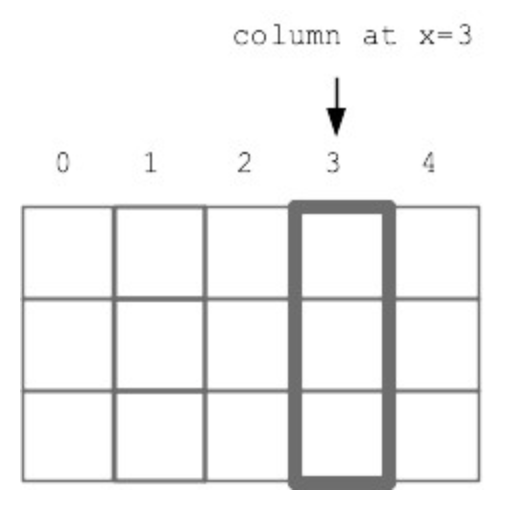
Look at every "candidate" square in the column, working from the bottom of the column to the top. If the candidate square contains sand, the sand will be moved. Its "destination" square is n squares straight down, (n=1 meaning the square immediately below). If the destination is empty, move the candidate sand there. If the destination is not empty or is out of bounds, then erase the candidate sand from the grid. Obstacles between the candidate sand and its destination do not matter - the sand jumps to its destination.
def jumpdown(grid, x, n):
    """
    >>> grid = Grid.build([['s', 's'], ['r', None], [None, 'r']])
    >>> jumpdown(grid, 0, 2)
    [[None, 's'], ['r', None], ['s', 'r']]
    >>> grid = Grid.build([['s', 's'], ['r', None], [None, 'r']])
    >>> jumpdown(grid, 1, 2)
    [['s', None], ['r', None], [None, 'r']]
    >>> grid = Grid.build([['s', None], ['s', None], [None, None]])
    >>> jumpdown(grid, 0, 1)
    [[None, None], ['s', None], ['s', None]]
    """
    for y in reversed(range(grid.height)):
        if grid.get(x, y) == 's':
            grid.set(x, y, None)
            dest_y = y + n
            if grid.in_bounds(x, dest_y):
                if grid.get(x, dest_y) == None:
                    grid.set(x, dest_y, 's')
    return grid
Yellowstone
There are two functions for this problem, and you can get full credit for each function independent of what you do on the other function. We have a Grid representing Yellowstone park, and every square is either a person 'p', a yelling person 'y', a bear 'b', or empty None.
- is_scared(grid, x, y): Given a grid and an in-bounds x,y, return True if there is a person or yelling person at that x,y, and there is a bear to the right of x,y or above x,y. Return False otherwise. (One could check more squares, but we are just checking two.)
- run_away(grid): This function implements the idea that when a person is scared of a bear they begin yelling and try to move one square left. Loop over the squares in the grid in the regular top to bottom, left to right order (this loop is provided in the starter code). For each square, if is_scared() is True, (a) set the person stored in the grid to 'y' (i.e. they are yelling). (b) Also, if there is an empty square to their left, then move the person to that square leaving their original square empty. You may call is_scared() even if you did not implement it.
def is_scared(grid, x , y):
    if grid.get(x,y) == 'y' or grid.get(x, y) == 'p':
        if grid.in_bounds(x + 1, y) and grid.get(x + 1, y) == 'b':
            return True
        if grid.in_bounds(x, y - 1) and grid.get(x, y - 1) == 'b':
            return True

    return False

def run_away(grid):
    for y in range(grid.height):
        for x in range(grid.width):
            if is_scared(grid, x, y):
                grid.set(x, y, 'y')
                if grid.in_bounds(x - 1, y) and grid.get(x - 1, y) == None:
                    grid.set(x - 1, y, 'y')
                    grid.set(x, y, None)
    return grid
Minesweeper
Implement a function, add_mine_counts(grid), which adds mine counts to the given 'minesweeper' grid. Spaces with mines ('m') are left alone. If the space is empty, counts the number of mines in the 8 surrounding spaces and places that number in the space. We have provided you with a function get_num_mines(grid, x, y) which takes in a grid and a given x,y location and returns the number of mines in the 8 surrounding spaces. You can and should use this function to help you solve this task. We have also added the code for get_num_mines(grid, x, y) in case you are curious.
def add_mine_counts(grid):
    """
    This function adds mine counts to the minesweeper grid. Spaces with
    mines ('m') are left alone. If the space is empty, counts the number of
    mines in the 8 surrounding spaces and places that number in the space.
    """
    for x in range(grid.width):
        for y in range(grid.height):
            space_val = grid.get(x, y)
            if space_val != 'm':
                num_mines = get_num_mines(grid, x, y)
                grid.set(x, y, num_mines)
    return grid

def get_num_mines(grid, x, y):
    """
    This function takes in a grid filled with mines and a target square
    It returns the number of mines in the 8 spaces surrounding the target
    square.
    """
    num_mines = 0
    for change_x in range(-1, 2): # need to evaluate changes of -1, 0, and 1
        for change_y in range(-1, 2):
            # don't assess the target space
            if change_x != 0 or change_y != 0:
                curr_x = x + change_x
                curr_y = y + change_y
                # don't count out of bounds or non-mine spaces
                if grid.in_bounds(curr_x, curr_y) and grid.get(curr_x, curr_y) == 'm':
                    num_mines += 1
    return num_mines
String Parsing
Backward Hashtags
Yesterday, Juliette tried to teach her dad how to use hashtags so that he can sound hip when he texts, tweets, and emails. He wants a program to grab all of the hashtags that he uses in a given text, tweet, or email. The catch is that he does not fully understand how to use a hashtag and Juliette doesn't have the heart to correct him. He currently puts a hashtag at the end of a word and only wants them to contain alphabetic characters, numbers, and exclamation points (but no other punctuation). Implement a function, parse_backwards_hashtags(s), which takes in a string and returns a list of all of Juliette's dad's attempts at hashtags in that string. A call to parse_backwards_hashtags('Check out how hip# I am!!#. Tell the 106A students# good luck!# on their quiz#') would return ['hip#', 'am!!#', 'students#', 'luck!#', 'quiz#']
def parse_backwards_hashtags(s):
    tags = []
    search = 0
    while True:
        hashtag = s.find('#', search)
        if hashtag == -1:
            break
        search = hashtag - 1
        while search >= 0 and (s[search].isalnum() or s[search] == '!'):
            search -= 1
        tag = s[search+1:hashtag+1]
        tags.append(tag)
        search = hashtag + 1
    return tags
Liked Chars
Implement a function that is given a "liked" list of chars, with each char in lowercase form, e.g. ['a', 'b', 'c']. A liked word is a sequence of 1 or more liked chars. The chars making up the liked word may be in upper or lowercase form, e.g. 'cAB'. Your function should parse out and return a list of all the liked words that are length 2 or more in the given string s. So for example if liked is ['a', 'b', 'c'], the string 'xxabad..A..BB' returns ['aba', 'BB']. The starter code includes the first few lines of our standard parsing while-True loop.
liked = ['a', 'b', 'c']

'xxabad..A..BB' -> ['aba', 'BB']
'^^AB.BBD.CD.' -> ['AB', 'BB']
def parse_liked(s, liked):
    search = 0
    result = []
    while True:
        begin = search
        while begin < len(s) and s[begin].lower() not in liked:
            begin += 1
        if begin >= len(s):
            break

        end = begin
        while end < len(s) and s[end].lower() in liked:
            end += 1

        word = s[begin:end]
        if len(word) >= 2:
            result.append(word)

        search = end
    return result
Experimental Server
Checkout the parse1 section on the experimental server for more string parsing practice. Nick used at_words as an example in lecture, so feel free to rewatch Lecture 13 or check out the slides if you want to re-walk through these types of problems. Also, the Section 4 Handout has some string parsing problems that will help you study. Specifically, Exclaim Words, Parse Madlib Categories, and Parse out Hashtags are good examples of string parsing problems to study.
Strings and Lists
Censor Chats
A popular gaming site has decided to censor chat messages so that users cannot share personal information about themselves. They have created a tool that identifies personal information in each message and creates a censor pattern for each message, where a space represents a character that may be left alone and an "x" represents a character that should be censored in the final message with an "x". Now, they need a coder to create a function that takes a chat message and its corresponding censor pattern and outputs a safe message that has been censored to remove personal information.
Please design censor_chat(message, pattern) to read through the message string and replace characters with an "x" if the pattern string contains an "x" at the character's index. You can assume message and pattern will be the same length. For example, running the below program would print "My name is xxxxx, and I live in xxxxxxxxxxx!"
def main():
  msg = "My name is Karel, and I live in Wilbur Hall!"
  ptn = "           xxxxx                xxxxxxxxxxx "
  print(censor_chat(msg, ptn))
def censor_chat(message, pattern):
    """
    >>> msg = "My name is Karel, and I live in Wilbur Hall!"
    >>> ptn = "           xxxxx                xxxxxxxxxxx "
    >>> censor(msg, ptn)
    "My name is xxxxx, and I live in xxxxxxxxxxx!"
    """
    censored = ""
    for i in range(len(message)):
        if pattern[i] == "x":
            censored += "x"
        else:
            censored += message[i]
    return censored
Double Encrypt
This problem is similar to the Crypto homework with the simplification that the encryption is done entirely with lowercase chars. This "double" encryption uses two source lists, src1 and src2, and two slug lists, slug1 and slug2. All the lists contain chars and are the same length. Implement a function, encrypt_double(src1, slug1, src2, slug2, char), with the following algorithm: use the lowercase version of the input char, which may be uppercase. If the char is in src1, return the char at the corresponding index in slug1. If the char is in src2, return the char at the corresponding "reverse index" in slug2, e.g. like this for lists length 4:
index     reverse index
0         3
1         2
2         1
3         0
If the char is not in src1 or src2, return the char unchanged. No char appears in both src1 and src2.
Double Encrypt Example (len 4)
src1  = ['a', 'b', 'c', 'd']
slug1 = ['s', 't', 'u', 'v']
src2  = ['e', 'f', 'g', 'h']
slug2 = ['w', 'x', 'y', 'z']
encrypt 'A' -> 's'
encrypt 'e' -> 'z'
encrypt 'f' -> 'y'
encrypt '$' -> '$'
def encrypt_double(src1, slug1, src2, slug2, char):
    """
    >>> # Make len-4 lists for testing
    >>> src1  = ['a', 'b', 'c', 'd']
    >>> slug1 = ['s', 't', 'u', 'v']
    >>> src2  = ['e', 'f', 'g', 'h']
    >>> slug2 = ['w', 'x', 'y', 'z']
    >>> encrypt_double(src1, slug1, src2, slug2, 'A')
    's'
    >>> encrypt_double(src1, slug1, src2, slug2, 'e')
    'z'
    >>> encrypt_double(src1, slug1, src2, slug2, 'f')
    'y'
    >>> encrypt_double(src1, slug1, src2, slug2, '$')
    '$'
    """
    lower = char.lower()
    if lower in src1:
        idx = src1.index(lower)
        return slug1[idx]
    if lower in src2:
        idx = src2.index(lower)
        rev = len(src2) - idx - 1
        return slug2[rev]
    return char
Drawing
Fancy Lines with Margin
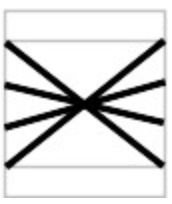
In this problem, impelement a function, draw(canvas, left, top, width, height, n), which takes in a left, top, width, height and number of lines n. The function should leave a 10-pixel high margin across the top and bottom of the figure without any drawing. Given int n which is 2 or more, draw n lines, as follows: The first line should begin at the left edge, 10 pixels from the top, and extend to the right edge, 10 pixels from the bottom. The last line should start at the left edge, 10 pixels from the bottom, and extend to the right edge 10 pixels from the top, with the other lines distributed proportionately.
Here is a picture showing the drawing for n=4 lines. The 4 lines to draw are shown as heavy black lines, with the outer edge of the figure and the margin areas outlined in gray.
def draw(canvas, x, y, width, height, n):
    for i in range(n):
        y_add = i/(n - 1) * (height - 20 - 1)
        canvas.draw_line(x, y + 10 + y_add, x + width - 1, y + height - 1 - 10 - y_add)
Diagonal Lines
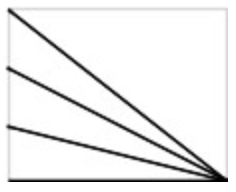
In this problem, impelement a function, draw(canvas, left, top, width, height, n), which takes in a left, top, width, height and number of lines n. Given int n which is 2 or more, draw n lines, each starting on the left edge and ending at the lower right corner of the figure. The first line should start at the upper left corner, the last line should start at the lower left corner, with the other lines distributed evenly.
Here is a picture showing the figure boundaries in gray with n=4 lines
def draw(canvas, x, y, width, height, n):
  for i in range(n):
      y_add = i/(n - 1) * (height - 1)
      # Draw from points going down left side, all to lower-right corner
      canvas.draw_line(x, y + y_add, x + width - 1, y + height - 1)
Draw Bullseye
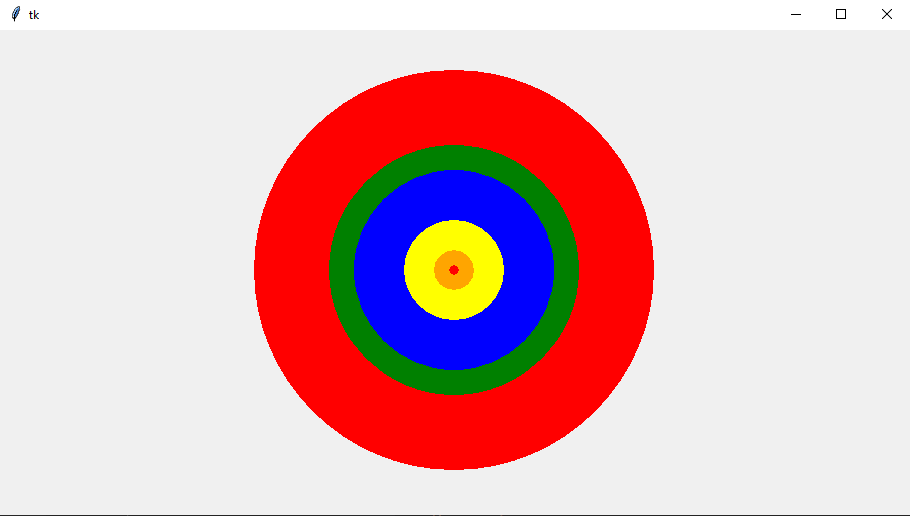
Implement a function, draw_bullseye(canvas, width, height, radii, colors), which given a canvas, width, height, a list of radii and a list of colors draws a bullseye centered on the given canvas. The radius and color of each ring are given by the passed in lists radii and colors, respectively. The values in the radii list are in order of outermost circle to innermost circle. If there are more rings than colors, then colors are repeated. The black line in the bottom is part of the screenshot and not part of the functionality of the code you will write.
Below is an example of a call to draw_bullseye(canvas, 500, 300, [200, 125, 100, 50, 20, 5], ['red', 'green', 'blue', 'yellow', 'orange'])
def draw_bullseye(canvas, width, height, radii, colors):
    """
    This function draws a bullseye centered on the given canvas. The radius and color
    of each ring are given by the passed in lists radii and colors, respectively.
    If there are more rings than colors, then colors are repeated.
    """
    center_x = width / 2
    center_y = height / 2
    for i in range(len(radii)):
        radius = radii[i]
        curr_color = colors[i % len(colors)] # use mod to ensure we cycle through colors
        upper_left_x = center_x - radius
        upper_left_y = center_y - radius
        canvas.fill_oval(upper_left_x, upper_left_y, radius * 2, radius * 2, color = curr_color)
Do You Want to Build a Snowman?
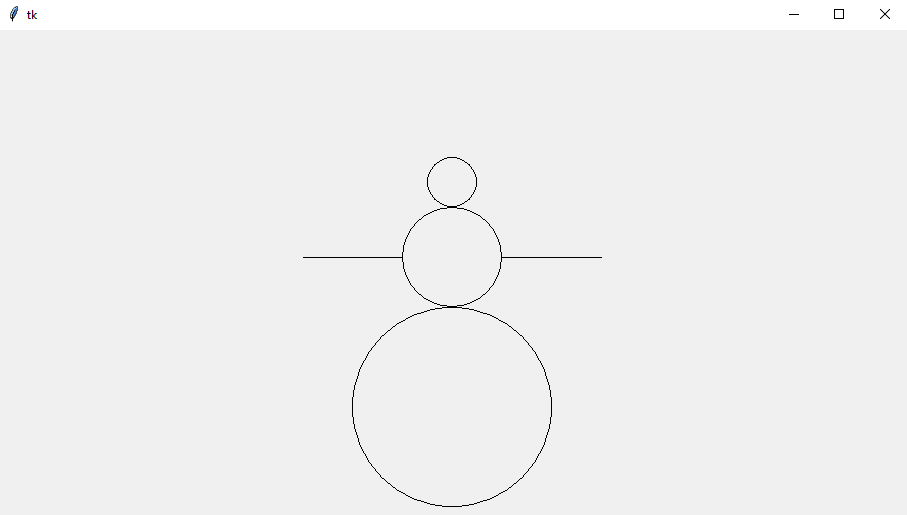
Implement a function, draw_snowman(canvas, width, height, radii), which given a canvas, its width and height, and a list of radii draws a snowman centered along the bottom of the given canvas. The snowman consists of circles, one on top of another, with the smallest on top and the largest on the bottom; the radius for each is given by the passed in radii list (smallest radius is first, largest is last). Two arms are drawn protruding from the middle circle of the snowman using the ARM_LENGTH constant.
Below is what happens when calling draw_snowman(canvas, 500, 300, [25, 50, 100])
ARM_LENGTH = 100 # given constant
def draw_snowman(canvas, width, height, radii):
    """
    This function draws a snowman centered along the bottom of the given canvas.
    The snowman consists of circles, one on top of another, with the smallest
    on top and the largest on the bottom; the radius for each is given by the
    passed in radii list (smallest radius is first, largest is last). Two arms
    are drawn protruding from the middle circle of the snowman.
    """
    center_x = width / 2
    curr_y = height # keep track of the top y-value of latest circle
    # draw body circles
    for i in reversed(range(len(radii))):
        curr_radius = radii[i] # travel backwards through radii starting from the end
        x = center_x - curr_radius
        y = curr_y - 2 * curr_radius
        canvas.draw_oval(x, y, curr_radius * 2, curr_radius * 2)
        # if we are at the correct circle, draw the arms too
        if i == len(radii) // 2:
            arm_y = curr_y - curr_radius
            canvas.draw_line(center_x - curr_radius, arm_y, center_x - curr_radius - ARM_LENGTH, arm_y)
            canvas.draw_line(center_x + curr_radius, arm_y, center_x + curr_radius + ARM_LENGTH, arm_y)
        curr_y = y # update our new highest y
Draw Grid
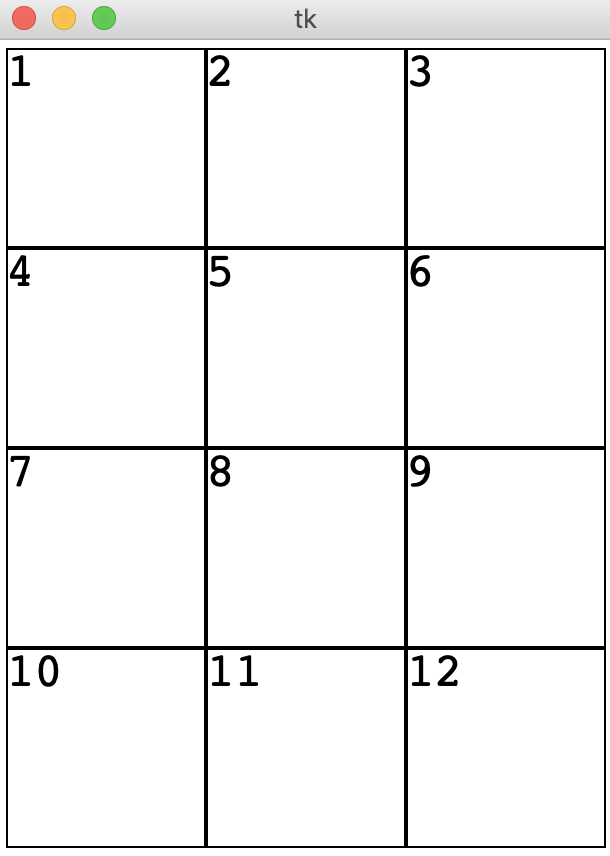
Working with data structures like Grids can get a little tricky when you can't visualize what you're working with! Let's code the visualize_grid(grid) function, that takes a Grid as input and draws the grid to the canvas. Each box in the grid should have height and width CELL_SIZE. We also want to print the contents of each grid cell as a string on the canvas! You can assume that the grid's contents are all strings.
Below is an example call to visualize_grid(grid) on a grid with 4 rows and 3 columns.
            grid = Grid.build([['1', '2', '3'], ['4', '5', '6'], ['7', '8', '9'], ['10', '11', '12']])
visualize_grid(grid)
CELL_SIZE = 100
def visualize_grid(grid):
"""
Working with data structures like Grids can get a little tricky when
you can't visualize what you're working with!
Let's code the visualize_grid(grid) function, that takes a Grid as input
and draws the grid to the canvas.
Each box in the grid should have height and width CELL_SIZE. We also want
to print the contents of each grid cell as a string on the canvas!
You can assume that the grid's contents are all strings.
>>> grid = Grid(3, 3)
>>> initialize_grid(grid, ['1', '2', '3'], ['4', '5', '6'], ['7', '8', '9'])
>>> visualize_grid(grid)
"""
canvas = DrawCanvas(grid.width*CELL_SIZE, grid.height*CELL_SIZE)
for row in range(grid.height):
for col in range(grid.width):
canvas.draw_rect(CELL_SIZE*col, CELL_SIZE*row, CELL_SIZE, CELL_SIZE)
canvas.draw_string(CELL_SIZE*col, CELL_SIZE*row, grid.get(col, row))