The not-so-distant past
How have we traditionally done this?
- All source/headers/resources for Stanford library are distributed as part of every project
- Each project is self-contained unit with no external dependencies
- Build performance
- Significant first build penalty (1-4 minutes). Affects all projects/platforms
- Reasonable subsequent builds on Mac/linux (< 10 seconds).
- Abysmal link time on Windows (20-60 seconds, every single build1). Compiler nerds, hit me up me to hear the sordid backstory of mingw linker.
- Launch debugger is sluggish (5-20 seconds, particularly awful on Windows)
- Space use
- Each project size is > 5MB
- Build folder size > 50 MB
- Entire quarter of assign/section/lecture projects runs to 1-2 GB
- Versionitis
- Each project has own copy of library. Can patch bugs per-project, but leads to wild west of version control
- In sum
- So much redundancy, do we not always tell our students DRY?
- On Mac/linux, performance is perhaps tolerable, but Windows is painful and on low-end machine becomes completely unacceptable.
- It is time to take action!
The bright shiny future
- Distribute
CS106project with source/headers/resources for Stanford library- After install Qt, student downloads CS106 project and builds once which installs static lib and headers into standard location
- CS106 project incorporates sample project so can replace that step from our install instructions (no extra step required)
- Projects contain only student source code, no library
- Depends on headers/static lib installed in step 1
What you can look forward to
- One and only one copy of the Stanford library. Full library build takes 1-5 minutes, done once and never repeated.
- First and every build of student project on all platforms < 10 seconds
- Link on all platforms < 5 seconds
- Debugger launch < 10 seconds
- Project size < 100K, build folders ~4MB, total quarter 100 MB
- No versionitis
- can patch with per-project overrides if needed
- create new project is trivial
- Can piggyback course customizations onto the install step
- debugging helper views for Stanford collections (yay Jeremey Barenholtz!)
- To me, it is particularly motivating that the biggest beneficiaries of this work are students who own low-end machines. Let's hear it for super-charging 💪 the workflow of these long-suffering folks!
How to test
- Before changing anything: download new-style project . Open in Qt Creator. The new-style project should load fine, show files, etc, but will error on build because CS106 library is not installed. Try to build and confirm you get error message. Close that project. You can try it again after installing the CS106 library.
- You will need latest Qt installed (version 5.15.0). If your system has older Qt:
- first, try to install the CS106 library on your older Qt and confirm that it blocks you
- then install latest Qt to replace your older Qt, then install CS106 library
- To install CS106 library:
- Download the CS106 project zip.
- Unzip, open the top-level
CS106.proin Qt Creator. Build & Run.- Build. Will take 1-4 minutes. This is the last time you'll wait that long for any build ever again.
- Run. The welcome program runs to confirm your install is all good.
- You can now discard the entire CS106 project, you're done with it.
- Download a new-style CS106 project and build/run to enjoy an improved experience. Here are example new-style projects for assign, section, and lecture.
- You can create a new-style project of your own. Make a new folder, copy the .pro file from any of the above example projects, add your source files to the folder and you're good to go. A new-style project does not contain any of the Stanford library code or resources.
What to test
- Build: rework was focused on build process so that's primary need for testing :
- edit source, rebuild/run, make sure correct update, build clean, rebuild, etc.
- If you observe build step that takes > 15 seconds, report it to me
- try build in both debug and release configurations for client project
- (fyi library always installs in release mode)
- plant various compile/link errors to confirm reported correctly
- do project "reinitialize" (delete .pro.user and build folder) and re-open to confirm project resets correctly
- run under debugger, view variables, set breakpoints, read stack traces, confirm symbols from student code correctly identified.
- (Note that symbols/code within library will generally be opaque)
- try out debugging helpers, confirm internals of a Stack variable show labels for "top" and "bottom" element or [row, col] of Grid element.
- edit source, rebuild/run, make sure correct update, build clean, rebuild, etc.
- Library code: installed code is mostly same as previous, but good to test also:
- Confirm that runtime behavior of program built new-style is same as program built old-style
- One notable code change was to remove the harvesting of the stack trace on error (code was fragile and often misleading) and instead redirect student to use debugger, so you'll see slightly different behavior on error/exception/segfault. Try that and see what you think!
Follow up with Julie
- Hit a snag or observe a glitch, even seemingly minor one? If you see something, say something. Send it on over to me to investigate further and add to our knowledge base.
- If goes smoothly, a thumbs-up in Slack to help us track would be appreciated.
Thank you for your help!
Special bonus gifts
If you act now, not only do you get a shiny new build system, you also get a much improved substrate for all of us to move forward on:
- Class interfaces have been simplified and rationalized
- All of function synonyms have been removed (no
addANDenqueueANDpushBack…) Students are best served by a simple interface with clean, consistent conventions.
- All of function synonyms have been removed (no
- Library footprint is receding to tighter, more appropriate core
- We had accumulated various special-purpose features that were not well-tested nor broadly useful or redundant with std library (bitstream, bigint/decimal, regex). These have all been removed.
- Reworked library code to be unified/universal
- All platforms use same build specs: C++11, same flags, same dependencis
- OS/compiler-specific code paths should be avoided at all costs. These are fragile and difficult to maintain.
- Removed our custom backtrace harvesting, instead use existing debugger mechanisms
- New autograder builds on same SimpleTest facility that students use for testing
- Library now has comprehensive and robust library unit tests for many modules
- Unit tests built on SimpleTest (of course!)
- Thanks to Keith for helpful input to collection class tests and Cathy Zhang for writing the test suite for strlib
- New tests surfaced some lurking bugs that we then fixed.
- Unit tests allow continued evolution while ensuring no regressions are being introduced.
- Need unit tests for graphics (involvement role, anyone?)
- Library documentation updated to match
- We will have updated documentation in fall that matches the library
- for the first time in 6 years … yikes!
- I'm planning to hack it this time just to get it done but next up is getting the auto-generation working again
- involvement role? join me!
- We will have updated documentation in fall that matches the library
Shameful evidence of failure to listen
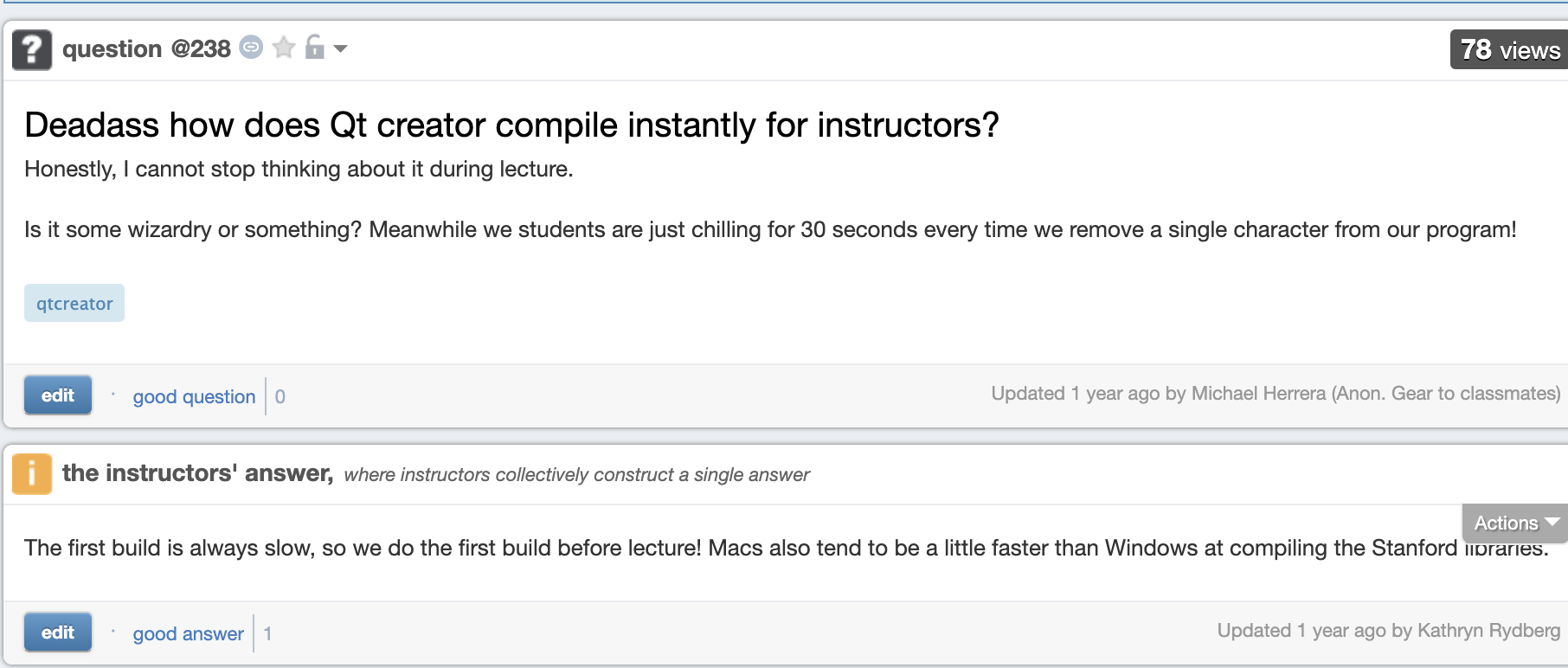
-
My feeling of guilt about this is profound. Reparations are due to everyone who has soldiered through this pain on Windows. Every time you see me for the next 4 years, insist that I treat you to coffee/boba/jamba.