Lab 7: Automatic Dependent Surveillance-Broadcast (ADS-B)
Overview
For the this lab we'll look at decoding packets from Automatic Dependent Surveillance-Broadcast (ADS-B). This is the system used to track aircraft in real time. Each plane constantly sends out a stream of digital packets. These are on-off keying, and are a great first project for decoding packet radio. There are many interesting aspects of how this system works.
If you want to get right to the lab, and your part, you can skip down to the "Decoding ADSB Packets" section below.
Introduction
ADS-B transmitters are currently carried by all planes in the US. Commercial aircraft use these packets to periodically broadcast their tail number, flight, altitude, direction, and speed. Light planes can transmit shorter packets that simply identify them. By 2020 all planes in US airspace were to have to their full information and status, but that is still continuing now. Other countries have sightly later schedules.
In the past planes were tracked with radar. This does a great job of detecting planes, and measuring their range and velocity towards the radar. It does less well for localizing the plane in angle space, due to the beam width, and has no idea which plane it is interrogating. The basic idea of ADSB is that planes have a very good idea of where they are from GPS, and who they are, and where they are going. All the air traffic control system needs to do is ask, and the plane will be able provide all this and more.
The general layout of the system looks like this:
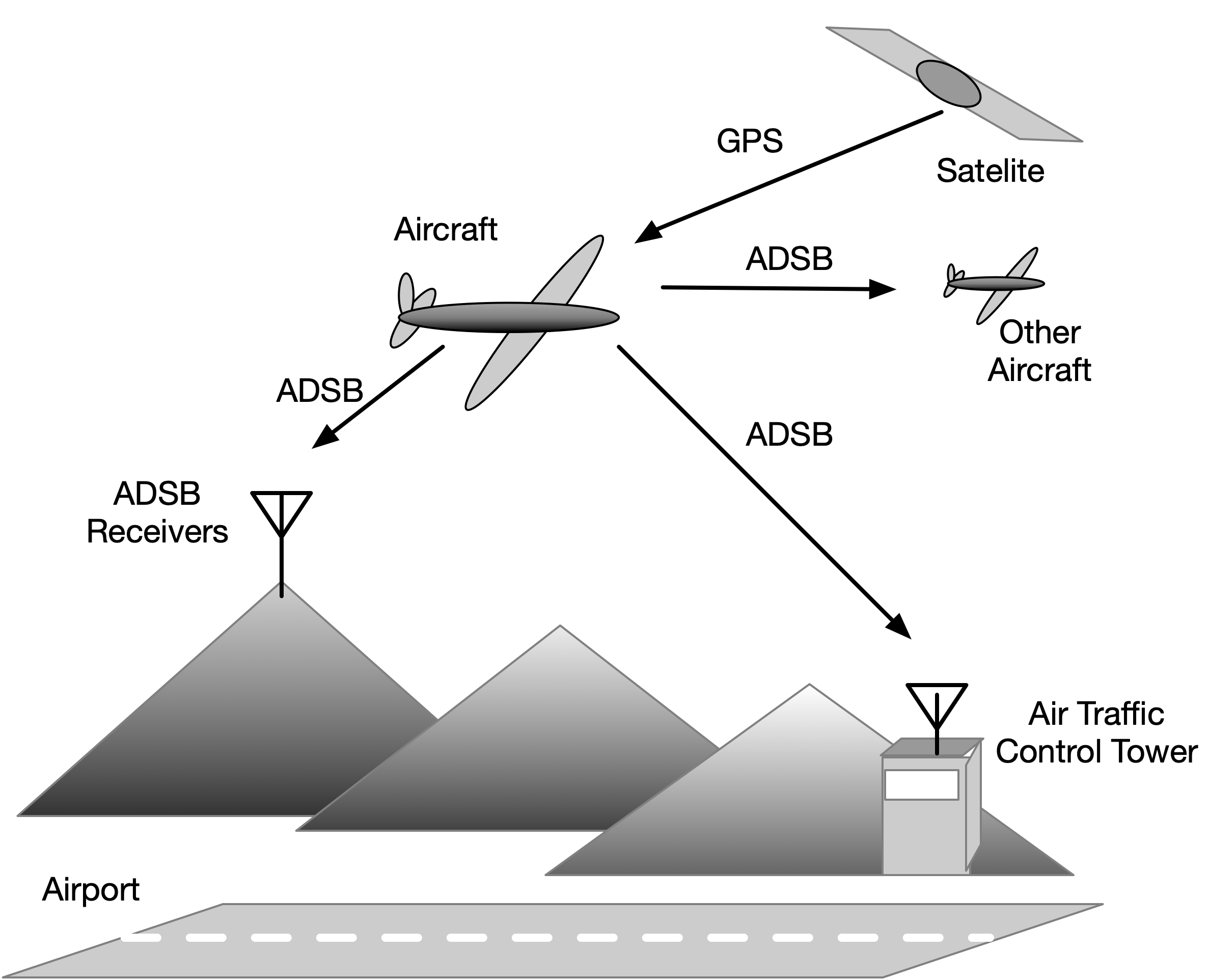
The planes listen to the GPS system to figure out where they are, and then transmit that information to other planes, air traffic control, and you, using short digital packets.
The packets that are sent are called "squitters", a term which originated in the military with Identification Friend or Foe (IFF) systems. The goal of this lab is to acquire and decode these packets.
Programs like dump1090 on MacOS and Linux (and many more on Windows) use your rtl-sdr to acquire and track the ADSB packets. An example from yesterday afternoon is shown below,
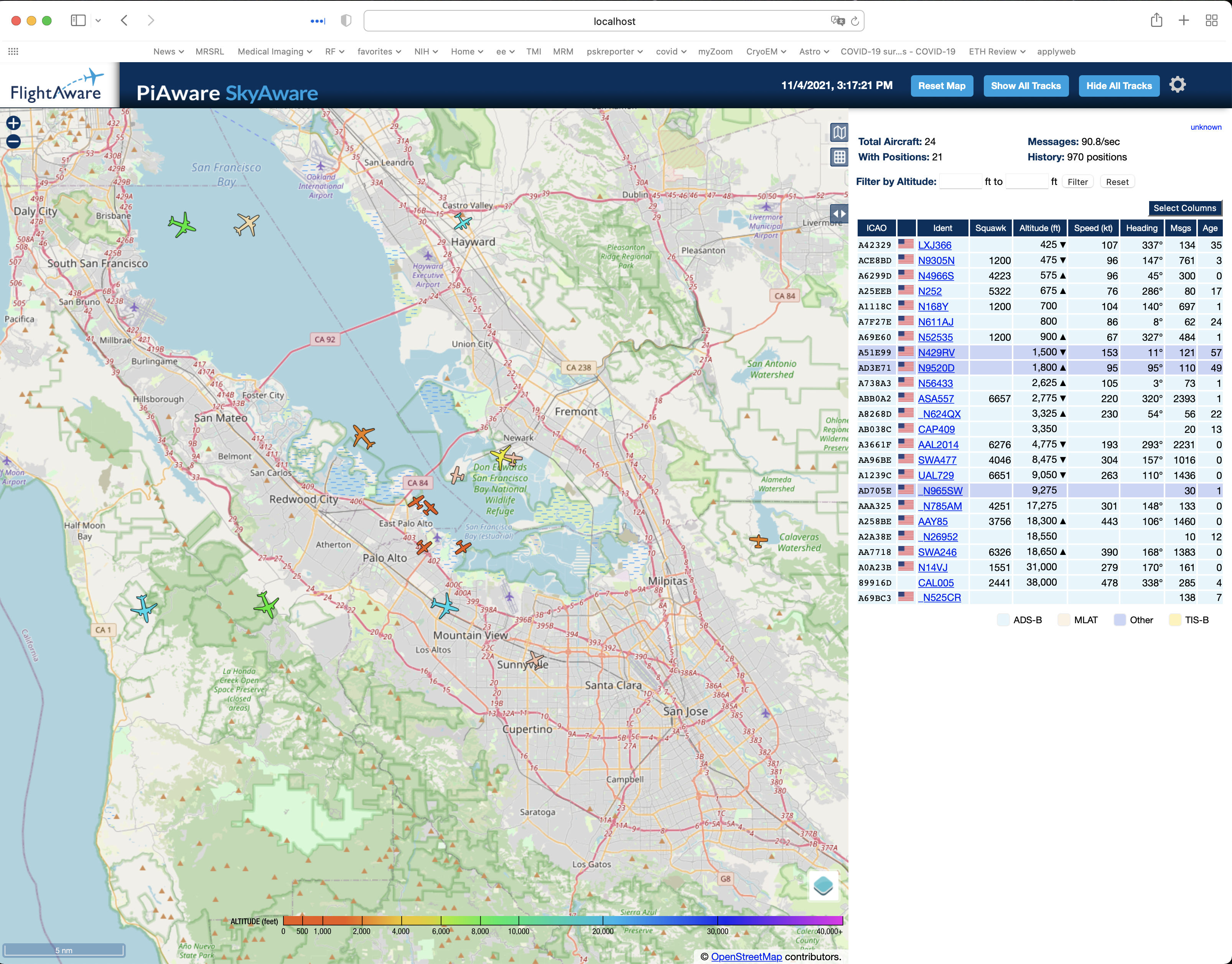
This is in the afternoon about 3:30. You can clearly see how the planes are lining up for SFO, and lots of small plane traffic around San Carlos. The small planes have only recently started appearing in large numbers. If you click on a plane, it gives you its flight information including it current flight track.
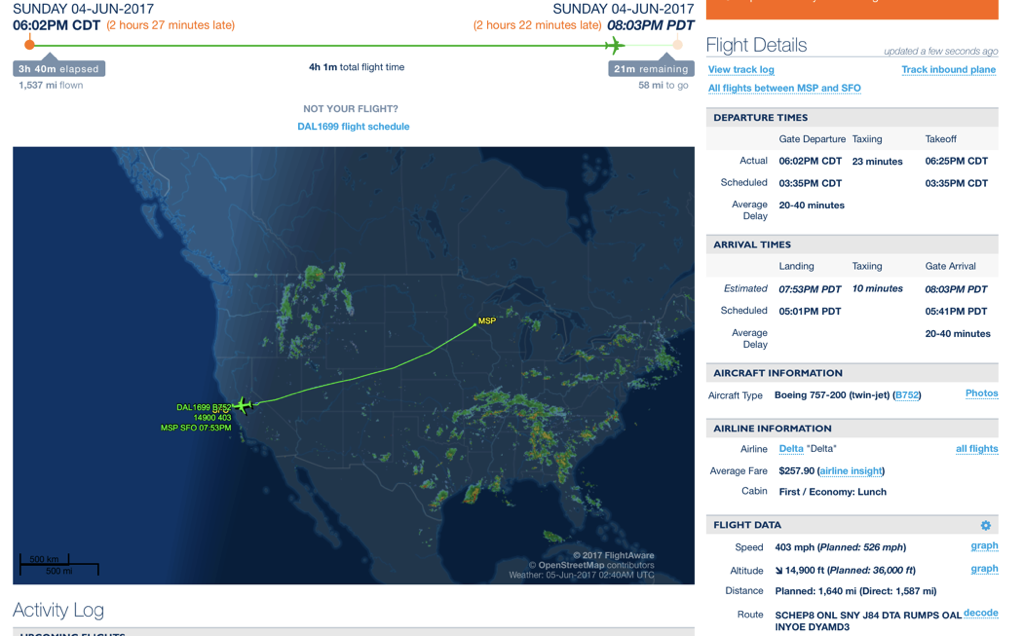
Since ADSB is public, many web sites aggregate the ADSB data from a wide range of sites to provide real time information about where flights are, and the flight paths they have taken. Two are Flightaware.com and Flightradar24.com. This is very useful.
An example from Flightaware for a flight a few summers ago is
These sites actively recruit people with rtl-sdr's to participate in their network, and even sell branded rtl-sdr's explicitly for this purpose:
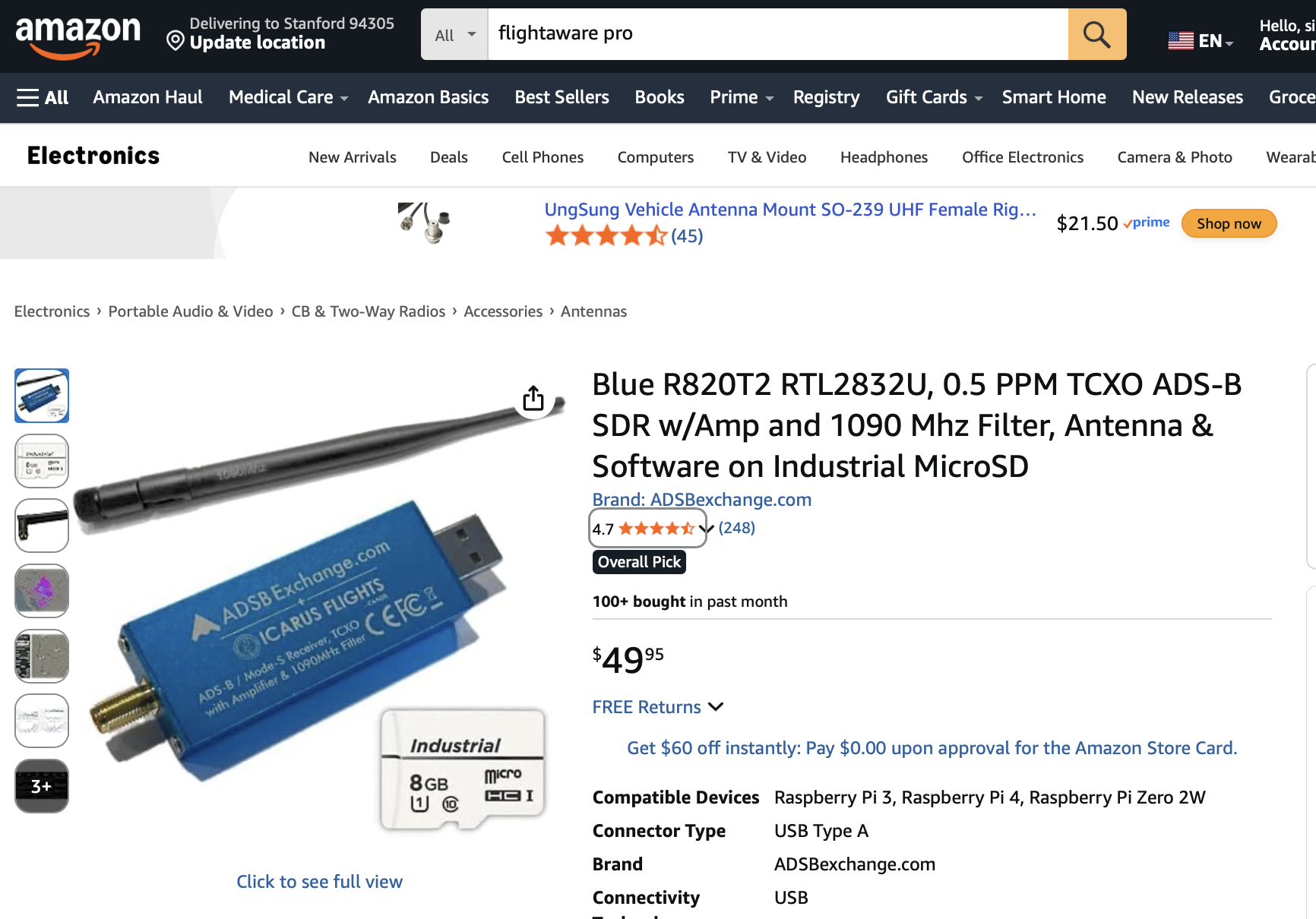
This package includes special antennas and filters to improve its sensitivity. It also includes the code for your Raspberry Pi, so that you can feed their network. The hardware is free if you are in an area that needs coverage (sorry, the Bay Area is already pretty well saturated!).
The most important fact about ADSB is that it is not encrypted. This makes the location and identity of every plane public information. This is significant. Numerous law enforcement agencies use surveilence planes or helicopters, and these all have tail numbers, and transmit on ADSB. All of these activities are now publicly available. Google "FBI and ADSB", or "CIA and ADSB" for example. You will find lots of interesting things.
Decoding ADSB Packets
If we run gqrx and look for packets at 1090 MHz, we see something like this:
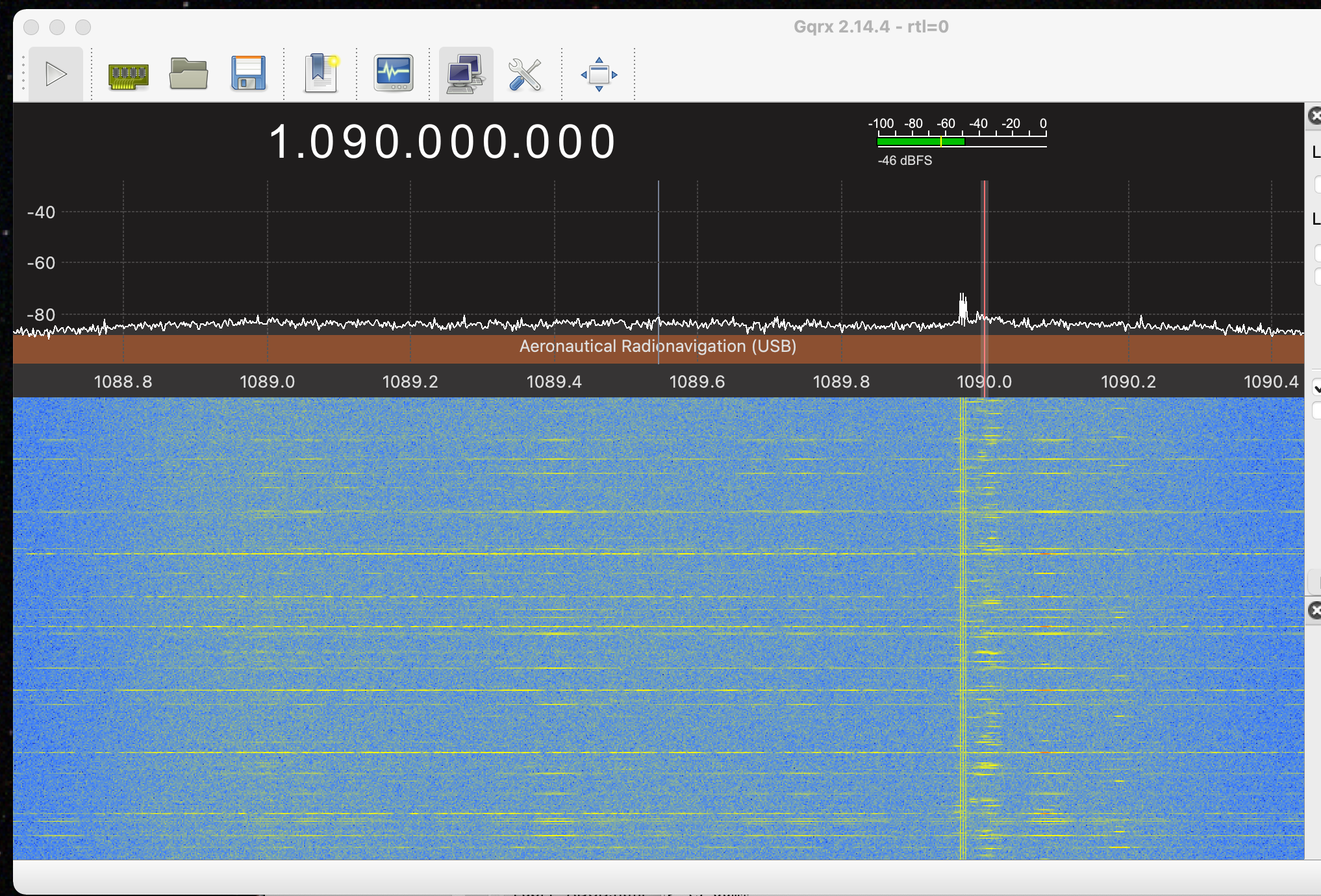
This should a little like the packets you captured for this week. Packets are very short, so they spread across the spectrum. Each time a packet comes in, the spectrum jumps. There is a lot of traffic! I'll get 250 packets a second right around the hour when lots of planes are landing or taking off from SFO. We are going to collect some of this, and decode it.
The ADSB packets are short sequences of pulses, that look like this:
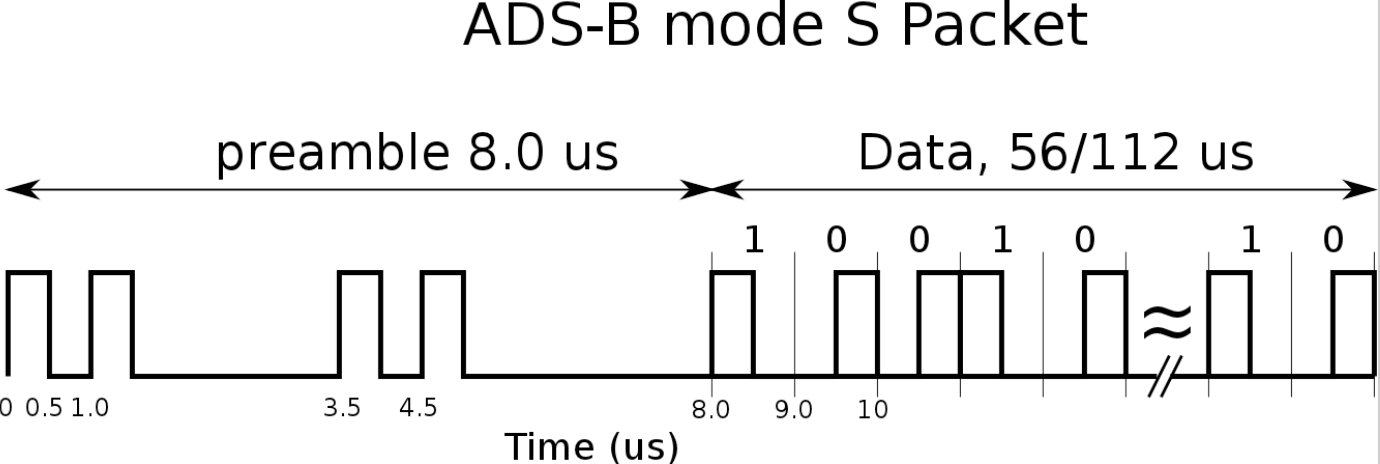
Each pulse is 1 us long, and consists of two 0.5 us pulses. There is an 8 us preamble that allows you to find the start of the packet. It's spacing is unique, and can't turn up in a packet. The packet itself follows, and is either 56 or 112 us long, which decodes to 56 or 112 bits. Bit are encoded as a split phase pulses, where a falling transition is a 1, and a rising transition is a 0.
The split phase pulses are exactly at the Nyquist limit if we sample at 2 MHz, as we have been doing in the previous labs, and that will make resolving the pulses difficult (although that is what is commonly done!). Fortunately the rtl-sdr's that you are using will sample up to 3.2 MHz, which is fast enough that we can see the pulses clearly.
Here is a capture I did sampling at 3.2 MHz. This is five seconds of data
Load them into matlab
We are only concerned with the envelope, so we use the absolute value. The signals are very wide band, which is why we are sampling at 3.2 MHz. This is as fast the rtl-sdr will go, and it will drop bits occasionally at this rate. The packets we are looking for are short, so this won't generally be a problem.
The bit boundaries are on 1 us increments, which doesn't match our 3.2 MHz sampling rate. We'll upsample to 4 MHz to make make the bit boundaries line up with the samples
This upsamples by a factor of 5, then downsamples by a factor of 4 to leave us at (3.2 MHz) * 5 / 4 = 4 MHz.
If we plot the first 1e6 samples, we see something like this
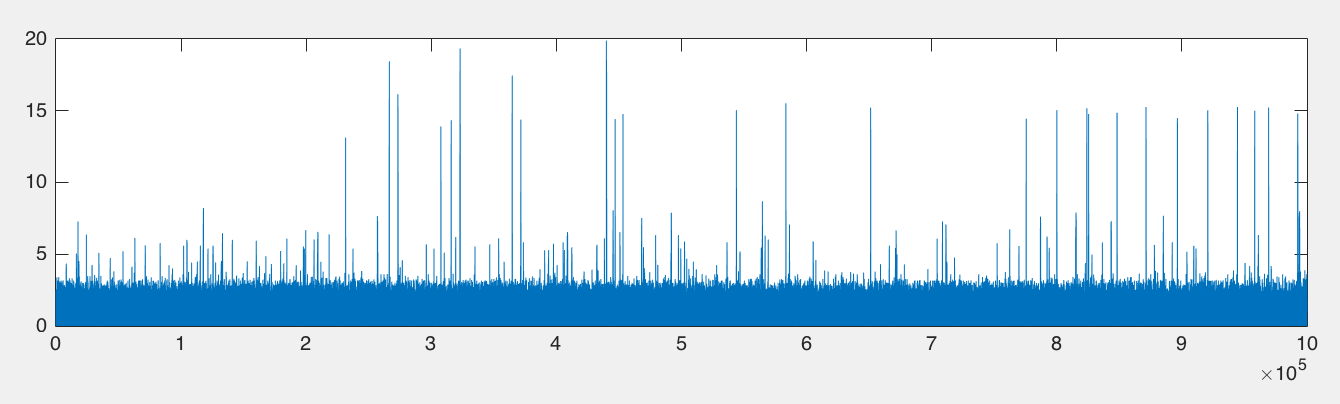
Each of the spikes is a packet. Use your matlab zoom to visualize one of them. One packet is shown here
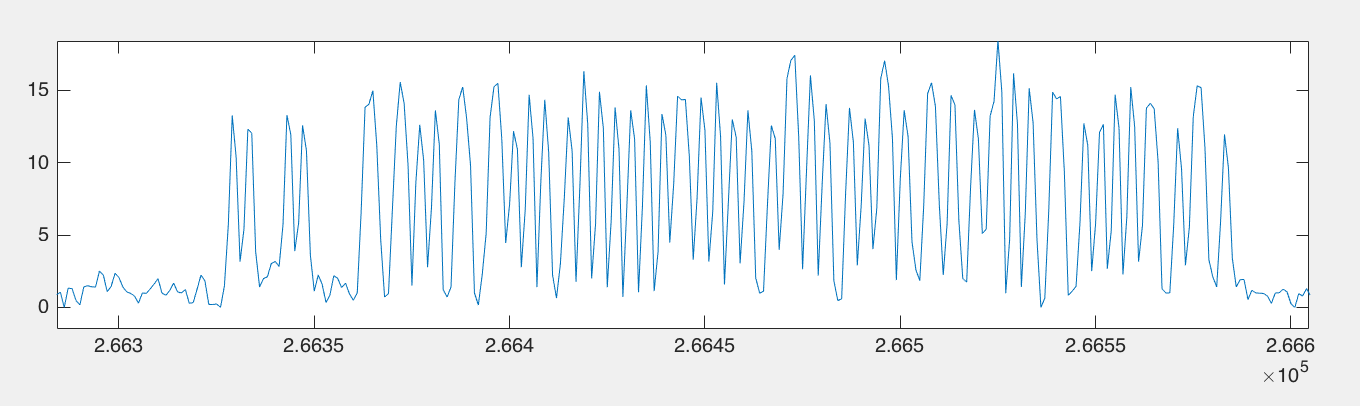
You can clearly see the preamble and the data bits. If we'd only sampled at 2 MHz, the result would have been
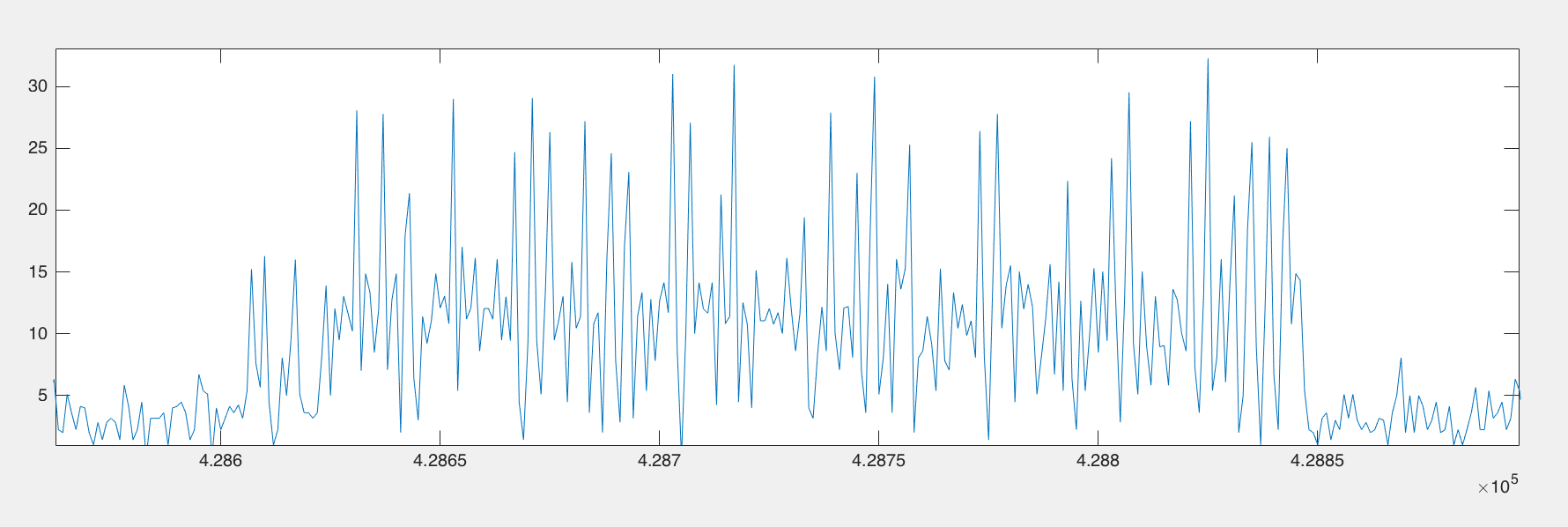
which is much harder to decode!
If we take the 4 MHz sampled data and threshold it we get the ADSB waveform
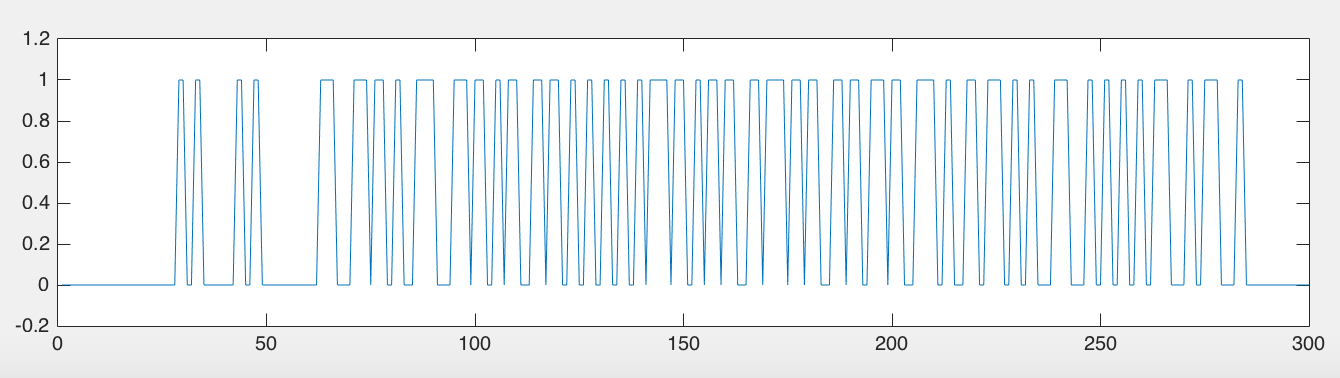
Then subsampling by a factor of 2 and shifting to the first non-zero bit, we get the ADSB bit stream for the packet.
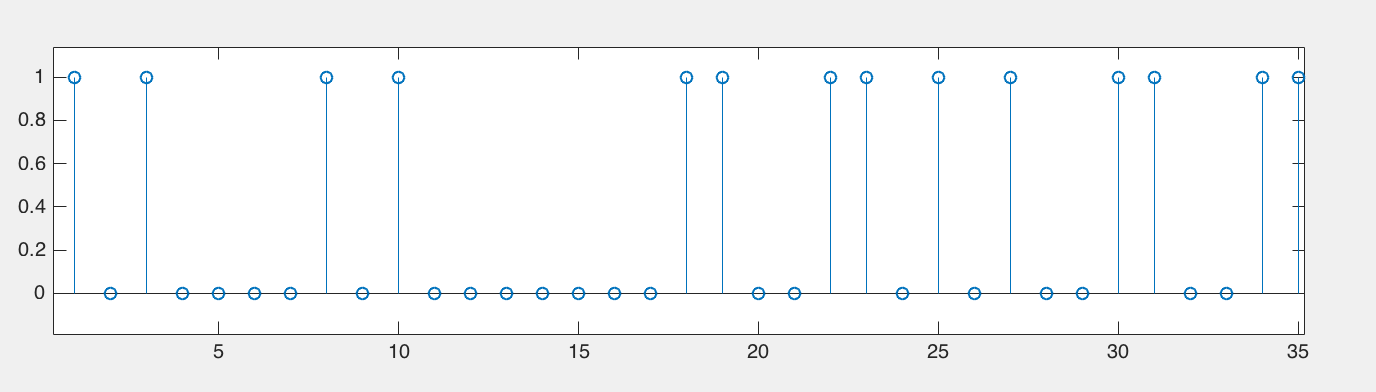
We decode this as
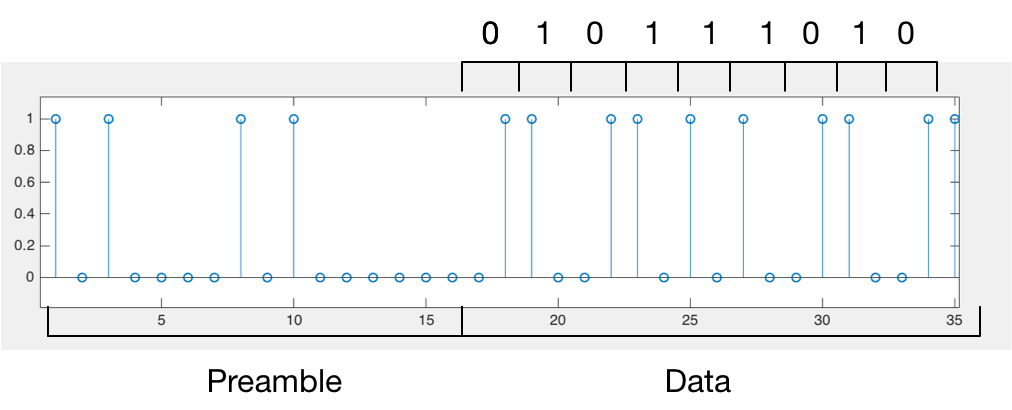
Since the packets are only 56 or 112 bits, a lot of effort has been devoted to compressing as much information into the packets as possible. This is fairly intricate. We'll restrict our attention to finding packets with the fight numbers of the planes. Each plane sends these out every 2 s.
The bits in the 112 us ADSB packet are allocated as follows,
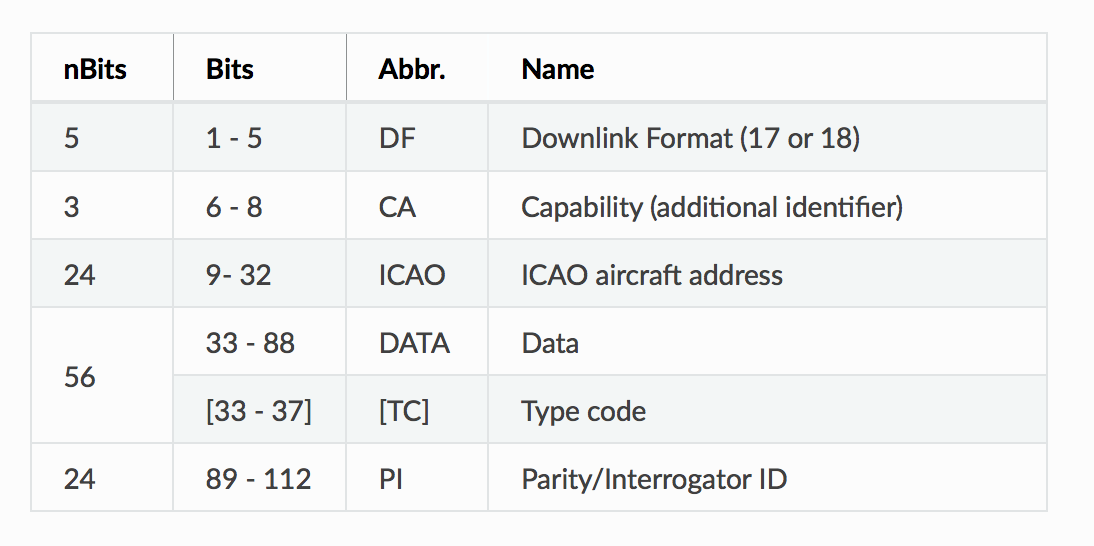
The first 5 bits after the preamble identify the type of packet. This will be 17 or 18 for planes communicating to the ground. We are only interested in the DF 17 packets. The next three bits tell something about where the plane is, we'll skip these.
The unique identifier for the plane is the next 24 bits. If you format these bits as a hexidecimal string, and type "ICAO" and the hex number into Google, you will find out which specific airframe this is, who owns it, and what they do with it. For this one the ICAO number is 4840D6, and a Google search shows it to be Folker F70 owned by KLM.
From the google search, the best link to use is the planespotters.net/search which you can also go to directly to search. If you click on that it will also give you lots more information along pictures of that specific aircraft.
This matlab routine will take the 24 bits from the ICAO field and return the hex humber you can enter into Google.
function hx = printICAO(v)

if length(v)~= 24,
    display("Length must be 24 bits")
    return
end

hx = sum(v .* (2.^[23:-1:0]));
fprintf("ICAO: %x\n", hx)
After that is the data bits, which we will decode. This looks like

The data field can be decoded for the flight number like this

The identify packets we are looking for have an initial 5 bits (bits 33-37) of [0 1 0 0](0), like the packet above. This is the TC field. Search for this to decide which packets to decode. There are lots of other DF 17 packets that report altitude, direction, and location. Only a few of the DF 17 packets are identify packets. These are sent out every 2 s, while each of the others is sent out every 0.2 s.
After the initial 8 bits of the data packet, the characters for the flight number are sent as six bit integers, where each integer encodes for a character
The # entries are not used. This can be summarized as 1-26 => A-Z, 48-57=> 0-9, and 32 => space. In matlab, you can implement the decoder as
function decode_id(pd)

% decoding vector
dcd = '#ABCDEFGHIJKLMNOPQRSTUVWXYZ#####_###############0123456789######';

% number of packets, np, and the packet length lp
[np lp] = size(pd);

% for each packet
for jj=1:np,
    cs = [];
    % decode 7 characters 6 bits at a time
    for kk=1:6:(6*7),
        % compute the value of the next 6 bits
        nc = sum(pd(jj,kk+[40:45]).*(2.^[5:-1:0]));
    % look up the value for this 6 bits in the decode table
        cs = [cs dcd(nc+1)];
    end
    % display the result
    disp(cs)
end
where pd is a matlab array of row vectors of 1's and 0's for each packet.
There is only one identify packet in the capture given above. To test your decoder, here are a couple of other identify packets to work with
pd = ['8da6e45a213b5d3340482042cea1'
'8da6c8262214a075cf68204fa2ea'
'8da5861e223b4d754538202b41ee'
'8fa9ee47213b7cf954c820d0b829'
'8da03f4825184633c75ce0c25fd9'
'8da2e62120592131df1d609c4876'
'8da0a457234cb5f5d39e2071ffa5']
These are in hexidecimal. To convert them into an array of bits for the decoder above, use this
function b = hex2bin(s)

bta = [0 0 0 0; 0 0 0 1; 0 0 1 0; 0 0 1 1;
       0 1 0 0; 0 1 0 1; 0 1 1 0; 0 1 1 1;
       1 0 0 0; 1 0 0 1; 1 0 1 0; 1 0 1 1;
       1 1 0 0; 1 1 0 1; 1 1 1 0; 1 1 1 1];

b = [];
for jj=1:length(s),
    kk = sscanf(s(jj),'%x');
    b = [b bta(kk+1,:)];
end
end
A couple of flight numbers you should find are N543PD , FDX3153,and SKW5498.
Lab Report
For your lab report, try your processing code on this data set
This was acquired during a much busier time of the day. There are about 400 packets of various types, with at least 7 identify packets.
Your task is to write an m-file that will take a signal sampled at 3.2 MHz, as in the example above, and find and decode the ADSB packets. Include your m-file in your report. The steps are:
1. Processing the RF Signal to Produce a Binary Waveform
Follow the outline of steps in the description above to produce a binary waveform sampled at 2 MHz. For your report, include
- A zoomed in plot of a packet where you can clearly see the preamble.
The threshold should be an input parameter that you can set. For now, set it to 20.
2. Locate Packets in the Binary Waveform
Each packet has a preamble that allows you to locate its beginning. If db is the binary sequence of 1's and 0's, and we are looking for a specific preamble sequence of bits, we can do this with
Then packet_ndx will be an array with packet starting addresses. The function strfind() is meant for finding strings, but it works well here. The transpose is because strfind() requires a row vector. For your report use this approach to locate packets for a threshold of 20. Include:
- How many packets did you find?
- Plot two of them to show they actually look like real packets, and start at the beginning of the preamble.
3. Decode the Data Bits
After skipping the preamble, we have the data packet itself. This is Manchester encoded so that the a data value of 0 is encoded by a rising transition between two pulses, and a data value of 1 is a falling transition. Write an m-file to take a packet and
- Trim off the preamble
- Decode the Manchester encoded data bits
For your report,
- Plot an undecoded sample packet you found above, including the preamble.
- Plot your decoded binary data for this packet.
4. Finding the Aircraft Tail Numbers
For each packet, extract the hex string for the ICAO identifier for each aircraft. This is the 24 bits starting at bit 9 after the preamble. For your report:
- How many unique aircraft do you find?
- Choose an ICAO number and see if you can find it with planespotters.net/search . Whose aircraft is it?
5. Find IDENT Packets and Decode Them
Search for IDENT packets by checking bits 1-5 for downlink format of DF = 17 and a data field for an IDENT packet. This has the bits 33-37 of [0 1 0 0 ](0).
Decode the string in the data field starting with the 9th bit of the data packet (bit 41 in the whole packet after the preamble). Use the decode_id() function above to turn the bit array into ascii characters.
For your report:
- How many IDENT packets did you find?
- List the flight ID's you decoded.
6. Adjusting the Threshold
So far we've just set the threshold to 20. The optimum threshold varies by packet, so you will get different planes with different thresholds. Now that you have this all in an m-file,
- Try lowering the threshold to 10. How many more planes you can find?
- When you decimate from 4 MHz to 2 MHz, you can choose to start on an even or odd sample. Some packets will decode better with one or the other. Try a one sample shift and see if you get any more decoded packets.
Just for Fun
Real Time ADSB Plane Plotting
Use your rtl-sdr to acquire ADSB data, decode it, and map it in real time. Thats where the plots above came from. Set your antenna up with an appropriate length, and vertical polarization. For Windows users the most popular program seems to be Plane Plotter. This comes as a self extracting .exe file. It has a free 21 day trial period, after which it costs 25 Euros. For the Mac and Linux, the key piece of software is Dump1090. This captures and decodes the data. The actual display is usually handled by other programs (typically a web server and a browser). Some basic installation guidelines for the mac are here. Raspbian even has dump1090 in its package manager. 1090 MHz doesn't go through buildings too well, so put your antenna in a window, or go outside. If you can see the planes, you can pick up their signal.
Dictator Alert
Check out Dictator Alert for a crowd sourced approach to track "authoritarian regimes."
Unfiltered ADSB
Most of the flight data aggregators filter out planes that the government would rather not have tracked, such as military, police, and other agencies. However, the packets are broadcast in the clear, and anyone can receive and decode them. One site that aggregates all available data is ADSBExchange. Here is what the Bay Area looks like yesterday evening
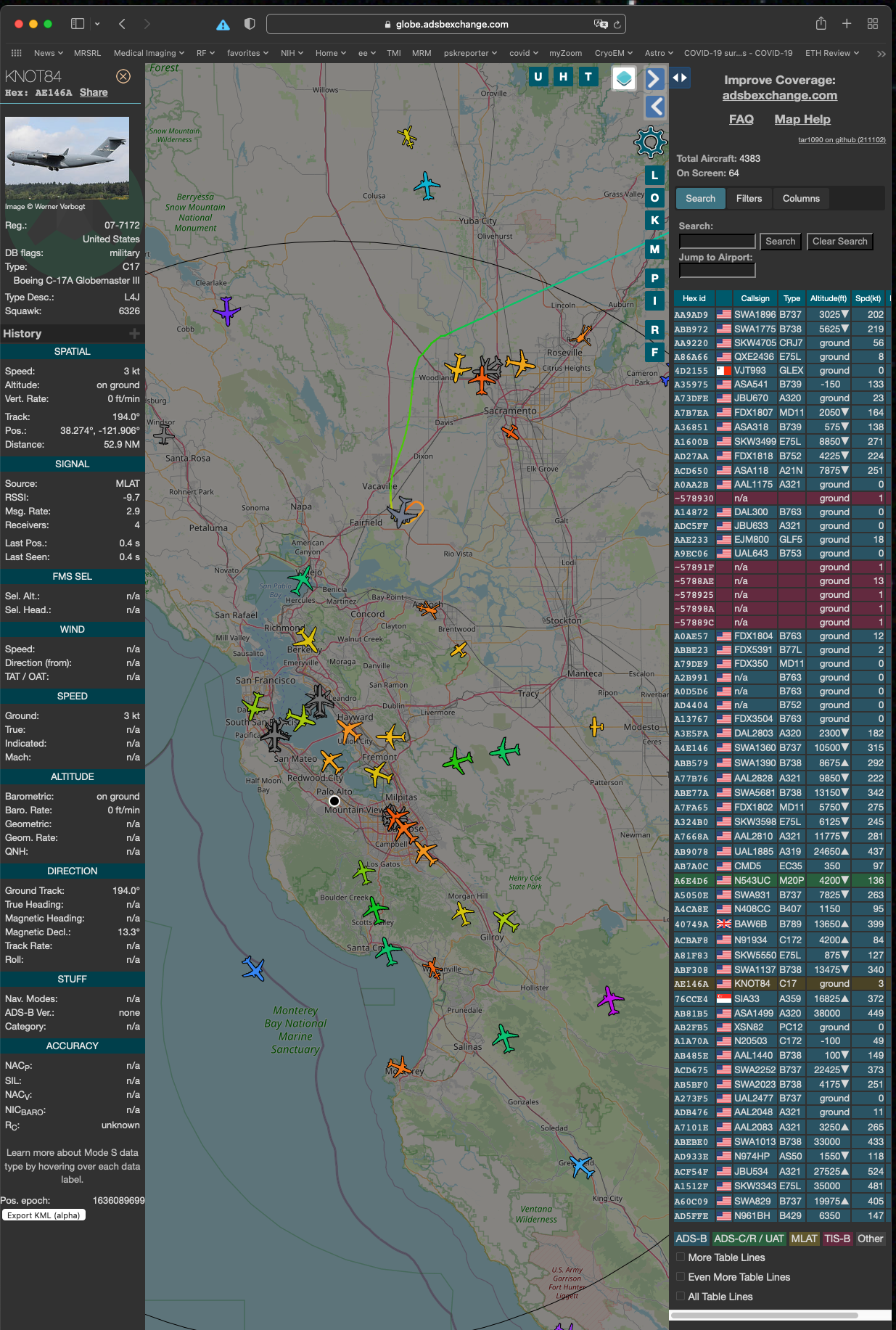
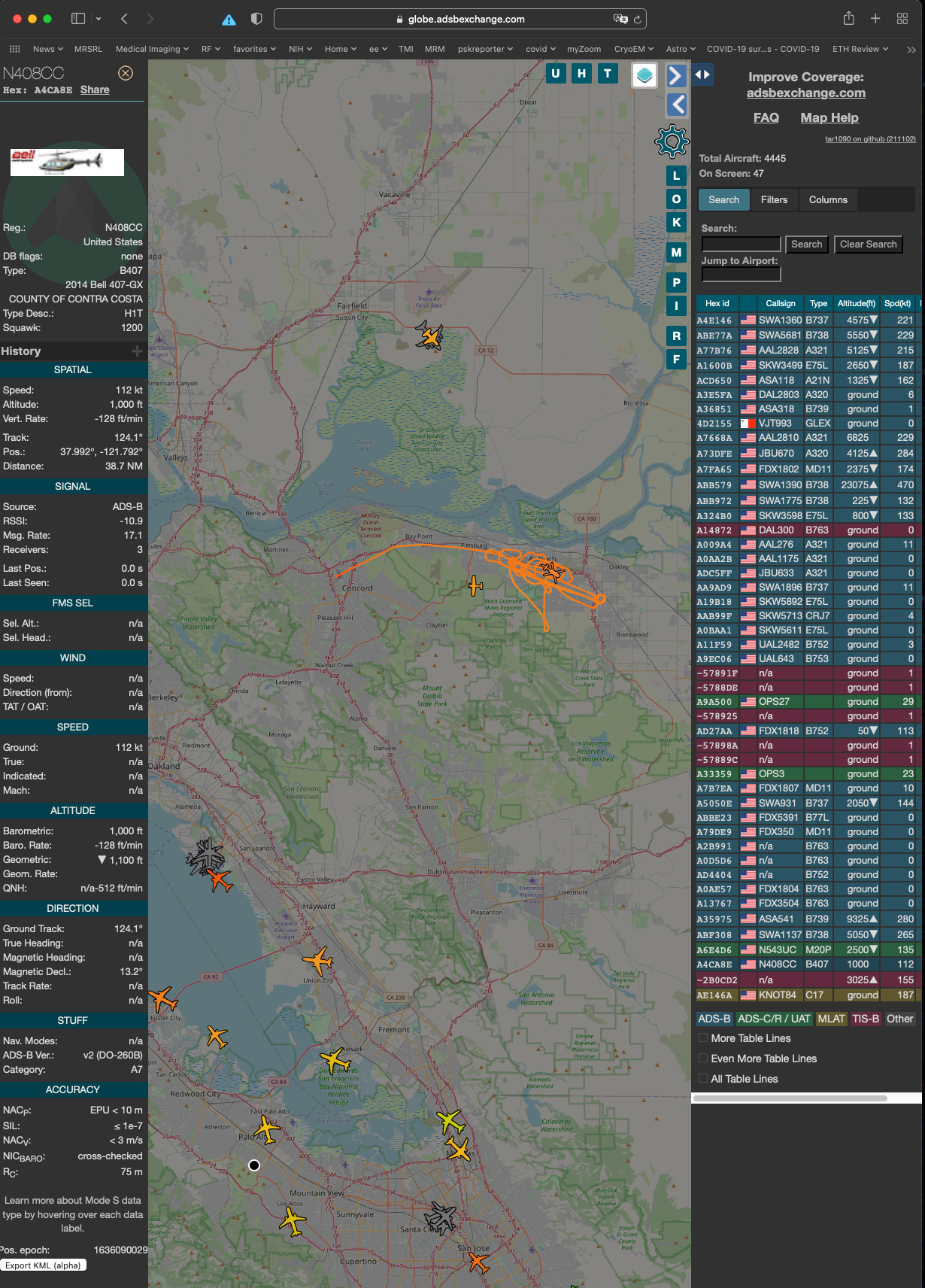
There are 64 planes visible. I clicked on an unusually shaped one, and it turned out to be a C17 just landing at Travis Airforce Base. There are also a Contra Costa County helicopter looking for something
See what you can find!