Assign2: ADT test and debug warmup
Throughout this course, you will strengthen your programming chops by writing a lot of C++ code. Having effective strategies for testing and debugging this code is a huge help when solving challenging programs along the way. Knowing your way around the debugger is key, so let's get cracking on learning how to make good use of it!
"How I got better at debugging" from Julia Evans
This exercise demonstrates use of the debugger and unit tests on the ADT types.
In this page, there are a few highlighted questions you are to write answers for in the file short_answer.txt. These answers are the only deliverable from the warmup, you do not need to submit your warmup code.
0) View ADTs in debugger (manually configure if needed)
Look over the provided code in adtwarmup.cpp that operates on Stacks, Queues, and Maps. Some of this code is buggy and provided for the purpose of practicing with testing and debugging.
The reverse function is implemented correctly and does not have bugs. It uses a Stack to reverse the contents of a Queue. Build and run the program. When prompted, enter the choice to run tests from adtwarmup.cpp. The reverse function should pass its single test case. (Ignore the test failures reported for the other functions, we'll get to those in a bit).
Let's use the reverse function to practice with ADTs in the debugger. Set a breakpoint on the first while loop and run the program in Debug mode. When the debugger stops at your breakpoint, look to the Variables pane in the upper-right of debugger window.
You should see the variables q , s and val. Expand q by clicking the triangle to the left of its name. The expanded contents of the Queue should look like this:
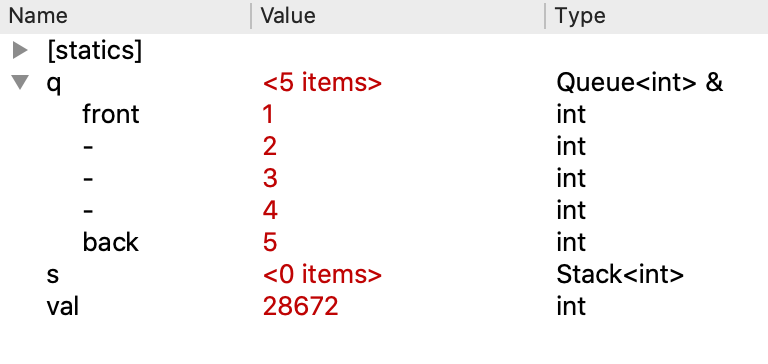
IMPORTANT: If the Queue contents displayed in your debugger do not match the screenshot above, this likely means that your debugger is not configured to properly display variables of Stanford collection type. Stop here and follow the instructions to configure your Qt debugger.
The Queue q was passed as an argument to reverse; its contents were initialized in the calling function to {1, 2, 3, 4, 5}. The Stack s and integer val were declared as local variables in reverse . Neither of these variables was assigned an initial value.
In the debugger variables pane, s is displayed as a Stack containing <0 items>. The Stack class has a "default" initializer that configures a new stack that is not otherwise initialized. The default initializer for Stack makes an empty stack. In fact, all of the Stanford collection classes have a default initializer that creates an empty collection.
Compare that behavior to what you see for the integer variable val. Like s, the variable val was declared without an explicit initialization. Unlike the collection types, the int type does not have a default initializer. This means the int variable is left uninitialized. The variable will have a "value" but that value is the leftover contents of the location where val is being stored. In the screenshot above, the leftover value happened to be 28672 but you may see something different on your system. It can even vary from run to run. Using the value of a variable that has not been initialized will lead to erratic results. For now, just file this fact away. If at some later point, you are debugging and seeing a crazy value for a variable, check to see if what's wrong is a missing initialization.
Using the Step Over button, single-step starting at the top of the while loop. After executing the assignment to val, the uninitialized garbage value now becomes sensible. Single-stepping the next line adds the value onto s. Expand s by clicking the triangle to the left of its name. You should now have both the stack and queue expanded. Continue single stepping through the loop. As you step, keep your eye on the Variables pane and watch elements being added and removed to the stack and queue.
- Q1. The display of the Stack in the debugger uses the labels
topandbottomto mark the two ends of the stack. How are the contents labeled when the Stack contains only one element?
You now know how to inspect and interpret ADTs in the debugger. We hope that you will find this a useful skill when working on the rest of the assignment.
2) Test duplicateNegatives
Testing and debugging are closely related. After writing a piece of code, you will want to test it to verify its behavior. If you uncover a problem, you run your test case under the debugger to further diagnose the bug.
The function duplicateNegatives is intended to modify a Queue<int> to duplicate each negative number, i.e. turning the queue {3, -5, 10} into {3, -5, -5, 10}. The given code is buggy and does not behave correctly on all inputs.
There are some provided tests that demonstrate a few of the inputs that are problematic. Run those tests and observe which tests pass and which do not. The provided test cases include an input with no negative numbers, one with a single negative number, and another with mixed negative numbers. There is no test for input
of all negative numbers, so you decide to add one. Add a STUDENT_TEST for this case.
Run the tests again. When running, it seems this new case is taking a really, really long time. In fact what has happened is that the program has entered an infinite loop. A infinite loop is one that never reaches its stopping condition.
Pro tip: dealing with an infinite loop
When a program is stuck, your only recourse is to manually intervene to stop it.
- If not running in Debug mode, you can stop the program by closing the console window or choosing "Quit" from the menu bar. These actions forcibly exit the program.
-
If running under the debugger, your better option is to interrupt the program using the interrupt button depicted below:

Interrupting the program will pause its execution and return control to the debugger. The program state is preserved and can be examined in the debugger. This will allow you to gather more information to diagnose what's gone wrong.
Let's take stock of what we have learned from testing the duplicateNegatives function. The function works correctly for some inputs. For other inputs, the function terminates but produces the wrong result. Your new test shows there is also a third category, where some inputs go into an infinite loop.
When constructing tests and analyzing buggy code, it is important to understand what kind of inputs cause specific problems, as that can help focus the debugging process. To develop your understanding of the function, carefully read over duplicateNegatives and manually trace through it to develop a hypothesis about what might be going wrong.
For example, you might predict that the infinite loop is triggered when all numbers in the queue are negative, but you aren't entirely confident about this hypothesis. You wonder if it might instead be specific to an input that starts or ends with a negative number, or specific to having an even or odd count of negative numbers. What additional test cases can you add that allow you to confirm the precise trigger for the infinite loop?
Gather the results of your observations and answer the following questions in
short_answer.txt:
- Q2. For which type of inputs does the function produce a correct result?
- Q3. For which type of inputs does the function go into an infinite loop?
Rather than identify one specific input, we would like you to describe the general characteristics of the respective inputs.
3) Debug duplicateNegatives
Now that you've observed the buggy behavior and know what kind of input triggers it, let's use the debugger to diagnose the flaw in the code. (You may have already seen the bug when reading over the code; if so, great! But the purpose of this exercise is to show you a methodology for using the debugger that will help you in later times when you cannot spot the bug just from reading the code.)
Choose a failing test that goes into a infinite loop. Set a breakpoint on the call to duplicateNegatives inside the test case and then run the tests in Debug mode.
When the breakpoint is hit, Step Into the call to duplicateNegatives and then use Step Over to single step through a few iterations of the for loop. Expand the variable q to see its contents and pay attention to the changing values for i and q. Can you use this information to explain why the loop never reaches its intended termination condition?
Answer the following question in short_answer.txt:
- Q4. What is the bug within
duplicateNegativesthat causes it to get stuck in an infinite loop?
Given the above detective work, you may have a fix in mind to apply to the
duplicateNegatives code. Try out that fix and see that it resolves the problem with
the infinite loop inputs. As a followup, re-test the inputs that
terminated but produced incorrect results. You should find they are also working correctly now. In this case, the same underlying flaw was producing two
seemingly unrelated symptoms. Debugger use for the win!
4) Recognize a common ADT error in removeMatchPair
The last part of the warmup is learning how to recognize when a test case raises an error and how to follow up.
The function removeMatchPair is intended to modify a Map<string, string> to remove any pair where the key is equal to the value.
Run the provided test cases. It passes the first test that makes no change, but the subsequent test goes down in flames. An error is raised during the test execution. The error message tells you it is disallowed to add/remove elements in the midst of iterating over that collection. (If you think it through, you can see why this would be problematic….) Students very commonly run afoul of this restriction so we thought we'd get it on your radar before it trips you up.
When an error is raised in the middle of a test, SimpleTest reports it like this:
    Test failed due to the program triggering an ErrorException.

    This means that the test did not fail because of a call
    to EXPECT() or EXPECT_ERROR() failing, but rather because
    some code explicitly called the error() function.
When you see this message, it means a fatal error was raised when running the test and that the error prevented the test from completing. The error was not expected. It is due is a bug in your code that attempts an illegal operation. Sometimes there is additional commentary which further explains what made the operation is illegal, e.g. index was out of bounds, attempt to read a non-existent file, or modify a collection while iterating over it.
You follow the same debugging process for an error as a failing test case: set a breakpoint in the test case and step through the test to see what has gone wrong. There is one added twist that you can step up to, but cannot step over, the actual crashing operation. If you step over an operation that crashes, a clever bit of C++ "hyperjumps" control to an error-handling routine (or perhaps program may terminate if error is more catastrophic). You must restart the program and step up to the crash again to regain the context at the point of the crash.
- Q5. What is the value of the variables (as reported in the debugger variable pane) right before the program crashes? What happens if you try to step over the line where the program crashes?
That's it. Now that you've made it through the debugging exercise, you should be prepared with all the skills you need to attack the rest of this assignment. Go to it!