Image
Given an image filename and ints a and b which are 1 or more,
produce a new output image with three features: (1) a blank stripe 10 pixels high at the top;
(2) a vertically flipped copy of the original image, with blank margins a pixels wide
on both sides; and (3) a yellow stripe b pixels high across the bottom.
Add code in the three indicated places.
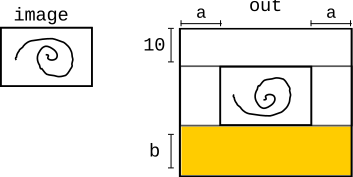
- Write one line of code to create the output image.
- The code that copies the original image is provided. Write one line to set
pixel_outinside the loop. -
Write separate loops and other code to fill the yellow rectangle.
You can make a white pixel yellow by setting its blue value to 0.
Assume
return outis the last line.
def do_image(filename, a, b):
    image = SimpleImage(filename)
    #### 1. Create "out" image


    # Write flipped image to out
    for y in range(image.height):
        for x in range(image.width):
            pixel = image.get_pixel(x, y)
            #### 2. Set "pixel_out"


            pixel_out.red = pixel.red
            pixel_out.green = pixel.green
            pixel_out.blue = pixel.blue

    #### 3. Fill yellow rectangle
View solution
def do_image(filename, a, b):
    image = SimpleImage(filename)
    out = SimpleImage.blank(image.width + 2 * a,
                            image.height + 10 + b)

    # Copy the image upside down, below the top stripe.
    for y in range(image.height):
        for x in range(image.width):
            pixel = image.get_pixel(x, y)
            pixel_out = out.get_pixel(
                a + x, 10 + image.height - 1 - y)
            pixel_out.red = pixel.red
            pixel_out.green = pixel.green
            pixel_out.blue = pixel.blue

    # Fill the bottom stripe yellow.
    for y in range(b):
        for x in range(out.width):
            pixel_yellow = out.get_pixel(
                x, 10 + image.height + y)
            pixel_yellow.blue = 0

    return out
Why it works
- The output width includes a margin of
aon each side. Its height includes the 10-pixel top stripe and theb-pixel bottom stripe. - The destination row
10 + image.height - 1 - yboth offsets the image and flips it vertically. - The yellow stripe spans the entire output width and starts immediately below the flipped image.